
Scheduling vs Planning: What Grows an Audience
You've filled your content calendar weeks ahead, every slot has a post, and nothing is moving. Subscribers barely increase, posts publish on time, and the...
By Ian Kiprono
You've filled your content calendar weeks ahead, every slot has a post, and nothing is moving. Subscribers barely increase, posts publish on time, and the queue is so committed that you can't respond naturally to a comment, a news event, or a question your readers are asking today. You're producing consistently, but the work feels disconnected from the audience you're trying to grow.
I've been in that position. The problem wasn't a lack of discipline or publishing capacity. I was confusing planning with scheduling, then treating a full calendar as proof of a sound strategy. By the end of this guide, you'll know which decisions belong in a plan, which belong on a calendar, how far ahead different content types can safely go, and how to combine consistency with enough flexibility to grow.
When Your Calendar Is Full but Your Growth Is Flat
The warning sign is easy to miss because the system looks healthy from the outside. You have ideas documented, captions drafted, publication times assigned, and perhaps a queue stretching several weeks into the future. Nothing is late. Yet your subscriber count barely changes, engagement fades quickly, and your strongest ideas receive no follow-up because the calendar is already full.
That was my experience after batching content too aggressively. I had protected writing time, but I'd also removed my ability to react. A reader would ask a useful question in the comments, and I'd have no open slot for the answer. A timely conversation would emerge, but my scheduled post was already locked in. The calendar kept publishing, while the editorial judgment behind it became stale.
A calendar can prove that you're organized. It can't prove that you're publishing the right ideas, in the right format, for the right audience.
The practical test: if your calendar is full but you can't explain which posts deserve more distribution and why, you have a scheduling system without a planning system.
Planning should identify the outcomes worth pursuing, the audience problems worth addressing, and the themes that connect individual pieces. Scheduling should turn those decisions into realistic publication slots. Writers who want a stronger research layer can also use content gap identification to find questions their audience still needs answered before assigning more dates.
The distinction matters in ordinary work too. A resource such as the Approved Lux Personal Assistant calendar guide is useful for protecting time and organizing commitments, but content growth requires another layer of judgment. You need to decide not only when something happens, but whether the planned item still deserves the slot when publication day arrives.
My correction was simple, though not effortless. I stopped treating every scheduled item as untouchable, separated durable content from volatile content, and left room for posts that earned a second look. The goal wasn't an emptier calendar. It was a calendar that supported decisions instead of replacing them.
What Planning and Scheduling Actually Mean
Planning determines what should be accomplished, why it matters, which tasks take priority, and how work should be sequenced. It's the strategic layer. For a newsletter writer, planning might mean choosing a recurring theme, identifying a reader problem, deciding which argument deserves a full article, and mapping how that idea could become Notes or social posts.
Scheduling converts those decisions into specific time slots, deadlines, and recurring commitments. It's the execution layer. Scheduling answers when the article goes live, when a Note appears, and which platform receives the adapted version.
A 2025 systematic review of time-management research synthesized 107 sources, including 86 peer-reviewed articles and 21 dissertations. Across the underlying literature, 22 studies, including 15 in education and 7 in workplace settings, reported that time-management practices enhanced performance. The review also found that planning, goal-setting, prioritization, and task organization were repeatedly associated with productivity, well-being, and performance.
Those findings don't say that a calendar automatically produces audience growth. They show why separating the two functions is useful. Planning helps you choose valuable work. Scheduling makes that work executable.
The content translation looks like this:
| Function | Core question | Example for a creator |
|---|---|---|
| Planning | What and why? | Choose a high-performing newsletter theme and define the reader outcome |
| Scheduling | When and where? | Assign the article, Note, LinkedIn post, and follow-up to publication slots |
| Review | What changed? | Use audience response to revise the next plan |
A full calendar can still be strategically empty. If every slot contains an isolated idea, you may publish frequently without building a recognizable point of view. If the plan contains themes but no dates, the strategy remains theoretical.
For creators who like capturing ideas while moving between tasks, a practical guide to speak your day into order can help with collecting commitments. The important distinction remains yours to make: voice capture and calendar placement are scheduling aids, while choosing the editorial priority is planning.
This short video gives another visual explanation of how the two functions relate:
Use content scheduling to understand the execution mechanics, but don't let publishing mechanics make strategic choices on your behalf. Schedule a decision you've already made. Don't schedule in the hope that dates will create direction.
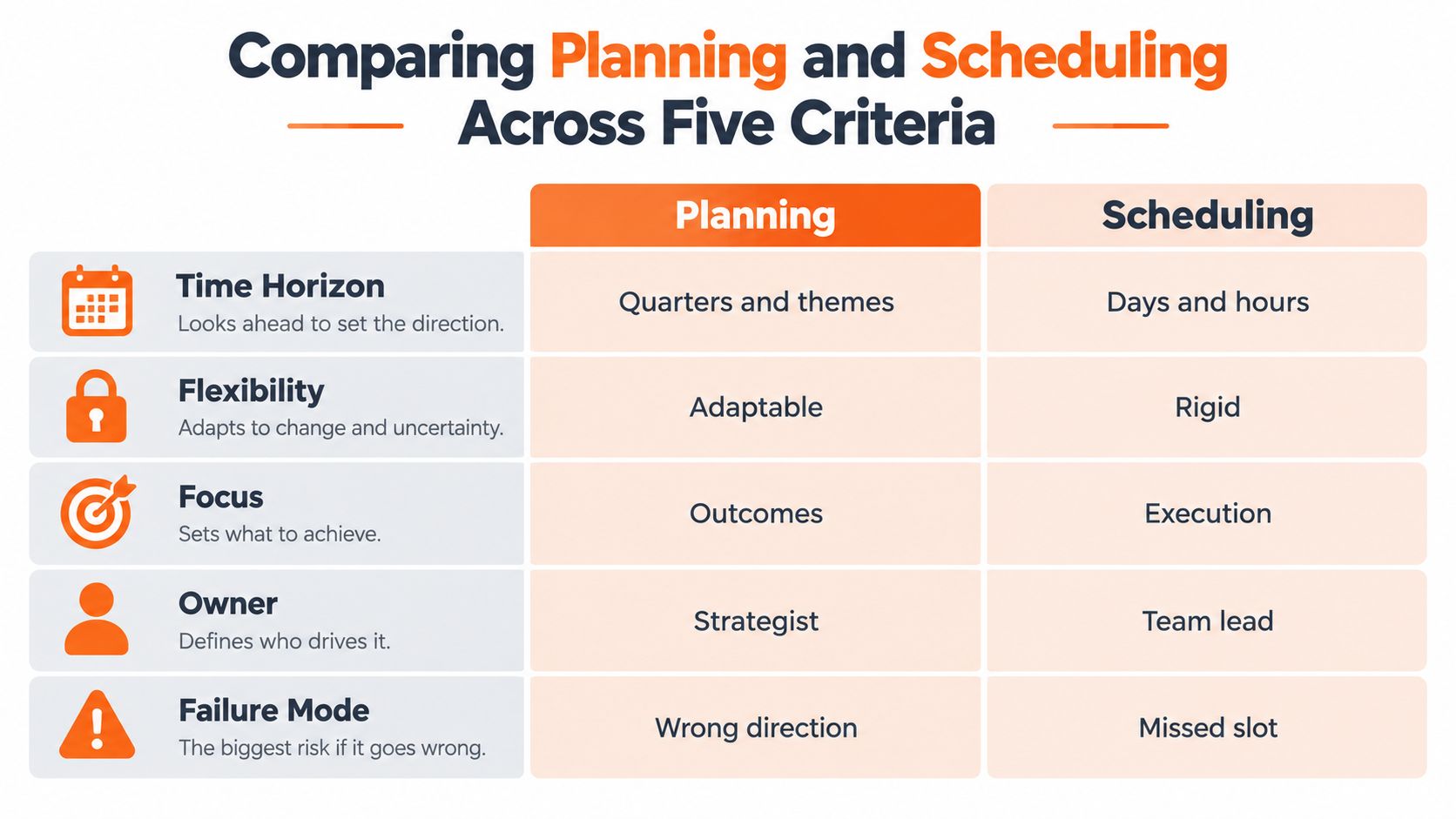
Comparing Planning and Scheduling Across Five Criteria
A calendar can be full while the content system remains directionless. Planning and scheduling solve different problems, use different inputs, and carry different risks. The useful question is which decisions deserve a fixed place in advance and which should remain open until the publishing window.
| Criterion | Planning | Scheduling |
|---|---|---|
| Time horizon | Longer-range themes, goals, and sequences | Nearer-term dates, time slots, and recurring commitments |
| Decision type | Decides what to publish and why it matters | Decides when and where approved content appears |
| Inputs | Audience research, goals, content gaps, and editorial priorities | Analytics, engagement patterns, platform availability, and production capacity |
| Failure mode | Drifting without a clear direction | Publishing efficiently without strategic relevance |
| Owner | Strategist, editor, or creator responsible for priorities | Creator, assistant, or operator responsible for execution |
Planning has the wider field of view. It tests whether a topic serves the audience, belongs in a series, and deserves expansion or removal. Scheduling operates closer to publication. It protects a commitment, assigns the next action, and reduces the chance that approved work sits unfinished.
A structured content calendar helps separate those planning decisions from scheduling execution. Keep themes, audience needs, and editorial priorities in the planning layer. Put dates, channels, production tasks, and approved assets in the scheduling layer.
The failure modes are different. A creator who plans indefinitely can build thoughtful frameworks that never reach readers. A creator who schedules indefinitely can publish polished material that answers no meaningful need. One produces drifting without publishing. The other produces publishing without direction.
Assign ownership before adding automation. The person accountable for audience outcomes should own the plan, even when an assistant or operator manages the calendar. An executor can place an approved item at the correct time, but should not decide that an outdated angle still deserves distribution.
Cadence also needs a platform-specific decision. Analysis of more than 100,000 accounts found that accounts posting at least weekly for 20 or more weeks achieved more than four times the engagement per post of accounts posting fewer than five times over the same period, as reported in this analysis of where social engagement is moving. The same source gives different generic guidance by platform, including roughly 1 to 2 LinkedIn posts daily and 2 to 3 X posts daily.
Those figures are reference points, not instructions to copy every cadence. They show why identical cross-posting is strategically weak. Schedule reliable publishing windows, then keep the message, format, and final timing open to platform-specific judgment.
Use fixed plans for direction and repeatable production. Keep context-sensitive responses flexible, especially around conversations, news, and audience feedback. The practical goal is planned consistency with adaptive responsiveness, not a calendar that publishes unchanged work regardless of what readers are saying.
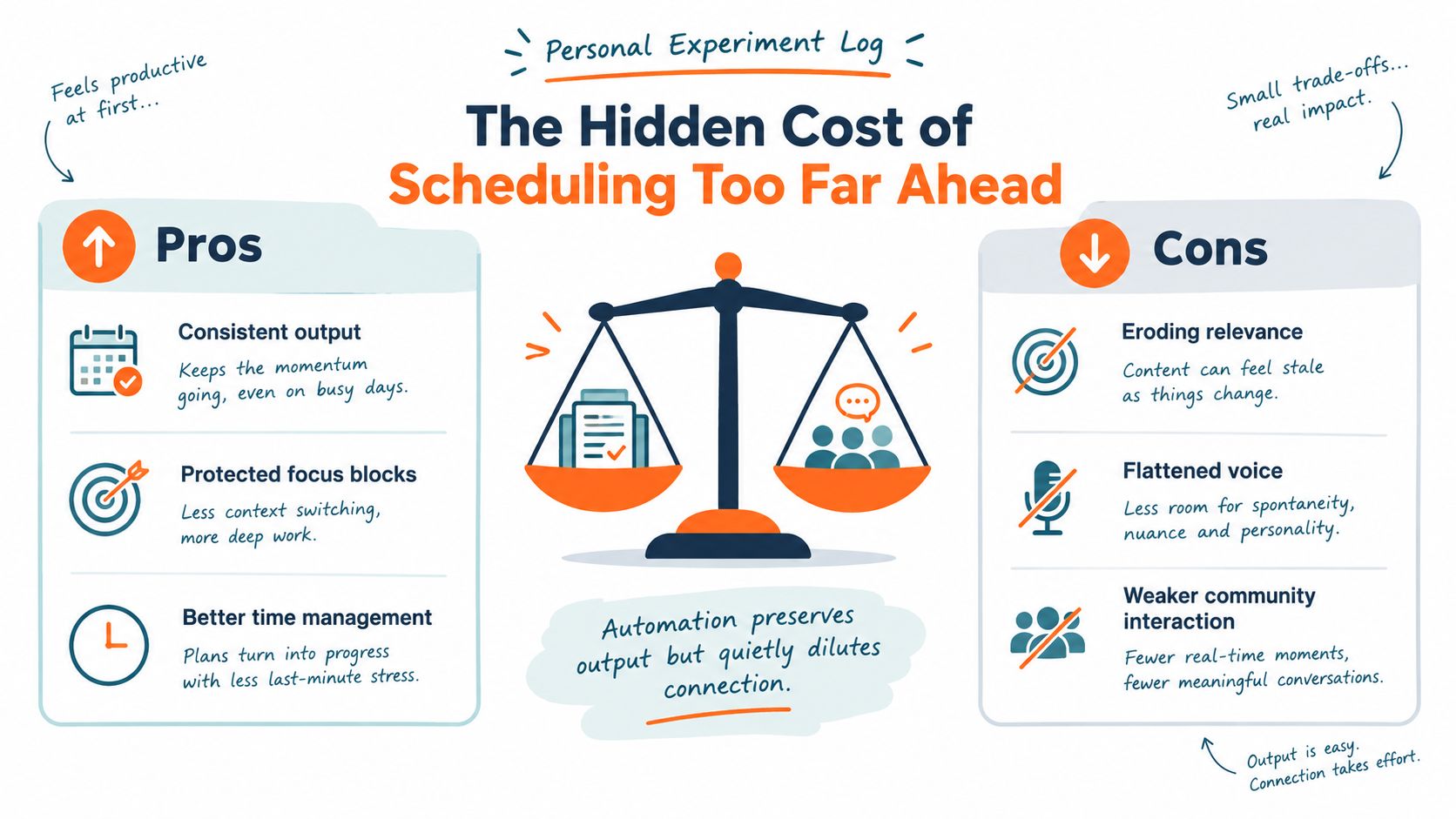
The Hidden Cost of Scheduling Too Far Ahead
I once batched a month of posts in one concentrated session. The immediate benefit was real. Writing felt calmer because I wasn't switching between research, drafting, formatting, and publishing every day.
The hidden cost appeared later. A reader started a valuable comment thread, but my next contribution was already prepared around a different angle. A discussion changed the context behind an opinion post before it went live. Some posts still made sense, but the voice sounded detached because I was no longer writing in contact with the conversation.
Automation had preserved output while weakening relevance, voice, and community interaction.
That trade-off matters because creator workload is already difficult to sustain. A 1,000-person US/UK creator study estimated burnout among 52% of surveyed creators, while research cited by a creator-focused publication placed the estimate at 79%. Those figures are reported in the discussion of content creation and posting schedules. “Batch and schedule more” can reduce context switching, but it isn't a complete answer when the batching process cuts creators off from audience signals.
Use a volatility rule
I now classify content before assigning a publication date:
- Evergreen education can be scheduled weeks ahead. Tutorials, definitions, checklists, and durable explanations usually remain useful when the surrounding conversation changes.
- Opinion and trend analysis should stay close to publication. Their value depends on context, and context can move faster than the calendar.
- Community-response content shouldn't be automated without review. Replies, questions, and audience-led posts need a human check because the reader's actual wording matters.
- High-performing content deserves adaptation, not blind duplication. Review what made it work, then change the opening, example, or platform format before redistributing it.
A 2025 scheduling analysis recommends reviewing automated posts before publication because time savings still require quality control. I treat that checkpoint as part of scheduling, not as an optional extra.
The safe distance depends on volatility, not on an arbitrary number of days. A durable explanation can wait. A reaction to a live conversation should remain close to the moment. The calendar should hold commitments lightly enough that you can replace a weak item with a stronger response.
Scheduling is controlled distribution, not autopilot.
The system that fixed my problem kept the productivity benefit of batching while restoring editorial contact. I prepared reusable structures and evergreen drafts in advance, then protected review points where I could adjust the wording, timing, or destination based on what readers were discussing.
My Three-Note Experiment for Every Newsletter Issue
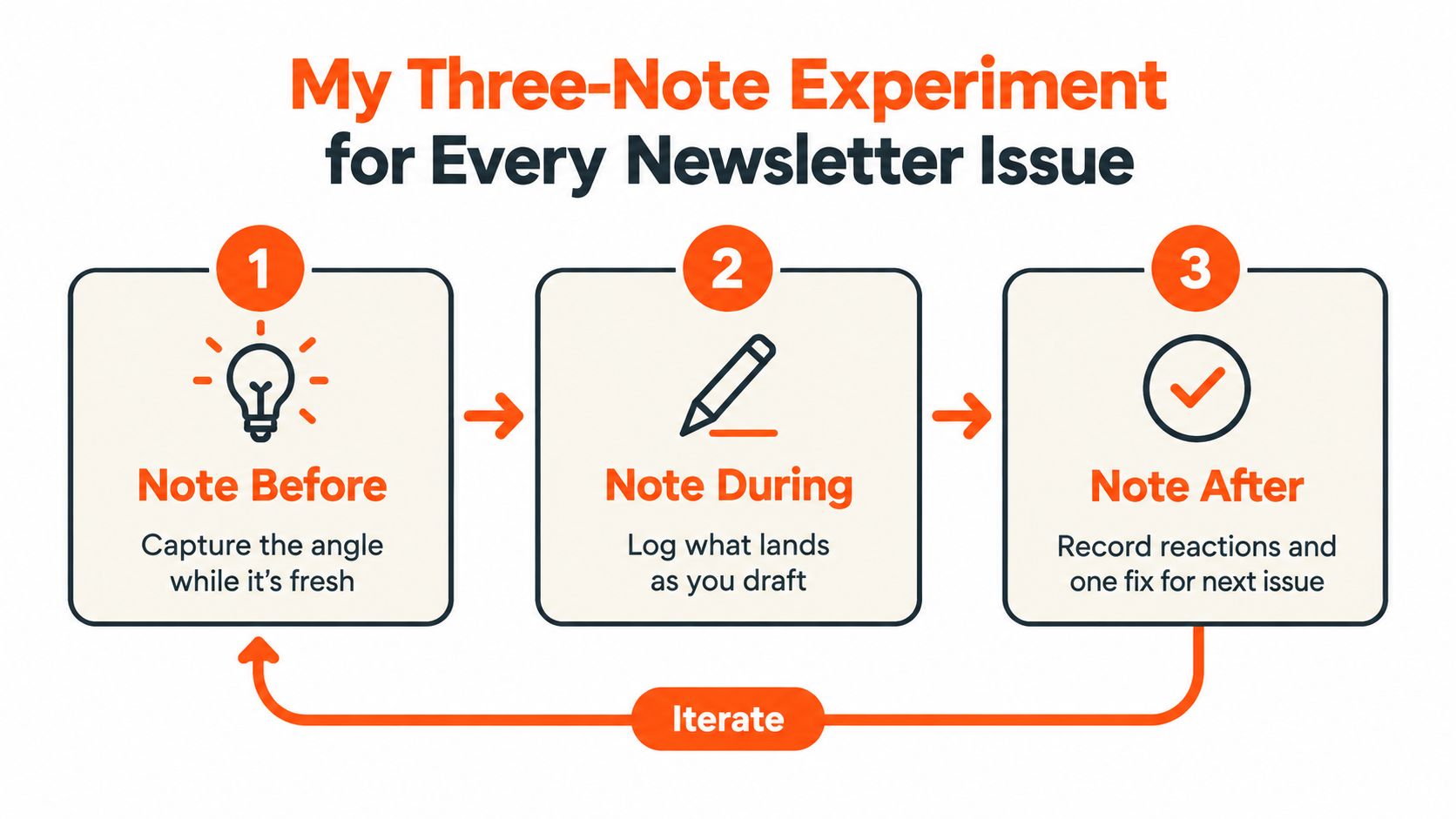
I tested a fixed sequence around each newsletter issue:
- One Note before the article, to create anticipation.
- One Note immediately after publication, to drive initial traffic.
- One Note later the same day, to create a second exposure opportunity.
The sequence stayed fixed. The content didn't. The pre-publication Note might introduce the problem or pose a question. The immediate Note might highlight the article's clearest takeaway. The later Note might use a different framing, answer an early response, or invite readers to share their experience.
Substack's mechanics make this workflow practical. On the web, open the Notes composer and select the calendar icon. On mobile, open the three-dot menu and choose Schedule. The selected time uses your local time zone, and scheduled Notes remain in the Drafts tab, where you can edit them until publication, according to Substack's Notes scheduling announcement.
That editability matters. I can prepare the sequence in one sitting, then revise the later Note after seeing how the article lands. Batch preparation gives me focus. The editable queue preserves judgment.
Keep Notes separate from inbox distribution
Substack treats short-form Notes and long-form posts differently. A new Note doesn't automatically email every subscriber, while a regular post can be distributed by email at its publication time. Notes appear through Substack's Home and profile surfaces and may also reach readers through digests or push notifications, depending on settings, as described on Substack's features page.
That distinction lets the article remain the primary inbox event while Notes handle discovery and repeated exposure. I'm not sending three full emails to the same list. I'm giving readers multiple ways to encounter the idea.
The measurement sheet is deliberately small. For every issue, record:
- Publication time for each Note and the article
- Note views
- Clicks
- Resulting subscriber activity
The supporting workflow recommends recording these fields and comparing timing over several weeks in this three-Note experiment. The point isn't to claim that one timing always wins. It's to replace intuition with a repeatable test.
I also write one sentence after each issue: what landed, what felt flat, and what I'll change next time. That sentence turns scheduling into a feedback loop instead of a recurring obligation.
For additional ideas on improving discovery, use Substack Notes best practices for growth alongside your own measurement. Advice can suggest a starting sequence, but your audience's response should decide what stays.
Combining Planning and Scheduling Into One System
A workable content system fixes decisions at different distances from publication. Set the direction early, queue durable work with care, and leave enough space to respond when audience needs or current events change.
Fix the strategic layer
Plan the theme, audience problem, desired outcome, and repurposing rules before drafting. Decide what the main article should accomplish and which formats naturally follow from it. These choices provide structure without forcing every sentence or publication time into place too soon.
One newsletter article might produce a pre-publication Note, a takeaway Note, a LinkedIn explanation, an X thread, and a Medium adaptation. The plan defines how those pieces support one another. It also gives each platform a job, rather than treating distribution as identical repetition.
A useful operating rhythm follows the discipline described in OKR execution cadences. Set recurring review points for themes, audience signals, and distribution results. Apply that idea to editorial work through disciplined content calendar management, so the calendar stays connected to outcomes instead of becoming a list of dates.
Schedule the durable layer
Queue proven evergreen formats weeks ahead only when they can survive a change in context. A timeless educational explanation may be safe to schedule well in advance. A post tied to a live conversation, product change, or audience concern needs a shorter review window.
Give each platform its own version. Substack Notes can support discovery around a newsletter, Medium can carry a longer adaptation, LinkedIn may need a direct professional lesson, and X may work better as concise observations. One idea can travel across channels, but the format and emphasis should change with the reader's expectations.
The safe scheduling horizon depends on volatility. Fix strategic themes further ahead, schedule durable assets closer to publication, and keep context-sensitive posts in draft until a human can verify their relevance. Automate distribution only after the content, audience, platform, and timing have passed review.
Reserve a responsive layer
Leave capacity for audience questions, timely reactions, and posts that perform well early. A strong Note should not vanish because the next calendar slot is occupied. Examine why it worked, adapt the idea for another destination, and schedule that version only after someone approves it.
Narrareach fits beneath this feedback loop as an execution layer. It can schedule Substack Notes, Medium articles, LinkedIn posts, and X content from one dashboard, support cross-posting without copy-paste, repurpose long-form writing into platform-specific content, and connect cross-platform analytics with subscriber outcomes. Audience-activity signals can help place approved content, while human checkpoints keep publication controlled.
The tool does not set editorial direction. Your plan determines the theme, audience promise, and repurposing rule. The scheduler handles distribution, analytics show which ideas deserve another look, and you decide whether the next version is worth making.
A practical system follows this sequence:
- Plan themes and outcomes: Decide what deserves attention and why.
- Create reusable formats: Define how one strong idea can become several useful pieces.
- Schedule evergreen distribution: Queue durable work far enough ahead to protect focus.
- Hold responsive capacity: Leave room for questions, trends, and emerging winners.
- Review before release: Check relevance, voice, platform fit, and timing.
- Measure and revise: Use views, clicks, and subscriber activity to improve the next plan.
This structure supports consistent publishing without turning audience building into an automated conveyor belt. Durable ideas keep working through thoughtful redistribution, while human review protects the relevance that made the original idea valuable.
Which Approach Fits Your Situation Right Now
If you're a solo newsletter writer who over-plans and rarely publishes, lean on scheduling. Choose a manageable recurring commitment, prepare the essentials, and let the calendar create forward motion.
If your calendar is full and engagement is flat, lean on planning and analytics. Stop adding more posts until you know which themes deserve expansion and which should be removed.
If you publish across Substack, Medium, LinkedIn, and X, consolidate the scheduling workflow but adapt every platform version. One source idea should create coordinated distribution, not identical repetition.
If you're a startup content marketer balancing thought leadership with reactive posting, split the system into evergreen and volatile tiers. Schedule the first, review the second close to publication.
The simplest next step is to run the three-Note experiment around your next newsletter issue and record publication times, views, clicks, and subscriber activity. If you're ready for a distribution layer, start free with Narrareach, with no credit card required, and use it to schedule and adapt approved content across your publishing channels.
Narrareach helps writers plan content sequences, schedule Substack Notes and articles, distribute platform-specific posts across Medium, LinkedIn, and X, and track which ideas drive subscriber activity. Visit Narrareach to start free, or apply the three-Note experiment to your next issue and stay connected for more practical creator workflows.