Content Calendar Management: My 30-Day Experiment
You've just published a strong Substack article, but the distribution work is still waiting. LinkedIn needs a useful post, X needs a thread, Medium needs a...
By Ian Kiprono
You've just published a strong Substack article, but the distribution work is still waiting. LinkedIn needs a useful post, X needs a thread, Medium needs a version that fits its audience, and Substack Notes need short ideas that don't sound like copied promotion. By the time you've copied, pasted, reformatted, and scheduled everything, the next article is already late.
That was my content calendar management problem. I had ideas, drafts, and platforms, but no reliable system connecting them. I spent 30 days testing a calendar built around repurposing, scheduling, and feedback, rather than treating each post as a separate task. The result was a calmer workflow and a clearer way to decide what deserved more distribution.
The Content Juggling Trap I Just Escaped
On publishing day, I used to move through the same exhausting sequence. I'd finish a Substack article, open LinkedIn, stare at the blank composer, then switch to X to work out how the same argument could become a thread. Medium required another edit, while Substack Notes demanded something shorter and more conversational.
Four platforms turned one finished idea into several unfinished jobs.
The problem wasn't a lack of motivation. It was the assumption that every channel needed a brand-new idea. That made distribution feel like a second editorial department, even though I was doing all the writing myself. The more ambitious my calendar became, the more often I postponed the posts that could have helped the original article reach new readers.

Why a publishing list wasn't enough
My old spreadsheet tracked titles and dates. It didn't tell me which article could support a LinkedIn lesson, which paragraph could become a Note, or what result would justify reposting an idea. It was a schedule, not a decision system.
Editorial calendars have existed for decades across blogs, newsletters, and social channels. Their role gradually expanded from controlling publication dates to tracking audience responses such as likes, tweets, and inbound links, as described in the history of editorial calendars. That shift matters because modern content calendar management must connect what gets published, where it appears, and what happens afterward.
The operational gap is visible in recent industry reporting. A 2026 summary says 92% of marketers use a content calendar, compared with 85% in 2025, while 65% of small businesses use one, compared with 45% in 2024. The same summary reports that only 32% of content teams consistently meet their planned calendar, while teams using project management tools achieve 62% higher calendar adherence. These figures come from the 2026 content calendar statistics summary.
The uncomfortable lesson: a full calendar can hide a weak distribution system. If every row represents a fresh task, consistency eventually becomes expensive.
The 30-day reset
I stopped measuring success by how many empty calendar slots I filled. Instead, I asked three questions about every strong idea:
- Can this travel: Which platform-native formats can carry the idea without repeating the article word for word?
- Can I measure it: What action, such as a click, reply, or subscription, would show that the post earned another distribution cycle?
- Can I sustain it: Does this workflow protect writing time, or does it consume the time that should produce the next useful idea?
That change turned the calendar from a list of obligations into a map of opportunities. I still planned publication dates, but I also planned the transformations that made each piece work harder.
Building a Flexible Content Calendar System
A useful calendar needs structure without pretending the future is predictable. I built mine around flexible rigidity, a model that protects planned work while leaving room for timely ideas, audience questions, and updates.
The basic allocation was straightforward. I planned core content 3 to 6 months ahead, then kept 20% to 30% of capacity open for agile or reactive topics, following the workflow described by Social Strategy Hub. This leaves roughly 70% to 80% planned in advance, a split also recommended by The GuideX.
The fields that made the calendar useful
I used one row for each core idea and added a second layer for its distribution assets. Every row carried enough information to answer “what, when, where, who, and why” without opening another document.
| Field | What I recorded |
|---|---|
| Working title | The clearest useful description of the idea |
| Content pillar | The recurring subject the piece supports |
| Publish date | The planned publication date and time |
| Channel | Substack, Medium, LinkedIn, X, or Notes |
| Format | Article, Note, post, thread, or newsletter |
| Audience | The reader segment most likely to care |
| Primary keyword | The search topic when relevant |
| Owner | The person responsible for moving it forward |
| Status | Idea, draft, review, scheduled, or published |
| KPI | A business-linked measure such as leads, clicks, or conversions |
The metadata schema comes from practical calendar guidance that recommends tracking publish date, content type, audience, primary keyword, status, owner, and a KPI tied to a business goal. I added format and channel because a title alone couldn't tell me how much work remained.
The editorial calendar example from Narrareach is useful if you want to see how a calendar can operate as a single source of truth rather than a decorative list of dates.
How I ran the weekly loop
I didn't schedule every detail months ahead. I kept the strategic themes visible, but worked through the execution in shorter cycles.
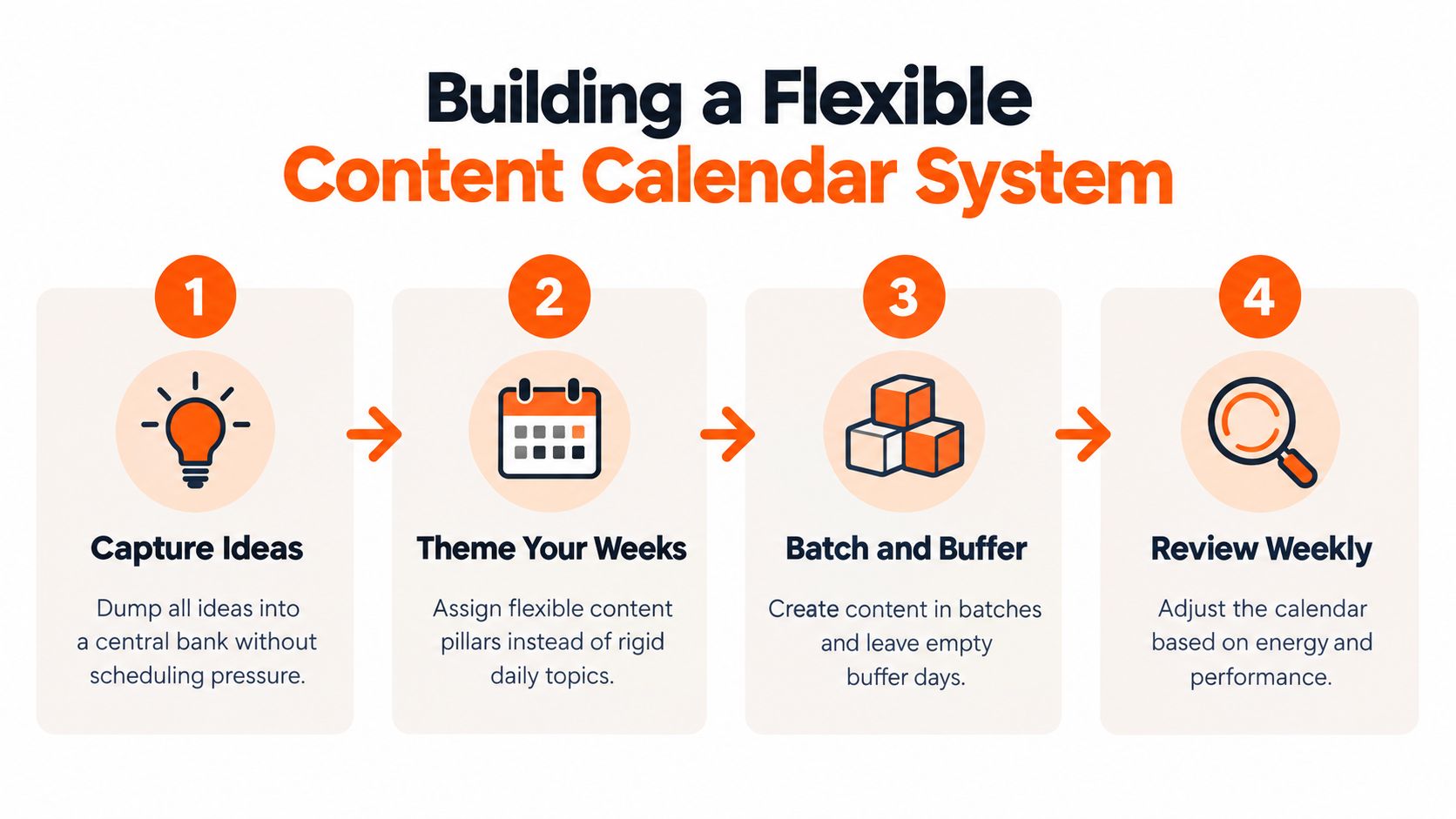
- Capture ideas centrally. I put reader questions, unfinished arguments, and promising observations in one idea bank. Nothing entered the calendar until it had a likely audience and purpose.
- Assign weekly themes. A theme gave me direction without forcing a rigid daily topic. It also made repurposing easier because related posts could reinforce one another.
- Batch production. I created the core article first, then drafted its supporting formats while the argument was still fresh.
- Review the flexible portion weekly. Reactive ideas had to earn their place by being timely or clearly useful, not merely exciting.
For detailed LinkedIn-specific planning, the LinkedIn content calendar playbook adds a useful channel perspective. LinkedIn posts shouldn't be treated as article announcements by default. They need a distinct professional takeaway, a clear opening, and a reason for that audience to respond.
The calendar also needs maintenance. A practical guide recommends building only 4 to 6 weeks of detailed planning at a time and using a weekly review to catch stalled pieces, as outlined by Storyflow. I used the longer horizon for themes and the shorter horizon for actual production. That separation stopped distant plans from creating false confidence.
Practical rule: plan the direction far ahead, but keep the copy and scheduling decisions close enough to reality that you can still respond.
Turning One Big Idea into Four Platform Posts
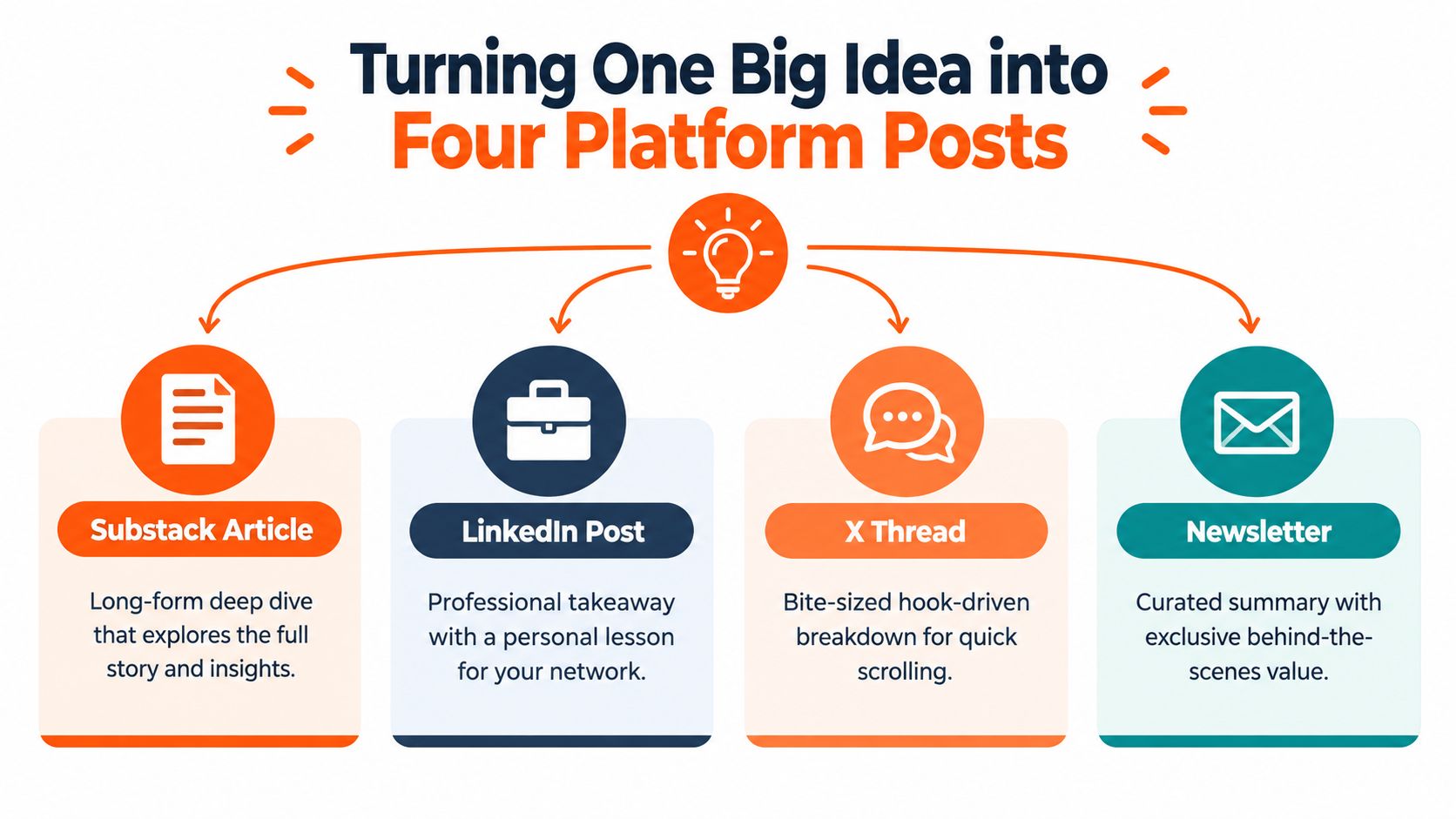
The most important change in my experiment was separating the core idea from the platform expression. I wrote one substantial piece, then adapted its strongest argument for each audience instead of duplicating the same caption everywhere.
Suppose the core idea is: “A content calendar should manage proven ideas after publication, not only schedule new ones.” The source article can explain the argument fully, but the supporting formats need different jobs.
The same idea, adapted properly
Substack article: This is the deep dive. It establishes the problem, explains the system, includes the workflow, and gives readers enough detail to apply it. The call to action can invite a subscription or a reply that reveals a related pain point.
LinkedIn post: I removed the full explanation and kept the professional lesson. The post might open with the operational problem, show the calendar fields that solved it, and finish with a question about how other writers manage distribution. LinkedIn readers need a useful insight they can absorb without reading the entire source first.
X thread: I broke the argument into a sequence of short claims. The first post carries the tension, the middle posts explain the contrast between a schedule and a system, and the final post points readers toward the longer article. Each entry must stand on its own because readers may encounter the thread out of order.
Medium article: I reshaped the piece for readers who may discover it through the topic rather than through my newsletter. That meant a more self-contained introduction, clearer subheadings, and enough context for someone unfamiliar with the original publication.
The fourth format in my working model was the newsletter or Substack Note layer. A Note could share one observation, one workflow detail, or one question from the article. It didn't need to summarize everything. Its job was to create a small interaction that could lead a reader toward the larger idea.
| Platform | Main job | What changes |
|---|---|---|
| Substack | Develop the full argument | Depth, narrative, and complete process |
| Deliver a professional takeaway | Framing, lesson, and discussion prompt | |
| X | Create fast-moving discovery | Hooks, sequence, and compact claims |
| Medium | Reach topic-led readers | Context, structure, and standalone clarity |
| Notes | Sustain conversation | One useful observation or question |
I kept a source bank beside the article with hooks, examples, objections, and quotable ideas. That prevented me from rereading the entire piece every time I needed a short post. The Narrareach guide to repurposing content is a useful companion for building this source-to-format workflow.
A repurposed post should preserve the idea, not the sentence structure. If the LinkedIn version reads like an excerpt from Substack, the adaptation has failed.
My test for each draft was simple: could a reader understand why this format exists? If the answer was no, I either changed the angle or removed the asset from the calendar. More output isn't the objective. Useful distribution is.
Smart Scheduling and Analytics-Driven Reviews
A calendar starts producing growth signals when publishing decisions respond to audience behavior. During my 30-day trial, I treated posting time as a variable to test, not a permanent rule. I began with 2 to 3 high-confidence posting windows per platform, then compared median engagement instead of letting one unusually strong post set the direction. Each test ran for at least 4 to 6 weeks, using rolling 7-day or 30-day averages as recommended in Socialinsider's LinkedIn best practices.
My review rhythm
The weekly review handled execution and queue quality:
- Check publishing status: Move stalled drafts, confirm owners, and remove dates that no longer fit.
- Inspect recent signals: Review replies, clicks, saves, shares, and subscriptions where available.
- Choose follow-up actions: Flag strong ideas for another format, a deeper article, or a revised opening.
- Protect reactive space: Leave room for timely responses instead of filling every slot.
The monthly review examined themes across the repurposing system. I compared which pillars generated meaningful responses, which formats led to useful conversations, and which distribution paths produced no clear next action. On LinkedIn, the 5.20% average engagement benchmark needs context from page size and content format, so I used it as a reference rather than a universal target.
Timing still affects results. Research from the American Marketing Association found that morning posts received 8.8% more link clicks than afternoon posts and 11.1% more than evening posts. I treated those findings as a starting hypothesis, then checked whether my audience behaved the same way.
Consistent link tracking connected each post to a measurable next step. The guide to best link tracking tools 2026 helped me compare tracking options, while a content analytics dashboard from Narrareach kept scheduling decisions beside distribution results. That feedback loop showed which ideas deserved another adaptation and which should leave the calendar.
The Tools and Templates That Made It Stick
The experiment worked because I reduced decisions at the moment of publishing. A tool can't rescue an unclear strategy, but a clear strategy still breaks when every channel requires manual copying and status updates.
I used three connected layers:
- An idea bank for raw observations, reader questions, and possible pillars.
- A production board for drafts, owners, approvals, assets, and dates.
- A distribution queue for the finished article and its platform-native adaptations.
The templates mattered more than the software brand. I created repeatable briefs for a Substack article, a LinkedIn lesson, an X thread, a Medium adaptation, and a Substack Note. Each brief included the source idea, target audience, hook, format, CTA, owner, status, and KPI.
The minimum viable template
For a core article, the template asked:
- Core claim: What should the reader remember?
- Evidence: Which examples or sources support it?
- Repurpose angles: What changes for LinkedIn, X, Medium, and Notes?
- Distribution date: When does each version enter the queue?
- Success signal: What would justify further reuse?
For a short post, I used fewer fields. The goal was speed without losing the connection to the source. A Note could be drafted quickly, but it still needed a reason to exist beyond filling a slot.
Centralize the publishing workflow
A spreadsheet can work for a solo writer, especially when the process is small. It becomes fragile when the same article appears in multiple statuses across separate tools. One dashboard for Substack Notes, Medium articles, LinkedIn posts, and X content makes it easier to see what's scheduled, what's waiting for review, and what's ready for another format.
Narrareach is one option for this workflow. It provides a unified place to schedule Substack Notes, Medium articles, LinkedIn posts, and X content, with AI-assisted repurposing and cross-platform analytics. The Narrareach content calendar software overview is relevant for writers who want the source article and its distribution queue visible together.
I still kept a manual approval step. Automation can format and queue content, but I wanted to check voice, context, and platform fit before anything went live. “Set it and forget it” is useful for recurring mechanics, not for publishing without judgment.
A sustainable system removes repetitive decisions, not editorial responsibility.
The final habit was a weekly cleanup. I archived ideas that no longer fit, assigned owners to anything active, and made sure every scheduled item had a clear source. That small ritual kept the calendar trustworthy.
Key Takeaways for Faster Audience Growth
My 30-day experiment changed content calendar management in three practical ways.
First, I stopped treating the calendar as a list of dates. The useful version connects goals, owners, formats, publication, and performance. Second, I separated long-range themes from near-term production, using planned capacity for dependable work and open capacity for timely ideas. Third, I made repurposing part of the original brief, so a Substack article could become a LinkedIn post, X thread, Medium version, and Note without starting from zero.
The historical role of editorial calendars was to keep publishing regular and track audience response. The modern version extends that logic across channels, refresh cycles, and follow-up distribution. Guidance on content syndication strategy is useful when you're deciding how one proven idea should keep traveling.
Start today with two actions: add the metadata fields that your current calendar lacks, then choose one strong article and draft four platform-specific adaptations. Review the results weekly, compare patterns monthly, and let evidence decide which ideas deserve another life.
Narrareach brings Substack Notes, Medium articles, LinkedIn posts, and X content into one scheduling and distribution workflow, with AI-powered repurposing and cross-platform analytics. If you want to turn your strongest writing into consistent audience growth without returning to manual copy-paste work, visit Narrareach and start free without a credit card.