
What Is Content Calendar
At midnight, your Substack draft is ready, your LinkedIn post is half-written, your Notes are scattered across three tabs, and a sticky note says “post...
By Ian Kiprono
At midnight, your Substack draft is ready, your LinkedIn post is half-written, your Notes are scattered across three tabs, and a sticky note says “post Tuesday.” You meant to turn one strong idea into a newsletter, a Medium article, a LinkedIn update, and an X thread. Instead, you publish the newsletter, forget the LinkedIn version, leave the thread in drafts, and discover three weeks later that the Medium repost never went live. The problem isn't motivation. It's the invisible work of remembering what happens next.
I spent six months testing a content calendar as a distribution operating system, not a spreadsheet of hopeful dates. The change didn't require writing more. It required giving every idea a route from draft to publication, from publication to measurement, and from measurement to its next useful format. That's the practical answer to what is a content calendar when you're trying to grow an audience across Substack, Medium, LinkedIn, and X.
The Midnight Tabs Problem Every Writer Knows
The work hiding between drafts
My worst publishing nights looked productive from a distance. I had fifteen browser tabs open, four publishing dashboards loaded, and a note beside the keyboard that said “post Tuesday.” The Substack essay was finished, but its Notes version existed only as a sentence in my head. LinkedIn had an old draft with no opening line. X had a thread outline buried beneath unrelated ideas.
I kept switching platforms to answer simple questions. Had I already shared this argument? Did the Medium version need a new introduction? Was Tuesday the publication date or the drafting deadline? Which image belonged to the post? Each answer took seconds, but the switching consumed the evening.
The missed opportunities were ordinary and expensive in the way ordinary problems become expensive. An essay finally shared on Substack never received its LinkedIn version. A useful thread sat untouched because I forgot its intended slot. A Medium repost appeared three weeks late, after the topic had lost its urgency. The audience saw inconsistent output. I experienced a growing sense that I was always behind.
The operational diagnosis: A disciplined writer can still lose hours when ideas, deadlines, owners, and distribution steps live in separate places.
Why memory fails across platforms
A single idea creates several jobs. Someone has to decide the angle, adapt the format, schedule the post, check the published link, and decide whether the result deserves another version. When those jobs stay inside memory, every platform switch becomes a fresh act of reconstruction.
The history of content calendars helps explain why this happens. Editors and publishers planned newspapers, magazines, and serials months or even years ahead, coordinating recurring output, deadlines, and audience demand. As content calendar history shows, digital publishing later carried that editorial logic into platforms such as WordPress.com, Blogger, Facebook, and Twitter.
That history changed how I viewed my own mess. A calendar wasn't merely a social media schedule. It was an editorial coordination system adapted for fast channels. The question driving the rest of my experiment became simple: if a calendar isn't a piece of paper, what would a working system look like?
What a Content Calendar Actually Is
Start with the kitchen wall
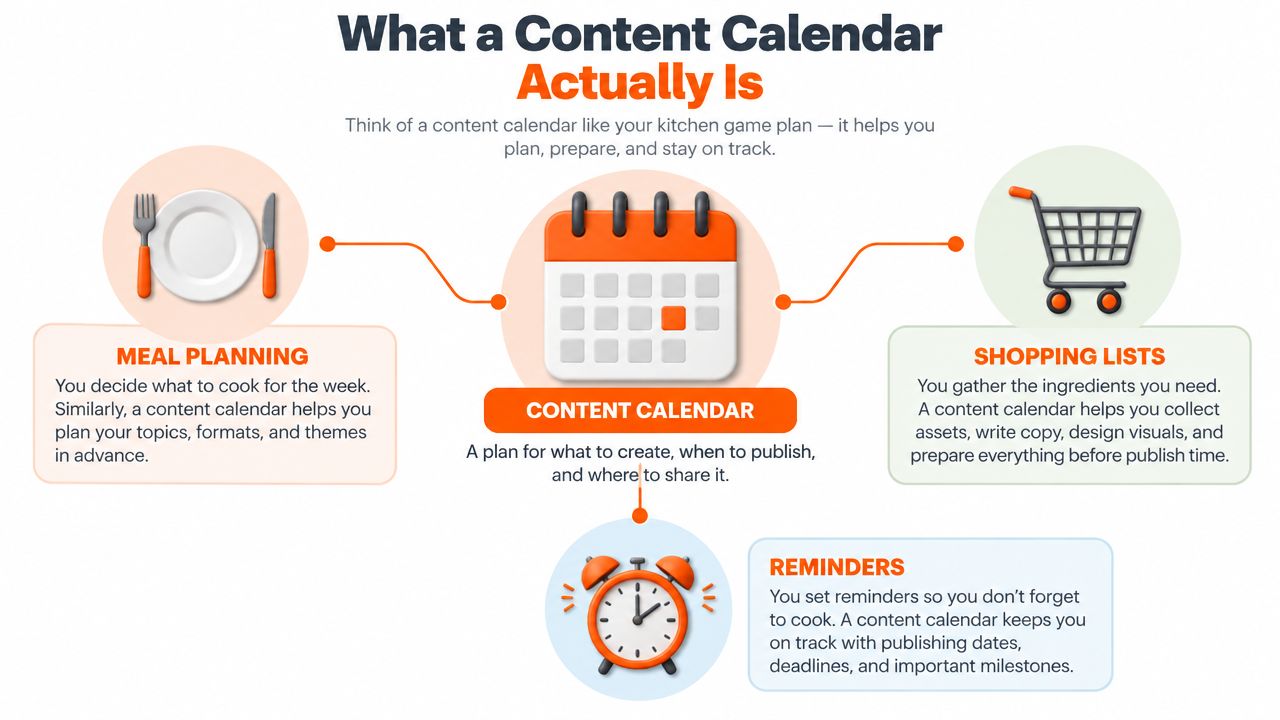
A kitchen calendar makes a household visible. It shows which meals are planned, what needs to be bought, and what must happen before dinner. Nobody mistakes the calendar for the meal itself. Its value comes from connecting ingredients, timing, responsibility, and reminders.
A content calendar does the same for publishing. It records what you'll publish, where it will appear, when it will go live, and who owns the next step. The entry might represent a Substack newsletter, a Medium article, a LinkedIn post, or an X thread. The format changes, but the coordinating function stays intact.
Here's the definition I used during the experiment:
A content calendar is a planning document, spreadsheet, or tool that maps planned content to a channel, publish date, status, owner, and supporting assets, while connecting ideas to drafting, distribution, and measurement.
Four questions make the system useful
A date alone doesn't tell you enough. A working calendar answers four practical questions:
- What is the topic? The idea, working title, and target keyword keep the editorial direction clear.
- Where does it go? The channel determines the format, voice, length, and call to action.
- When does each step happen? Draft, review, approval, scheduling, and publication need their own timing.
- What happens afterward? The published URL, engagement notes, repurpose decision, and refresh date keep the idea alive.
That last question separates a publishing ledger from a date tracker. Without post-publish information, you can't tell whether an idea deserves another format or whether it should remain a one-time experiment.
For a solo writer, a spreadsheet can hold this structure. For a team distributing newsletters and social posts, a dedicated workflow can make ownership, status, and scheduling easier to see. The difference between content scheduling and calendar planning is useful here. Scheduling answers when an item goes live. The calendar connects that moment to everything before and after it.
The Four Pillars That Make a Calendar Work
I began with four columns that seemed obvious, then discovered that each one prevented a different failure. Frequency stopped me from planning an imaginary workload. Channels stopped me from treating every platform as a duplicate publishing surface. Topics stopped random ideas from taking over. Deadlines stopped “soon” from becoming a permanent status.
Frequency is a capacity decision
Frequency means the rhythm you can sustain, expressed as slots per week for each channel. It isn't a challenge to imitate a larger creator. If your writing time only supports one substantial piece, the calendar should protect that piece and assign derivatives only where they fit.
Channels require separate rules
I narrowed the experiment to Substack, Medium, LinkedIn, and X. That constraint helped because each channel played a different role. Substack carried the complete argument. Medium reached readers who hadn't subscribed. LinkedIn extracted a professional insight. X broke the idea into a sequence that could travel independently.
Topics create continuity
I grouped entries into a small set of recurring themes. Every idea had to reinforce a core subject or deliberately test an adjacent one. This made the archive easier to understand and gave readers a reason to follow the next post.
Deadlines reveal the real pipeline
A publication date isn't enough. I also tracked when an idea became a draft, when review ended, and when the item was scheduled. The status field showed whether my apparent abundance of ideas was actually a shortage of finished work.
| Pillar | What It Controls | Quick Check |
|---|---|---|
| Frequency | Sustainable publishing rhythm | Could I repeat this cadence next week? |
| Channels | Platform-specific execution | Does this format belong on this platform? |
| Topics | Editorial focus and continuity | Does the idea support a core theme? |
| Deadlines | Movement from idea to publication | Is the next action dated and owned? |
A useful companion for the process is this guide on how to master your 2026 content workflow, especially if your calendar also includes approvals, assets, and handoffs. I kept my own system deliberately small, then added fields only when a recurring problem justified them. That approach also aligns with practical guidance on content calendar software, where visibility matters more than decorative complexity.
Anatomy of a Real Calendar Entry
One row, seven answers
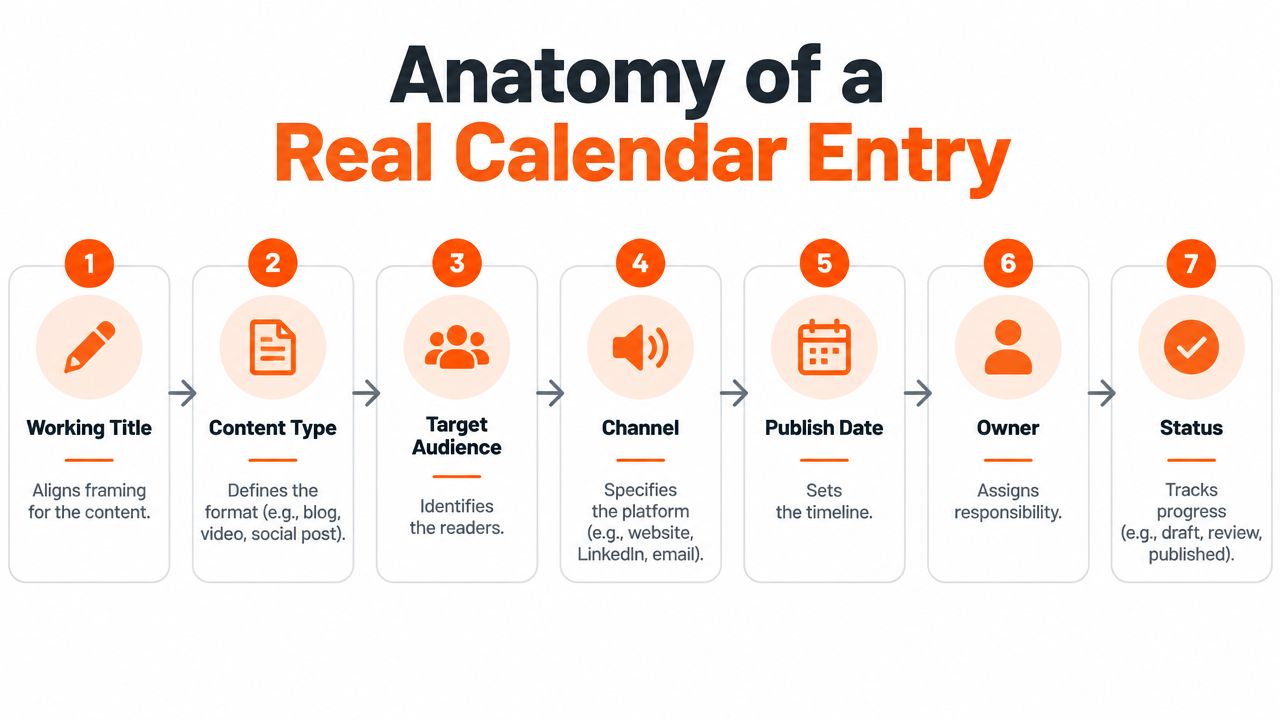
My first calendar had vague rows such as “write newsletter” and “share on LinkedIn.” Those entries looked tidy but failed under pressure. I replaced them with a self-contained production unit that answered the questions I usually asked while rushing.
A useful entry included:
- Working title, to align the framing without locking the final headline.
- Target keyword, to connect the piece to search intent and avoid competing with another draft.
- Content type, to distinguish a newsletter, article, update, or thread.
- Channel, to define the platform and its format expectations.
- Publish date, to establish the public commitment.
- Owner, to clarify who drafts, reviews, designs, and publishes.
- Status, to show whether the item is an idea, draft, review, scheduled, or posted.
I also added a draft link and a final asset link. The draft link opened the living document. The final link turned the row into a record that could support later repurposing and analytics.
The same idea needs different instructions
Take an idea titled “Consistency is a systems problem.” On Substack, I might develop the complete argument and include a reader-focused closing. On Medium, I'd remove the newsletter-specific invitation and rewrite the opening for someone arriving cold. On LinkedIn, I'd lead with the sharpest claim and one practical example. On X, I'd turn the logic into a connected sequence rather than paste the article paragraph by paragraph.
| Entry Detail | Substack | Medium | X | |
|---|---|---|---|---|
| Content type | Newsletter | Article | Update | Thread |
| Opening | Personal scene | Search-oriented problem | Bold claim | Contrarian hook |
| Core asset | Full argument | Adapted article | One insight | Sequential points |
| Final link | Newsletter URL | Article URL | Relevant destination | Full piece |
The editorial calendar example is useful for seeing how these details can sit together without turning every row into a project-management maze. The point isn't to fill every possible field. It's to remove the questions that otherwise interrupt publishing day.
Turning One Idea Into a Week of Posts
The anchor piece
During the experiment, I treated the Substack post as the anchor rather than the only deliverable. A strong source idea had enough density to support an argument, three supporting examples, and a clear closing position. I planned the derivatives at the same time as the anchor, so repurposing became scheduled work instead of an optimistic promise.
The sequence looked like this:
- Substack newsletter, a complete long-form argument for existing readers.
- Medium article, a trimmed version with a new opening for a colder audience.
- LinkedIn update, the strongest claim, one example, and a question.
- X thread, a hook followed by connected points and a route back to the full piece.
I changed the opening on every platform. I also changed visuals and tags where the channel required it. Repurposing meant preserving the idea, not copying the same paragraph into four boxes.
| Platform | Format | Opening Hook | Length | CTA |
|---|---|---|---|---|
| Substack | Newsletter | Personal story or central argument | Long-form | Subscribe or reply |
| Medium | Article | Reader problem and search intent | Adapted long-form | Read the full perspective |
| Professional update | Bold claim | Short-form | Answer the closing question | |
| X | Thread | Strongest tension | Connected posts | Visit the full piece |
Give each version room
I scheduled the versions with a two-to-four-day gap, so one idea didn't compete with itself in every feed at once. The gap also gave me time to observe which language attracted responses before shaping the next version.
The deeper process is covered in this guide to content repurposing. My practical rule was to reserve 20–30% of calendar slots for reactive content, a recommendation also documented by Airtable's content calendar guidance and The Stacc's planning rule. Those open slots absorbed reader questions, timely commentary, and topics that appeared after the calendar was built.
A weekly review kept the sequence alive. I checked which format earned attention, marked the strongest angle, and chose the next channel based on evidence rather than habit. The calendar then became a map of the idea's journey through the week.
Scheduling Cadence That Matches Your Capacity
Work backward from available hours
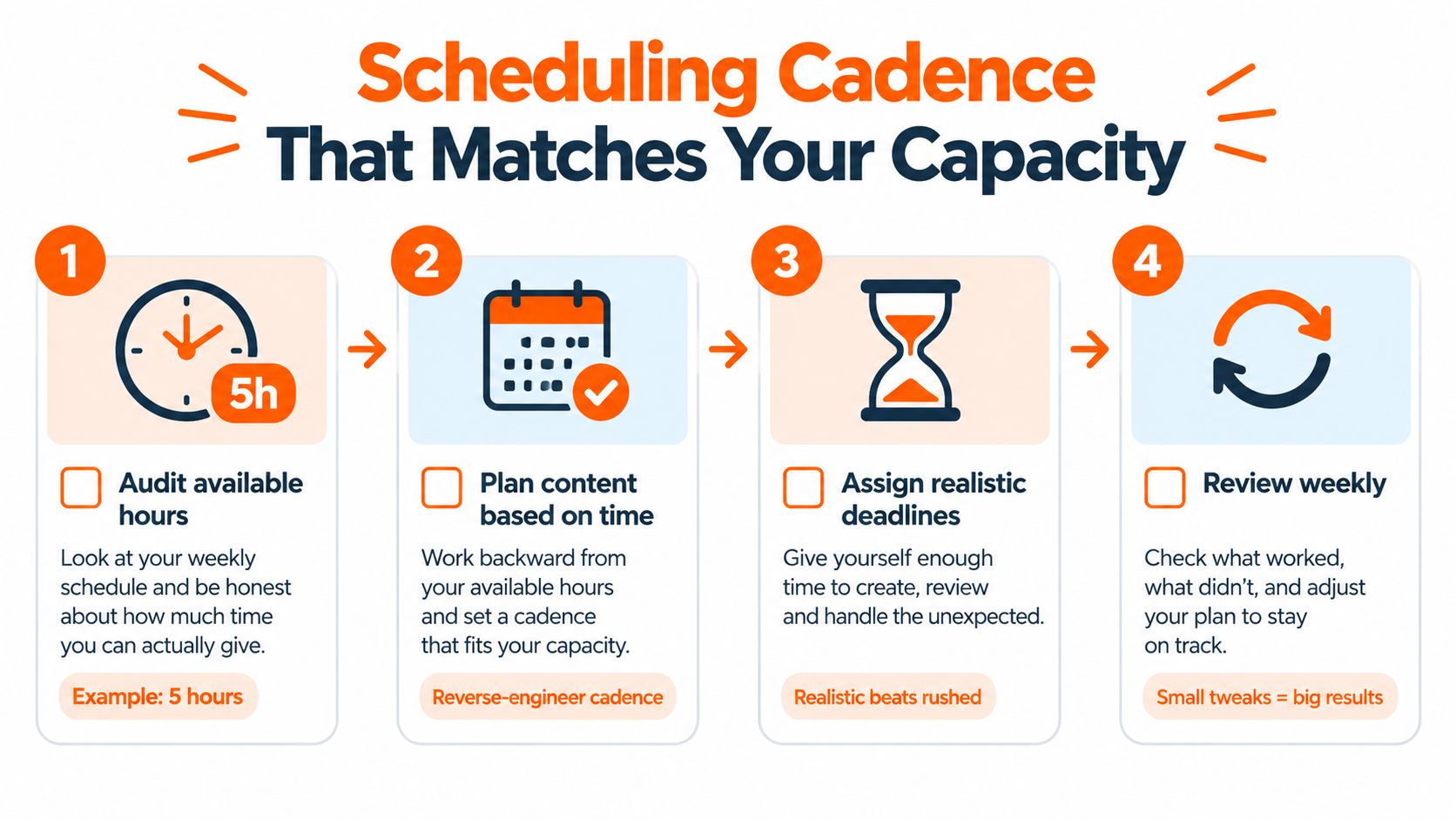
The fastest way to break a calendar is to build it from ambition. I started by asking how many focused hours I had, then assigned output to that constraint. A writer with five focused hours might sustain one long-form post and two derivative pieces. A writer with two hours might choose one pillar post and one lightweight channel touchpoint.
Those examples are planning scenarios, not promises. Your calendar should reflect the time you can protect without borrowing from sleep, client work, or recovery. Capacity belongs in the same system as publication dates because an impossible deadline is operationally identical to no deadline.
Set channel rhythms, then adjust
Published guidance gives different channel examples, including 3–5 Instagram posts per week, 2 Stories per day, 1–2 LinkedIn posts per day, and 3–5 TikToks per week, while another guide places blog output around 4–8 posts per month and email at weekly intervals. These figures come from Contently's channel cadence guidance, but they aren't instructions to copy. They show why cadence needs to be assigned by channel and capacity.
For my four-channel test, I created a repeatable rhythm around the anchor piece and its derivatives. I left 20–30% of slots unassigned for reactive ideas, then reviewed the calendar weekly. The Brightspot workflow guide also recommends including draft deadlines, review cycles, approval gates, promotion tasks, and no more than 2 reviewers per piece to avoid slowing throughput.
Use the weekly review as a pressure valve
Every Sunday, I checked the previous publishing cycle. I marked which formats underperformed, flagged strong angles for redistribution, and moved timely ideas into open slots. I also kept a buffer week every fifth week for unfinished drafts, revisions, or rest.
That review changed the emotional role of the calendar. It stopped acting like a contract I had failed to honor. It became a living document that could bend when evidence, capacity, or audience questions changed.
From Calendar to Growth Loop
A row should have a second life
By the final months of the experiment, I added four post-publish fields: post URL, peak engagement metric, repurposing decision, and next-format slot. Those fields turned a finished row into a decision record.
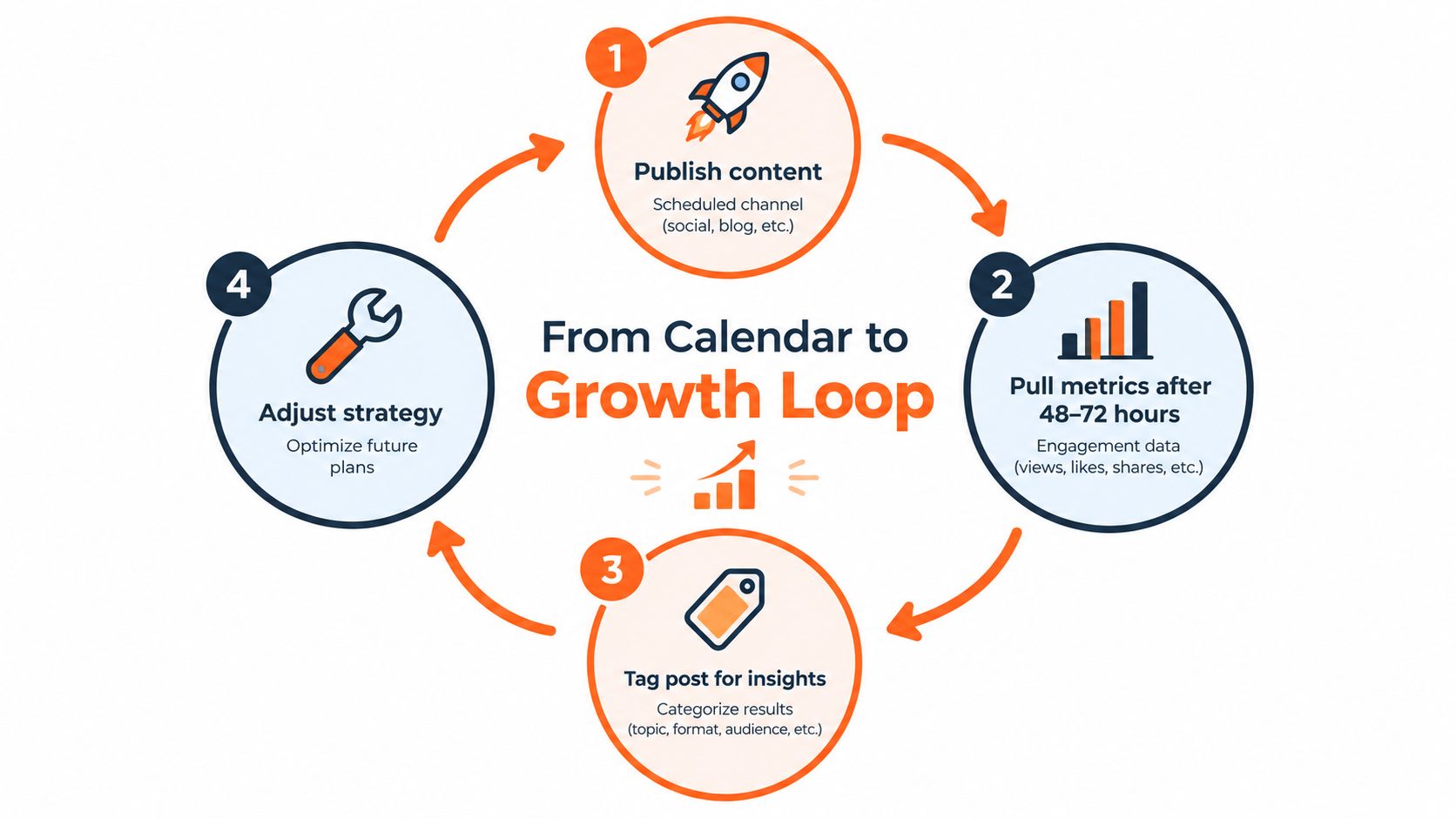
The loop was straightforward:
- Publish the planned format on its assigned channel.
- Pull metrics after 48–72 hours, using the platform's available engagement signals.
- Tag the result as evergreen, one-off, needs revision, or worth redistributing.
- Queue the next format in an open week.
One Substack essay illustrates why this matters. It drew little attention on its first day, then gained a stronger response after a LinkedIn reshare in the second week. In the fourth week, I adapted the central argument into an X thread. The original row held the links and decisions, so I didn't need to remember the essay's history from scratch.
The lesson wasn't that every post will follow this path. It was that an early result doesn't have to decide an idea's entire lifespan. The calendar gave the idea more than one chance to find the right format.
Keep distribution close to measurement
A distribution-focused tool can reduce the handoffs between planning, scheduling, and repurposing. Narrareach is one option that combines scheduling for Substack Notes, Medium articles, LinkedIn posts, and X content with cross-platform analytics and repurposing workflows. Writers who want a broader outreach reference can also use the EmailScout guide for marketers when connecting content distribution with email and audience development.
The strategic principle is bigger than any one tool. Your calendar should show where an idea has been, what happened there, and where it goes next. That is the difference between publishing more often and growing faster without writing every idea from zero. A single Substack post can become Notes, a professional insight, a thread, and a future refresh when the workflow records the decisions.
Start tonight with one row. Add the working title, target keyword, content type, channel, publish date, owner, status, draft link, final URL, and next repurpose slot. Then use this content distribution strategy to decide which version should follow the original instead of leaving the decision to a tired future you.
Narrareach helps writers schedule Substack Notes, Medium articles, LinkedIn posts, and X content from one dashboard, then repurpose high-performing ideas into platform-specific posts while tracking cross-platform results. If you're ready to turn your calendar into a distribution workflow, visit Narrareach and start free without a credit card.