Content Creation Schedule Template: 4 Editable Layouts
It's Sunday afternoon. You've blocked time to plan 14 posts across Substack, LinkedIn, X, and Medium. The spreadsheet looks manageable until you remember...
By Ian Kiprono
It's Sunday afternoon. You've blocked time to plan 14 posts across Substack, LinkedIn, X, and Medium. The spreadsheet looks manageable until you remember that the essay still needs an ending, the LinkedIn version needs a different opening, and none of the Notes are ready.
By Wednesday, you've missed three planned posts. You're moving colored cells instead of finishing drafts, and the time reserved for your next idea has gone into formatting yesterday's work. The calendar is full, but the publishing queue is empty. Now you're deciding whether to catch up over the weekend or abandon the plan and start another spreadsheet.
Why Your Content Calendar Keeps Falling Apart
That Sunday scenario usually starts with a small mistake: assigning content to days before there's anything ready to publish. Tuesday becomes a promise rather than a slot for a finished item.
Without status tracking, an idea and an approved draft look equally real. Without a workload cap, every promising topic becomes another obligation. Then a deadline collides with ordinary life, and you have no rule for deciding what to drop.
A long essay takes hours of concentrated work. Reformatting it manually for every destination uses the attention you need for the next argument. Your strongest ideas stay on one platform while you struggle to maintain the others.
Practical rule: A publishing date belongs to a ready item, not to an optimistic intention.
The distinction between scheduling and planning matters: planning decides what deserves your time; scheduling assigns finished work to a queue.
A useful content creation schedule template includes weekly and monthly layouts, a production sequence, a lighter-week rule, and a record of which adaptations bring subscribers. I'd test it as a capacity experiment, not a challenge to publish more.
The useful question isn't how much you can fit into next week. It's how to build a calendar you'll still use in week ten.
Copy-Ready Weekly and Monthly Schedule Templates
Publishing cadence templates by workload
| Template | Weekly floor | Platform mix | Long-form per month | Best fit |
|---|---|---|---|---|
| Minimum visibility | 1–2 items | Substack Notes plus one LinkedIn post | 4 essays | Writers with a day job and one fixed weekly slot |
| Growth cadence | 3–5 items | 3 Substack Notes, 1 LinkedIn post, 1 X thread | 4 essays | Writers who batch drafts in one weekend block |
| Monthly anchor | 1 essay plus 3–4 adaptations across the month | Substack essay, Medium cross-post, LinkedIn repost, Substack Note | 1 essay | Slow producers or teams with one editor |
These are planning examples, not quotas. In the first two rows, the weekly floor counts short-form posts separately from essays. Four essays a month remain a substantial writing commitment, even when the social cadence is light. The growth mix shows possible destinations, not a requirement to publish on every platform. For the monthly-anchor template, publish one essay in the first week, distribute its adaptations over the following weeks, and reserve time for review.
Buffer's creator growth playbook identifies 1–2 posts per week as a minimum visibility cadence and 3–5 as a stronger growth range. Its analysis of more than 100,000 users found that those publishing during at least 20 of 26 weeks received approximately 450% more engagement per post than those publishing during four weeks or fewer. Treat these as benchmarks, not promises about newsletter results.
An editable weekly production grid
Use this grid when the weekly floor includes an essay and its short-form distribution. If the available production time shrinks, keep the essay slot and drop unfinished extras rather than letting the queue become overdue.
| Day | Production task | Release condition |
|---|---|---|
| Monday | Outline the essay and draft three Notes from its argument | Keep everything in draft |
| Tuesday | Review claims, links, hooks, and formatting | Schedule only approved items |
| Wednesday | Publish the essay and queue its Notes | Confirm the destination link works |
| Thursday | Publish the LinkedIn adaptation | Give it a standalone takeaway |
| Friday | Publish the X thread | Check the sequence before release |
| Weekend | Batch next week's draft | Leave unfinished extras out of the queue |
An editable monthly anchor sheet
| Week | Anchor | Derivative allowance |
|---|---|---|
| First | Essay A | 3–4 adaptations |
| Second | Derivative-only | Use a planned adaptation from Essay A |
| Third | Derivative-only | Use a planned adaptation from Essay A |
| Fourth | Derivative-only | Use a planned adaptation from Essay A |
| Last Friday | Review | Compare planned, published, and subscriber outcomes |
This monthly template schedules one anchor essay and 3–4 adaptations, not a new essay each week. Spread the adaptations across the month, then use the review slot to decide which formats to keep in the next cycle. If the essay is not ready, pause new derivatives rather than filling the calendar with work that has no finished source.
Use the video alongside your sheet while setting up the workflow.
Choose the row you can maintain for 20 weeks. The weekly floor sets the minimum you intend to keep; the pause rule protects it when capacity drops.
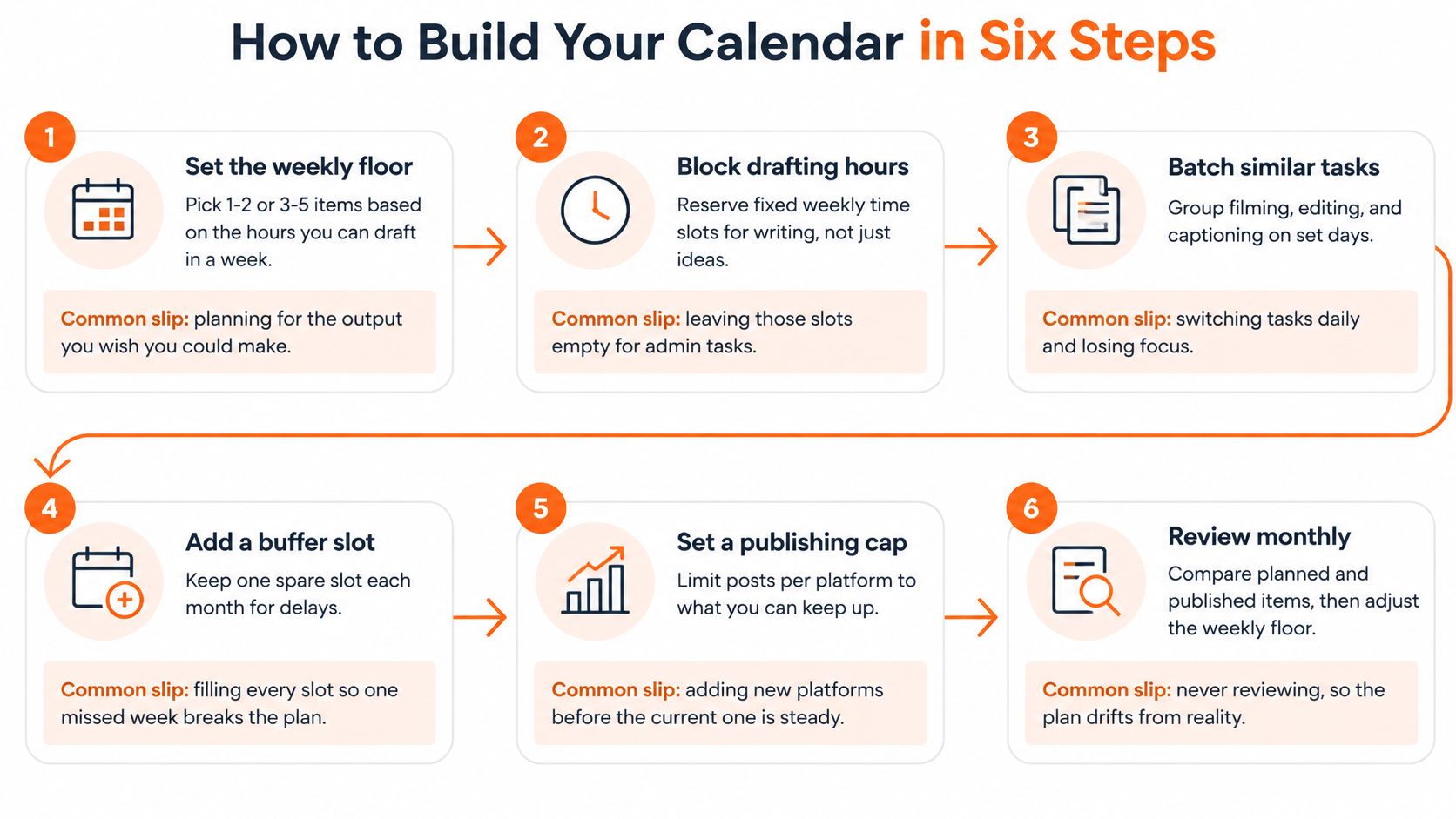
How to Build Your Calendar in Six Steps
Build the calendar in Google Sheets, Notion, or Trello before adding automation. The essential fields are source asset, platform, status, production block, publication date, and subscriber outcome.
Buffer's consistent-posting analysis supports prioritizing sustained publishing over bursts, but it's observational. Audience size, content quality, and creator resources may explain part of the association. Don't turn consistency into a guaranteed growth formula.
Build the production sequence
Set the weekly floor from available hours. Choose the lighter or growth-oriented distribution range only after reserving writing time. The common slip is estimating how quickly you could work on an unusually good day instead of looking at the hours you have available.
Name the anchor before creating derivatives. Use a working title with a clear reader outcome, such as How to choose your newsletter's opening argument. If you're a slower producer, let that anchor span the month. Don't create placeholder social posts around an undefined essay.
Map each derivative to a destination. Assign a Note, LinkedIn adaptation, X thread, or Medium cross-post to its source asset. A destination is a format decision, not permission to publish identical text everywhere. Leave unsupported platforms blank.
Give every item a single current status: idea, draft, review, scheduled, published, or repurposed. Attach published URLs rather than relying on memory. The usual mistake is labeling an item scheduled when someone has merely chosen a date.
Separate drafting from distribution. Reserve one block for writing and another for formatting, links, and queue management. Use block scheduling to protect those sessions. Keep a spare slot for delays instead of filling every opening.
Review monthly. As a practical decision rule, if you miss the floor in more than one week of four, lower it. Don't add catch-up posts to an already overloaded plan.
The diagram provides a capacity check alongside that editorial sequence.
Make the status column the scheduling gate
Say a writer books Tuesday's essay before drafting and misses that slot every second week. Moving the deadline earlier won't fix an unfinished argument. Keep Tuesday as a production appointment, then assign the publication date after review.
A missed production block needs a workload decision. It doesn't need another publishing promise.
For a business newsletter, add the intended reader action to each anchor. The guide to turn content into pipeline with SubmitMySaas offers a useful planning companion when you need to connect editorial topics to commercial outcomes.
An item can then be ready editorially but incomplete operationally. For example, the draft may be approved while its subscription link is missing. Your status rules should prevent that item from entering the queue.
Publishing Limits That Protect Your Creative Time
A schedule that fills every open day can look productive until a demanding week leaves no room to recover. In a 2025 survey of 1,000 US and UK creators reported by Mavely, 52% had experienced career-related burnout, and 37% were actively considering leaving content creation. Creative fatigue was the leading cited cause at 40%, followed by demanding workloads at 31%.
Treat the calendar as a capacity limit, not a quota. Set a weekly floor you can keep during an ordinary week, then define what pauses when capacity drops. The goal is a schedule that can survive a difficult month without turning missed posts into a backlog.

Cap demanding work first
Research, essay drafting, and recording require focused creation time. Scheduling approved excerpts is lighter distribution work, not a substitute for the effort behind a new essay. Give both types of work space in the calendar, but reduce new drafting first when time gets tight.
Week modes that protect creation time
| Week mode | Trigger | What gets published | What pauses |
|---|---|---|---|
| Full week | Anchor essay drafted before the week starts | 1 essay, 3 Notes, 1 LinkedIn post, 1 X thread | Nothing; hold the floor |
| Lighter week | Drafting time is short or a deadline collides, or after two missed floor weeks in a row | 3 Notes and 1 repost of last week's essay | New long-form essay |
| Paused week | Three missed floor weeks in a row, or a clear burnout signal | 1 Note and 2 reshared archive pieces | All new drafting |
These are example operating modes, not health requirements. If archive distribution also exceeds your capacity, pause publication. Two missed floor weeks call for lighter mode, not catch-up work; pause only after a third consecutive miss or a clear burnout signal.
Capacity check: Reduce the workload before asking yourself to become more disciplined.
If you outsource distribution, package recommendations from The Creator List can help you define the scope. Assign responsibility for adapting, approving, and scheduling each item so coordination does not become another hidden task.
Set newsletter frequency to fit the creation time you can reliably protect. A modest floor you can maintain is more useful than a demanding schedule that collapses when work gets busy.
Repurpose One Essay and Automate Substack Notes
Adapting one essay across platforms
| Source asset | Platform | Format rule | Publish window |
|---|---|---|---|
| Substack essay | Substack Notes | Two-sentence hook plus the essay link | Day 1, same day as the essay |
| Substack essay | LinkedIn post | 150–250 words with one takeaway | Day 2 |
| Substack essay | X thread | 5–7 posts, one claim per post | Day 3 |
| Substack essay | Medium cross-post | Full text with canonical link to Substack | Day 7 |
These are proposed working specifications, not universal platform rules. Check that the Medium import or publishing workflow sets the canonical URL correctly; a visible backlink alone isn't a canonical setting.
The essay provides the argument. Each adaptation needs a reason to exist independently: a useful question on Notes, a professional implication on LinkedIn, or a sequence of supporting claims on X.
For a trial cadence, reserve at least three weekly Notes slots. Eden's analysis of 473,405 Substack Notes found approximately 20% breakout odds per Note among creators publishing at least three Notes weekly, compared with about 18% among those posting less than weekly. That modest difference doesn't justify filling slots with weak excerpts.
Run a controlled publishing experiment
I'd test the hook before changing publication time. For example, ask whether a question-led Note earns more substantive replies than a statement-led Note on the same topic.
Use two comparable two-week windows as a practical trial design. Keep the topic category, link destination, approximate length, and posting window similar. Change only the hook style, then record the outcome after the same measurement period.
A 2025 PACIS study on creator stressors identified algorithm uncertainty, platform-dependent visibility, audience expectations, and growth pressure as sources of uncertainty. A documented test won't remove those pressures, but it stops every disappointing post from triggering an entirely new strategy.
Track these outcomes separately:
- Reach: Did the adaptation receive distribution?
- Meaningful engagement: Did readers reply with questions, examples, or disagreement?
- Subscriber conversion: Did the tracked destination produce subscriptions?
- Repeat readership: Did those readers return to later work?
A popular adaptation can still produce no subscribers. Record clicks separately from completed subscriptions, and use consistent campaign tags where the platform supports them.
Use early engagement as a triage signal
In Write Build Scale's analysis of 21 million Substack Notes, Notes receiving at least 16 likes in their first three hours reached 50 total likes 78% of the time, compared with 0.3% for Notes receiving zero likes in that period; the most frequent writers also grew approximately 15 times faster than the least frequent writers.
The frequency gap is observational, not proof that multiplying output multiplies growth. Early likes predict later likes in that analysis, not subscriber quality.
Check each Note at hour three and flag unusually strong performers for expansion. Don't automatically delete a quiet Note or turn every winner into another essay. Compare it with your normal response, then inspect subscriber outcomes before committing more writing time.
Automate handoffs, not editorial judgment
For writers choosing a dedicated tool, Narrareach is an alternative to a spreadsheet and platform-native schedulers: it schedules Substack Notes, Medium articles, LinkedIn posts, and X content from one dashboard, cross-posts without manual copy-paste, and connects cross-platform analytics to subscriber outcomes. Scheduling can prevent missed releases, but it can't rescue a weak idea; repurposing still needs voice and formatting review, and attribution should be interpreted within the tracking available.
Import the approved essay, generate or draft its adaptations, review each version, then schedule the sequence. Keep the source asset attached so a later correction reaches every derivative. The same process works manually with a spreadsheet and native publishing tools.
Use the content repurposing workflow when building your adaptation checklist. If the anchor supports a launch, ShipTeaser's guide to automating content creation for product launches is a useful companion for coordinating the campaign.
Run Four Weeks on the Template Before Changing It
Copy the weekly grid, choose a cadence row, and run a four-week trial without changing the experiment midstream. Keep the workload and pause rules active throughout; consistency doesn't require ignoring exhaustion.
At the final review, count:
- Floor coverage: Which weeks met the chosen commitment?
- Notes output: How many Notes published each week?
- Subscriber contribution: Which derivative produced the most subscriber clicks, and which produced confirmed subscriptions?
Choose one move: keep the floor, lower it, or assign overloaded weeks to lighter mode. Investigate social posting times only after you know the production process is manageable.
Choose your next step
If you're ready for a tool, start free with no credit card, connect Substack and LinkedIn, and load the first four weeks. Schedule the approved anchor alongside its Notes and derivatives.
If you'd rather stay connected, join the mailing list for the next template update and monthly review checklist, or follow the next publishing experiment before changing tools. A template is useful only if you can still use it after the first bad week.
Narrareach offers scheduling, repurposing, and subscriber-focused tracking for turning a finished essay into a manageable distribution sequence. Visit to start free, or join the mailing list if you'd prefer the next template update before trying the scheduler.