Repurposing Content on LinkedIn That Actually Grows Reach
You publish a thoughtful Substack post or blog article, get a short burst of attention, then watch it disappear into the archive while your LinkedIn stays...
By Ian Kiprono
You publish a thoughtful Substack post or blog article, get a short burst of attention, then watch it disappear into the archive while your LinkedIn stays quiet. A few days later, you're back at the blank page, trying to invent something new even though you already said something useful. The worst part is knowing the issue isn't effort. It's distribution. Copy-pasting the same paragraph into LinkedIn doesn't work, and manually rewriting every idea for every platform gets old fast.
For 30 days, I ran a simple repurposing test: one long-form piece a week, broken into LinkedIn-native posts instead of reposted as-is. Some versions landed. Some flopped. The useful lesson was that repurposing content on LinkedIn isn't about squeezing more mileage out of one article. It's about format-shifting the right idea into the right container so LinkedIn readers stop, read, and engage.
If you've been writing newsletters, blog posts, or notes and wondering why they don't travel well, this will help. If you want a deeper mental model for why distribution behaves differently across platforms, Narrareach's piece on how algorithms work is a good companion read.
Why Your Best Content Is Stuck and Your LinkedIn Is Quiet
Monday morning. You publish a strong article, get a few replies from people already in your orbit, then watch it stall. By Wednesday, LinkedIn is quiet again, and the same idea that took hours to develop is already buried.
I saw that pattern all through a 30-day repurposing test. The article usually was not the issue. The issue was format fit.
LinkedIn readers do not consume ideas the way newsletter subscribers do. They scan in-feed, decide fast, and reward posts that feel built for LinkedIn. A blog argument often needs compression, a sharper angle, and a different container before it has any chance of traveling.
That distinction matters if you want reach from work you already did. Repurposing content on LinkedIn works when you treat the original piece as source material, then shift each idea into the format that gives it the best shot: a carousel for a framework, a text post for a sharp opinion, a short video for a nuance-heavy point that needs voice and context. If you want the platform mechanics behind that behavior, this breakdown of how social algorithms distribute content across formats is a useful companion.
What failed in practice
The weakest posts looked efficient from my side and generic from the reader's side.
- Pasted intros read like leftovers from an article.
- Link-first posts asked for a click before the post earned attention.
- One-post summaries flattened a nuanced piece into a bland recap.
- Reusing stale examples made a good idea feel dated.
The one-post summary mistake was easy to miss. It felt sensible. In reality, it stripped out the strongest parts. A framework lost its steps. A contrarian point lost tension. A story lost the moment that made it memorable.
What changed the results
Performance improved once I stopped asking, “How do I repost this?” and started sorting ideas by format.
A few questions made that easier:
- Which single idea from this piece can stand on its own?
- Does this idea need sequence, opinion, or explanation?
- Would it hit harder as a document, text post, or short talking-head video?
- Could someone understand and save it without opening the original article?
That shift sounds small. It changed everything.
In my test, the best-performing repurposed posts were rarely the ones closest to the article. They were the ones rebuilt for the feed. A checklist became a document post. One sentence with a strong opinion became text. A subtle lesson with trade-offs became video because tone did part of the work.
That approach lines up with broader LinkedIn performance data. Analysts at SocialNexis found that, across personal-profile posts from March 2025 through February 2026, document posts generated 1.72x the median reach of image posts, while text-only posts delivered 1.26x the reach in the same dataset, as shown in their LinkedIn repurposing and reach research. That does not mean every idea belongs in a document. It means format choice can change distribution enough that copy-paste repurposing is usually the wrong play.
A good article is not stuck because the idea is weak. It is stuck because the format is doing the idea no favors.
How to Break One Long-Form Piece Into a Week of LinkedIn Ideas
The system that worked best for me wasn't complicated. It was disciplined. I took one source asset, usually a Substack post, blog article, or transcript, and mined it for separate ideas instead of trying to summarize the whole thing in one LinkedIn update.
A useful rule of thumb is to extract 5 to 7 standalone ideas from one pillar piece, adapt each one to a native format, and space them across the week rather than posting them in a burst, based on SocialInsider's LinkedIn benchmark guidance.
The extraction method I used each week
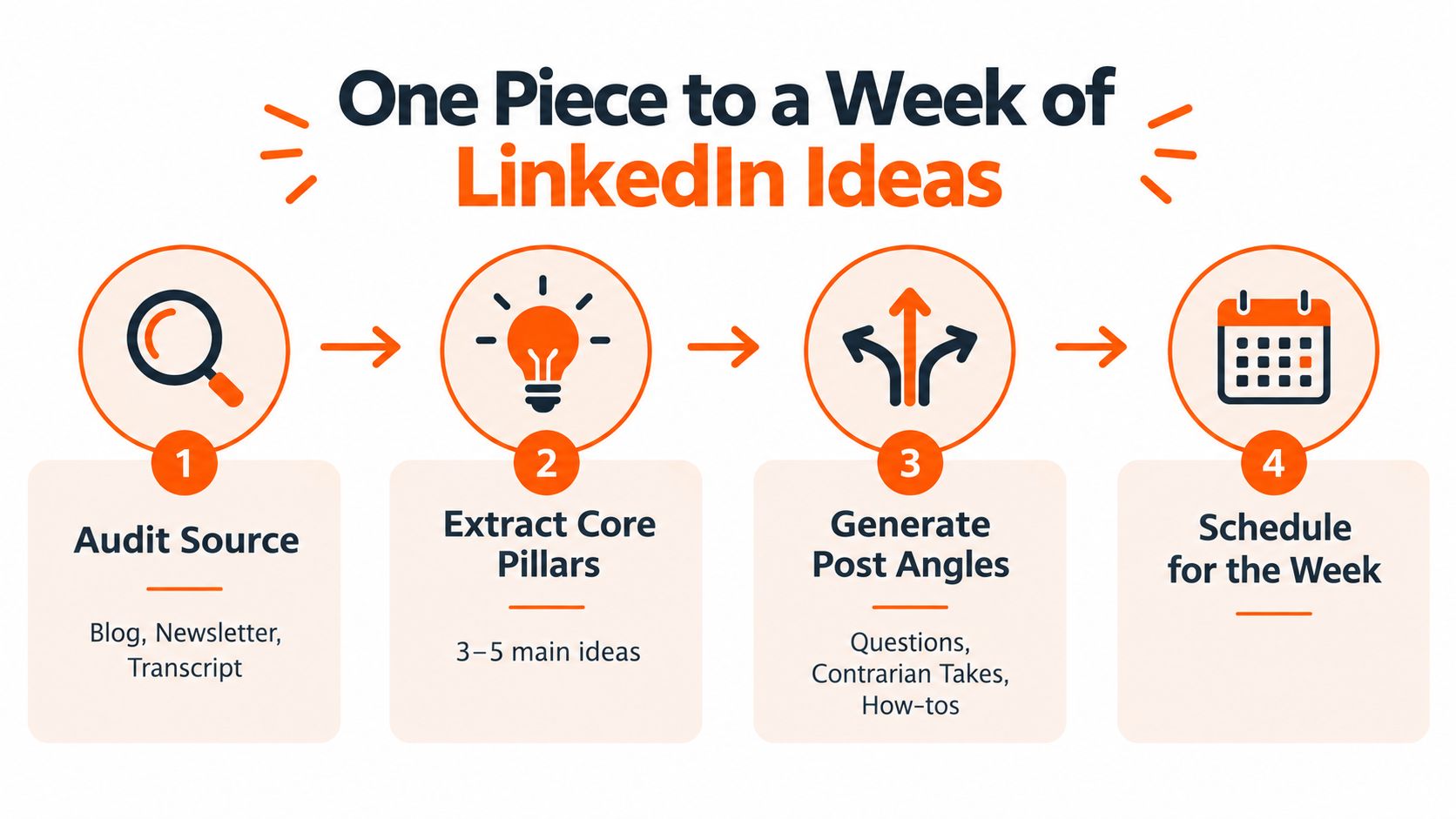
I'd read through the original piece once with a highlighter mindset. Not “what's the summary?” but “what can survive on its own?”
What to pull from a source piece
Some ideas become obvious once you stop looking for a recap.
- A framework that can stand alone without backstory
- A contrarian line that can open a text post
- A tactical checklist that can become a document carousel
- A story fragment that reveals a mistake, surprise, or shift in thinking
- A reply-worthy question that invites professionals to weigh in
- A data point that sharpens a broader claim, if the data is still current
In practice, one newsletter often contained all six.
The strongest repurposed posts didn't try to cover everything. They took one useful slice and pushed it all the way through. If a Substack essay had four lessons, I didn't write “4 lessons from my new article.” I turned lesson two into its own post with a new hook, gave lesson three a more opinionated angle, and left the rest alone.
A simple weekly workflow
If you want a repeatable process, this is the one I'd use again.
- Audit the source piece. Mark the parts that triggered replies, clarified a process, or challenged a common assumption.
- Extract the strongest ideas. Stop at the ideas that can stand independently.
- Rewrite each idea from scratch. Keep the meaning. Change the entry point, phrasing, and examples.
- Match each one to a native format. Don't default to text.
- Space distribution across the week. Let each angle breathe.
- Refresh weak spots. Update examples, tighten old wording, and remove anything that feels obvious.
For a deeper operating model, Narrareach's guide to a content repurposing workflow lines up well with this approach.
One small but important detail: I stopped posting every derivative in a tight cluster. Spacing mattered because each post needed room to gather its own engagement signals and audience reactions.
Later in the week, I'd also check comments and DMs. Those often revealed the next angle to repurpose, because readers usually tell you which part they found confusing, useful, or worth debating.
A quick walkthrough helps if you prefer seeing this visually.
The easiest mistake is treating repurposing like compression. The better move is extraction, then reconstruction.
Choosing the Right LinkedIn Format for Every Repurposed Idea
You publish a strong article on Tuesday. By Friday, the LinkedIn post you pulled from it has done almost nothing. The problem usually is not the idea. The problem is that the idea got squeezed into the wrong format.
That was the clearest lesson from my 30-day repurposing test. Once I stopped treating LinkedIn repurposing as copy-pasting and started treating it as format-shifting, results got easier to predict. Some ideas needed slides because readers had to follow a sequence. Some needed plain text because the tension lived in the wording. Some only worked once I explained them out loud on video.
Format choice changes how the idea is consumed, not just how it looks.
The format match that changed results
I used to default to text because it was fast. That saved time and wasted reach.
One independent review of LinkedIn post formats found that image posts and carousels tended to outperform text and link posts on visible engagement, while video stayed competitive when the delivery itself added context, according to MagicPost's review of LinkedIn post formats. That lines up with what I saw in practice. Feed performance was less about finding one winning format and more about matching the right container to the right kind of idea.
Here is the shorter version I wish I had earlier.
Quick format map for repurposed ideas
| If the source idea is... | Best LinkedIn format | Why it fits |
|---|---|---|
| A framework, process, or checklist | Document post | Readers can move step by step, save it, and revisit one screen at a time |
| A sharp opinion or contrarian take | Text-only post | The hook carries the post, and extra design usually weakens the punch |
| A demo, walkthrough, or reaction | Video | Voice, pacing, and screen context add meaning that text strips out |
| A visual example, teardown, or before-and-after | Image-led post | The proof sits in the visual, so the post feels clearer faster |
| A long, nuanced argument | Short text post first, article only if demand shows up | LinkedIn rewards clear entry points. Earn attention in-feed before asking for a longer read |
| A link to an external resource | Native teaser plus link only when needed | Direct link posts often lose momentum unless the audience already wants the click |
My practical format rules
A good repurposing decision starts with one question: what does the reader need in order to get the point?
If they need sequence, use a document post. This worked best for method posts, multi-step breakdowns, and anything I wanted people to save. In my test, carousels did well when each slide carried one job, one mistake, or one decision. They flopped when I turned them into cramped blog summaries.
If they need a strong point of view, use text. A blunt first line, a clear tension, and one useful takeaway beat a designed asset almost every time for opinion-led posts. Text also gave me the fastest feedback on whether the angle had any life before I spent time designing anything.
If they need to hear tone or watch a decision happen, use video. I would not use video for generic tips. I would use it for teardown-style posts, reactions to industry claims, and short explanations where emphasis changed the meaning.
If the proof is visual, make the visual do the work. Screenshots, marked-up examples, simple diagrams, and before-and-after comparisons consistently felt more native than turning the same material into paragraphs.
This is also where a lot of creators lose the plot. They repurpose a blog post into five LinkedIn posts, but every version keeps the same shape. Better repurposing changes the shape. If you want a useful reference point for that execution layer, Narrareach covers several of the mechanics in these LinkedIn posting best practices.
One more trade-off matters. The format that gets attention is not always the format that gets buyers closer to a decision. Text can start more conversations. Document posts often get more saves. Video can build trust faster if the audience needs to assess your judgment. If your end goal is pipeline, not vanity metrics, this piece on how to drive sales via content repurposing connects format choices to business outcomes.
A strong idea can still stall if the format fights the way people consume it on LinkedIn. Matching the format to the job of the idea fixes that faster than writing more posts.
Formatting Templates That Make Repurposed Posts Feel Native
After the format decision, execution takes over. Many repurposed posts lose their edge here. The idea is fine, but the post still feels imported.
The key technical rule is to keep the asset native to LinkedIn rather than cross-posting it verbatim. Practical workflow guidance also recommends tailoring the hook, visual, and length to the platform, while avoiding common mistakes like posting too quickly, adding no new perspective, or leaving stale facts untouched, according to DataSlayer's LinkedIn workflow guidance.
Text post template that actually reads like LinkedIn
A good LinkedIn text post usually feels like one idea with tension.
Independent 2026 guidance points to a strong performance band around 1,300 to 2,500 characters for LinkedIn posts, according to Neal Schaffer's LinkedIn post length guide. Another 2026 benchmark puts standard text posts at roughly 200 to 400 words as a practical target for delivering a hook, context, and takeaway in a short read window, according to Viralbrain's post length analysis. And LinkedIn still imposes a 3,000-character ceiling for a standard post, as noted in Taplio's breakdown of LinkedIn post length.
Use this structure:
Hook in the first line
Name the mistake, tension, or surprising lesson.Context in a short paragraph
Give the reader enough setup to care.One main insight
Don't cram the whole article into the post.Tactical takeaway
End with something usable or discussable.
Example skeleton:
I thought repurposing meant reposting. It didn't.
The posts that flopped were the ones I copied from a newsletter and dropped into LinkedIn with minor edits.
The posts that worked took one idea, gave it a new hook, and matched it to the format that made sense for the feed.
If your repurposed content feels flat, don't just rewrite the first sentence. Change the container.
Carousel and article templates
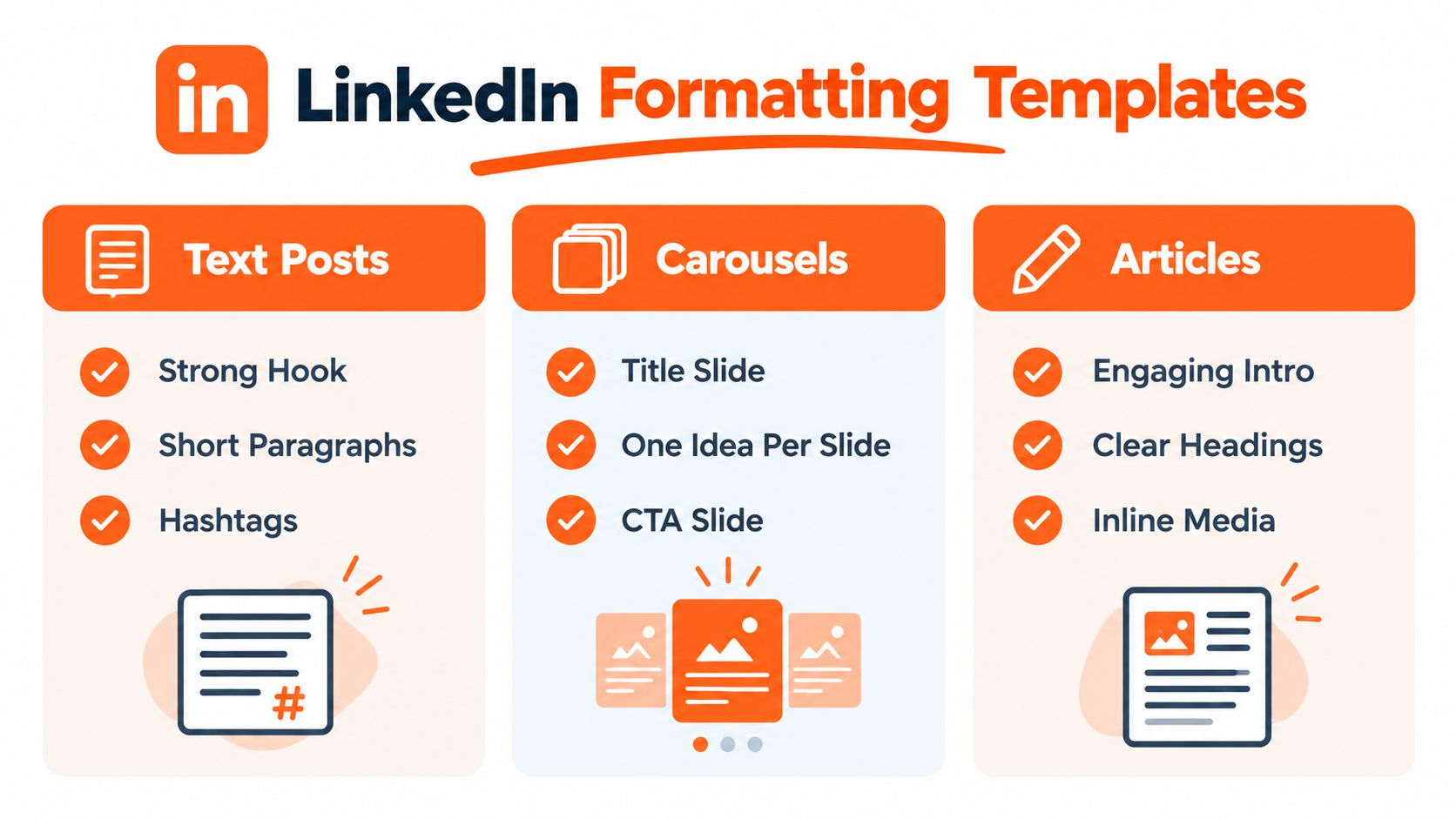
For document posts, simplicity wins.
- Slide 1 needs a promise. Give the reader a reason to swipe.
- One idea per slide keeps momentum. Don't overload with paragraphs.
- Final slide should direct the next action. Save, comment, or apply the framework.
For LinkedIn articles, I'd be more selective. Use them when the argument needs room, not because you want to paste a whole blog post somewhere else. Rework the intro, tighten the subheads, and make sure it reads like a platform-native article rather than duplicated site content.
There's also an overlooked originality issue here. One independent guide claims that a properly reformatted repurpose should have less than 40% lexical overlap with the original to recover most of the original engagement, while LinkedIn's own repurposing guidance emphasizes refreshing and reframing old posts rather than simple reposting, according to Ani Petrova's LinkedIn repurposing guide.
What I changed to avoid the copy-paste feel
I started doing three edits every time:
- Change the opening angle. Don't lead with the same sentence as the source piece.
- Swap examples. Pull from comments, DMs, or newer experiences when possible.
- Compress harder. If a paragraph only works with surrounding context, it doesn't belong in the post.
That last step is what makes repurposing content on LinkedIn feel intentional instead of recycled.
Scheduling and Automating Your LinkedIn Repurposing System
The strategy can be solid and still fail if distribution depends on your memory.
My first week of the experiment was messy for that reason. I had extracted the ideas, chosen formats, and drafted the posts. Then I posted them irregularly because I was still treating publishing like a side task instead of part of the system.
Why manual scheduling breaks down
LinkedIn's native scheduler works, but it's narrow. You write a post, click the clock icon, pick a date and time, then hit schedule. It only handles one post at one time, which makes batch distribution and multi-platform repurposing harder to manage manually, according to this walkthrough of LinkedIn's native scheduling flow.
That's fine for a single post. It's clumsy for a weekly repurposing engine.

The weekly system I'd recommend
My workflow settled into a rhythm:
- Monday for pulling angles from one source piece
- Midweek for publishing the strongest format first
- Later posts for alternate angles, not repetitions
- End of week for checking which angle earned saves, shares, or replies
If you're doing this by hand, create a simple calendar and queue each idea with its format, hook, and source asset. Also decide upfront which posts should become Substack Notes, which should stay LinkedIn-only, and which can travel to X or Medium with format-specific edits.
If you want to automate more of that workflow, Narrareach can be one option. It handles scheduling, tracking, and cross-platform distribution across Substack, Medium, LinkedIn, and X from one dashboard, which is useful if you want to schedule and publish posts and Substack Notes without manually reformatting every version.
For a manual-first foundation, this guide on how to schedule posts on LinkedIn covers the basics clearly.
Batch the thinking, then batch the publishing. Don't make yourself switch contexts every day just to stay visible.
The practical outcome is simple. You grow faster when strong ideas don't stay trapped in one format and one platform. A Substack essay can become LinkedIn documents, text posts, and Notes. The gain isn't just convenience. It's consistency without sounding repetitive.
Measuring What Worked and Turning Winners Into More Reach
By the end of my 30-day test, a pattern kept showing up. The posts I thought were strongest often stalled, while a few simpler ideas kept earning saves, shares, and follow-up questions. That changed how I measured repurposing. I stopped asking, “Did this post perform?” and started asking, “Which format carried this idea best on LinkedIn?”
That distinction matters. Repurposing is format-shifting, not reposting the same point in a new wrapper. A useful idea can miss in text and work in a carousel because the steps are easier to skim. The same idea can flop as a video if the payoff comes too late.
The signals worth tracking
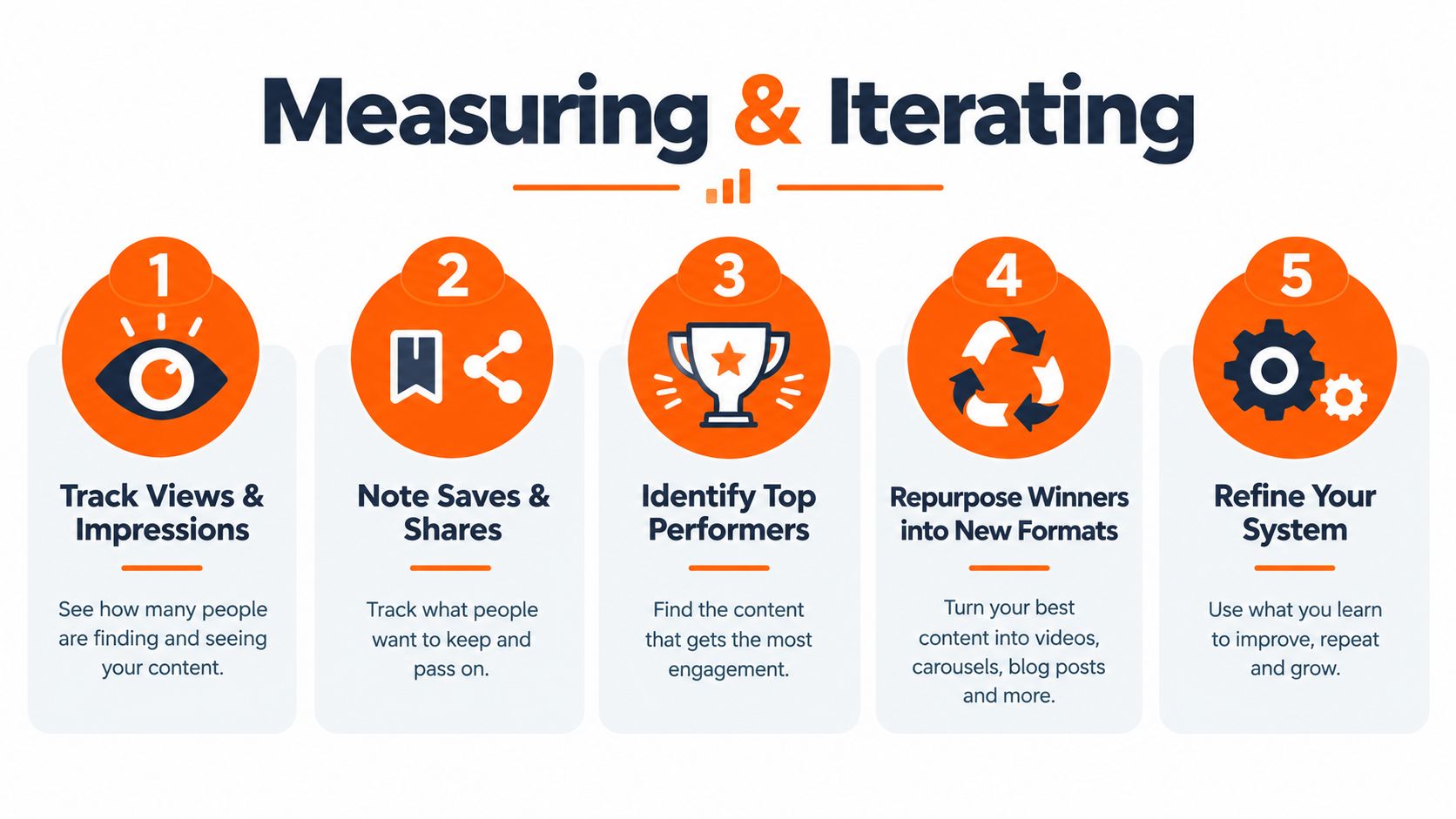
Track behavior, not vanity.
Here's the short list I'd use:
- Impressions to judge whether the hook and format earned initial distribution
- Saves to spot ideas with practical value
- Shares to find posts that travel beyond your existing audience
- Comments to surface objections, confusion, and phrases worth reusing
- Profile visits or DMs to catch posts that create business intent
- Engagement rate to compare the same idea across different formats
The earlier frequency benchmark still holds. More posting volume gives you enough shots to see patterns. But volume only helps if each post tests something different: a new hook, a tighter angle, or a better-matched format.
How to turn one winner into more distribution
The next move depends on what signal the post earned.
If a text post gets strong saves, that usually means the idea has teaching value. Turn it into a document post with cleaner sequencing, stronger subheads, and one takeaway per slide. In my test, this worked best for frameworks, checklists, and contrarian advice that needed structure.
If a document post gets shared, the idea probably has broad utility and clear packaging. Record a short video version that explains the same lesson with one example and one opinion. Video worked better for me when the topic needed tone, nuance, or a quick story to make the point stick.
If comments pile up with the same objection, use that friction. Write the next post around the pushback, not the original claim. Some of my best follow-ups came from comment sections where people misunderstood the first version.
If a post drives DMs, don't leave that signal sitting there. Turn the repeated question into a short article, a Substack Note, or a FAQ-style LinkedIn post.
A simple rule helped me choose the next format:
- Dense insight becomes a carousel
- Sharp opinion stays a text post
- Context-heavy lesson becomes video
- Repeated question becomes a follow-up post or article
That is the compounding effect. One strong idea earns another round of reach because you changed the delivery, not because you reposted it.
If you want one place to compare those signals across posts, this guide to a content analytics dashboard is useful. If you're sorting through platform metrics and need help reading them, tools that centralize reporting can also help you understand your Content Dashboard without jumping between tabs.
A winner on LinkedIn is not just a post with high reach. It is an idea that proves it can survive a format change and keep performing. That is the standard I'd use from now on.