
How the connector works
/mcp. The client discovers the rest.Connect the official Narrareach connector
Narrareachhttps://www.narrareach.com/mcp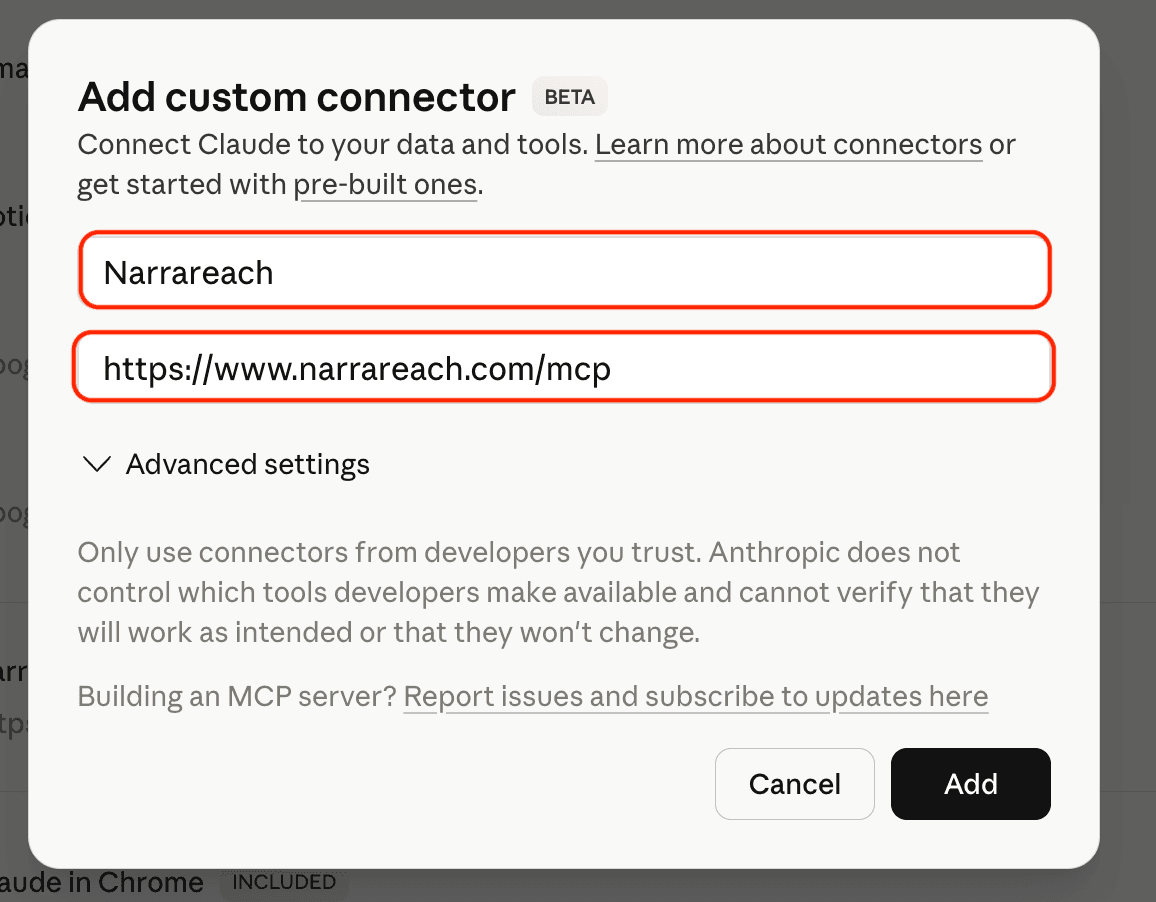
Connect the official Narrareach plugin
- Open the official Narrareach listing and install the plugin.
- Connect your account when prompted. Sign in with the same email you use for Narrareach and review the requested permissions.
- In a new chat, type @ and select Narrareach. Ask it to show your connected accounts and existing drafts before scheduling.
On a phone or tablet, open the listing in your browser if you cannot find it in the app. Availability can depend on your ChatGPT account and workspace settings.
If Substack asks for a verification code and your connection supports it, enter the emailed code in the same conversation. You do not need a desktop extension for that step. If the code box closes, send the code as a normal reply in that conversation. Continue with the same saved draft and wait for scheduling confirmation.
Already connected, but a tool is missing?
Official Narrareach plugin: new or changed tools become available after OpenAI approves them. Installing again or reconnecting does not bypass that review. Try a new chat with Narrareach selected once the update is available.
Custom connection: open its settings in ChatGPT in a browser. If Refresh is available, select it, check the tool list, then start a new conversation. Reconnect or Change connection may only repeat sign-in; they do not confirm that new tools were added.
If Refresh is missing or Substack verification is still unavailable, contact Narrareach support with the missing action and whether you use the official plugin or a custom connection. Keep your existing draft and publishing accounts connected. A managed workspace may need an administrator to review and enable new actions.
Contact Narrareach supportOptional: set up a custom connection
Use this route if you prefer a custom connection and your ChatGPT account allows it.
- Open ChatGPT Plugins in your browser. Click Add (or the plus button), then Add custom MCP server.
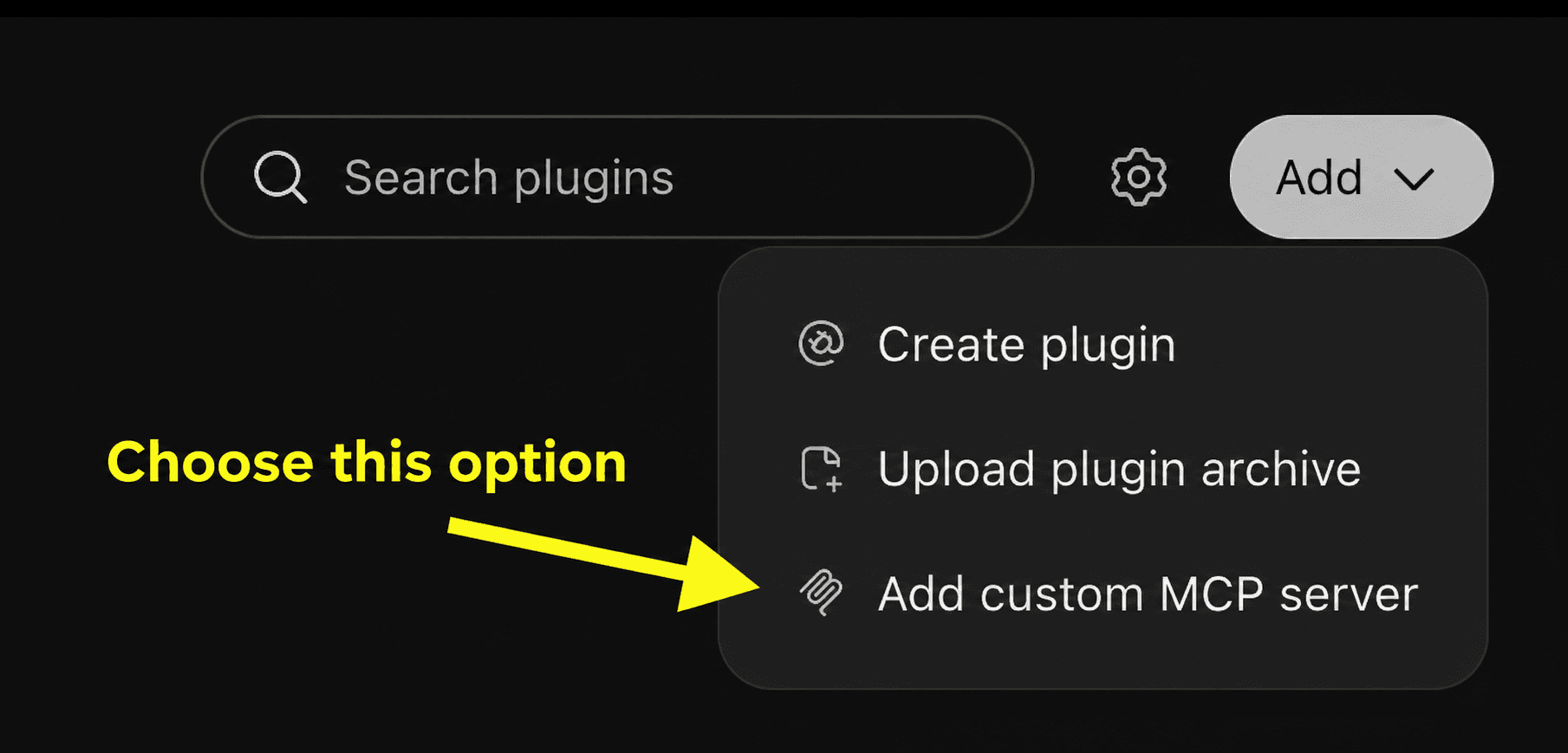
Choose Add custom MCP server to open the connection form. - In the form that opens, use Narrareach as the name and the server address below. Choose OAuth for authentication; leave client ID and client secret empty.
New Plugin
×Icon (optional)
+An icon is optional.
Connection
Server URLTunnelhttps://www.narrareach.com/mcpAuthentication
OAuth▾Advanced OAuth settings
Review discovered OAuth settings, or enter them manually.
Custom MCP servers introduce risk. Learn more
Create as a plugin - Review the warning, choose I understand and want to continue, then Create as a plugin. Finish Narrareach sign-in and install the resulting plugin.
- Start a new chat, select Narrareach with @, and ask it to show your connected accounts.
https://www.narrareach.com/mcp
If these controls are unavailable, use the official listing above or ask your workspace administrator about access.
OpenAI’s current custom connection guideCommon questions
blob: or file: URL. Ask ChatGPT to use schedule_article with coverImage or media as a data URI or base64 value. It can also call upload_media first and use the returned public URL.create_draft accepts a title and optional HTML body; it does not accept an attached image object. To keep the article as a draft, create it first and then call update_draft with coverImage. To schedule immediately, use schedule_article, which accepts cover and inline media.Add Narrareach as a Gemini custom app
- On a computer, open gemini.google.com and go to Settings → Connected Apps.
- If Connected Apps is hidden, open Personal Intelligence first, then Connected Apps.
- Under Custom apps, choose Add a custom app. Paste the Connector URL below, then click Next.
- Complete Narrareach sign-in with the same email as your Narrareach account.
- In a chat, type
@Narrareachto select the connector explicitly.
https://www.narrareach.com/mcpUse Narrareach in Notion Agents
https://www.narrareach.com/mcpNotion Agent
- On Notion web or desktop, open Settings → Connections → Discover → Add Custom MCP.
- Enter the Connector URL and sign in with your Narrareach account.
- Find Narrareach under All sources → MCP servers in chat. Mention it by name if the agent does not select it.
Custom Agent
- Open the agent's Settings → Tools & Access → Add connection → Custom MCP server.
- Enter the Connector URL, sign in with Narrareach, and choose the tools this agent can use.
- Keep write tools set to require confirmation, especially scheduling and publishing actions.
Connect a Make scenario through the REST API
- Create a token in Narrareach Settings > Integrations > REST API & webhooks with only the required scopes.
- Add an HTTP request module and use the endpoint and body from the public OpenAPI contract.
- Store the token as a credential and send it in the Authorization header.
- Use a stable source-record ID as the idempotency key. Notes accept the
Idempotency-Keyheader oridempotencyKeyin the body; articles take it in the body. - Store the accepted item ID, then check status before retrying after a timeout.
Use the Narrareach community node in n8n
n8n-nodes-narrareach for native actions to schedule Articles and Notes, check status, reschedule, cancel, work with reader activity, and read Stats outcomes. n8n handles triggers and branching while Narrareach handles connected destinations and publishing state. To start a workflow when a Note publishes or fails, use n8n's Webhook node with a Narrareach webhook.- Install
n8n-nodes-narrareachunder Community Nodes. - Create a scoped Narrareach automation token and save it only in the n8n credential.
- Map approved content, destination, schedule time, timezone, and a stable source ID.
- Run one future-dated canary and confirm it with Get Status before enabling the workflow.
Discovery endpoints
https://www.narrareach.com/.well-known/oauth-protected-resource/mcphttps://www.narrareach.com/.well-known/oauth-authorization-server/mcphttps://clerk.narrareach.com/.well-known/oauth-authorization-serverhttps://www.narrareach.com/mcpregistration_endpoint.S256.Edit scheduled LinkedIn posts with ChatGPT
- Ask your assistant to find the post with
list_scheduled_items, checkget_scheduled_item_readiness, and read the queued text withget_note. - Provide the replacement text and ask for a preview. The assistant uses
amend_scheduled_note_contentwith the schedule id, the current revision asexpectedRevision, and your full replacement text. Previewing alone does not change the post. - Review the preview and confirm before the assistant applies it with
apply: true. If the post has changed, review a fresh preview before confirming again.
amend_scheduled_item instead. Team Note changes still use the team dashboard.Inspect article drafts and change covers
draftId. Use it with get_draft to review the Narrareach draft, not a verified copy of what is scheduled on the publishing platform. For an unscheduled article, update_draft can change its title, body, or cover image. Cover-only edits preserve the body and existing subscribe controls. It cannot edit an active article schedule. Review the schedule status before making changes; do not cancel or recreate it without approval.Get new tools in your MCP connection
What LLMs can do
advisories; relay these as status updates without treating the accepted schedule as a failure.Choose the account before acting
list_workspaces to see the teams and writers you can access. The tool details below show which calls accept workspace andwriter. Drafts, article scheduling, and schedule changes currently use your personal account. Keep the same workspace when listing, reading, and scheduling team Notes. If team access fails, do not switch to personal publishing to work around it.Check Notes and articles separately
list_notes, thenget_note with the returned id. For articles, use list_scheduled_posts and find the scheduleid, not the draft id. After a timeout, an empty article list does not tell you whether a Note was scheduled. Check the right account, filters, and list limit before submitting again. Team Note changes currently use the team dashboard.list_workspacesAccount and fields
Discovers context from your signed-in account. No selectors needed.
Required fields: None.
Accepted fields: None.
Use the schema supplied by your MCP client for field types, choices, and limits.
get_user_profileAccount and fields
Discovers context from your signed-in account. No selectors needed.
Required fields: None.
Accepted fields: None.
Use the schema supplied by your MCP client for field types, choices, and limits.
list_draftsAccount and fields
Personal account only. Do not send workspace or writer.
Required fields: None.
Accepted fields: limit, status, query.
Use the schema supplied by your MCP client for field types, choices, and limits.
get_draftAccount and fields
Personal account only. Do not send workspace or writer.
Required fields: id.
Accepted fields: id.
Use the schema supplied by your MCP client for field types, choices, and limits.
create_draftAccount and fields
Personal account only. Do not send workspace or writer.
Required fields: title.
Accepted fields: title, contentHtml.
Use the schema supplied by your MCP client for field types, choices, and limits.
update_draftAccount and fields
Personal account only. Do not send workspace or writer.
Required fields: id.
Accepted fields: id, title, contentHtml, coverImage.
Use the schema supplied by your MCP client for field types, choices, and limits.
archive_draftAccount and fields
Personal account only. Do not send workspace or writer.
Required fields: id.
Accepted fields: id.
Use the schema supplied by your MCP client for field types, choices, and limits.
list_content_versionsAccount and fields
Personal account by default; accepts an authorized team workspace.
Required fields: draftId.
Accepted fields: draftId, workspace, writer.
Use the schema supplied by your MCP client for field types, choices, and limits.
create_article_from_noteAccount and fields
Personal account by default; accepts an authorized team workspace.
Required fields: draftId.
Accepted fields: draftId, workspace, writer.
Use the schema supplied by your MCP client for field types, choices, and limits.
list_notesAccount and fields
Personal account by default; accepts an authorized team workspace.
Required fields: None.
Accepted fields: limit, status, platform, query, workspace, writer.
Use the schema supplied by your MCP client for field types, choices, and limits.
get_noteAccount and fields
Personal account by default; accepts an authorized team workspace.
Required fields: id.
Accepted fields: id, workspace.
Use the schema supplied by your MCP client for field types, choices, and limits.
schedule_noteAccount and fields
Personal account by default; accepts an authorized team workspace.
Required fields: scheduledFor, platforms.
Accepted fields: draftId, title, content, scheduledFor, timezone, platforms, socialAccountIds, instagramDestinations, linkedInAccountId, linkedInOrganizationUrn, workspace, writer, publication, confirmProfileDestination, substackConnectionId, imageUrls, videoUrls, threadsTopicTag, firstReply, platformVersions, media.
Conditional field: postingAs. Available only when your connected tool schema includes it. Select a connected Substack pen name, profile handle, or publication label. Use postingAs or publication, not both. This field does not grant access to another account.
Use the schema supplied by your MCP client for field types, choices, and limits.
list_scheduled_postsAccount and fields
Personal account only. Do not send workspace or writer.
Required fields: None.
Accepted fields: limit, status, from, to.
Use the schema supplied by your MCP client for field types, choices, and limits.
cancel_scheduled_postAccount and fields
Personal account only. Do not send workspace or writer.
Required fields: id.
Accepted fields: id.
Use the schema supplied by your MCP client for field types, choices, and limits.
schedule_articleAccount and fields
Personal account only. Do not send workspace or writer.
Required fields: platforms.
Accepted fields: draftId, title, contentHtml, subtitle, coverImage, media, tags, sendToNewsletter, isPaidContent, paywallMarker, addSearchMetadata, linkedinShareCommentary, linkedinPublicationType, linkedinAuthorUrn, linkedinNewsletterUrn, scheduledFor, platformSchedules, timezone, platforms, publication, substackConnectionId, mediumPublicationId, mediumNotifyFollowers.
Conditional field: mediumPublicationId. Only valid when platforms includes MEDIUM. Call list_medium_publications and pass its returned id; never guess one. When canPublish is false the story is submitted for editorial review and left unscheduled until an editor accepts it. A rejection by the publication is best-effort — the story still goes to the personal profile and the rejection is returned as a warning.
Conditional field: mediumNotifyFollowers. Only valid when platforms includes MEDIUM. Defaults to false (no subscriber email).
Use the schema supplied by your MCP client for field types, choices, and limits.
get_substack_verification_statusAccount and fields
Personal account only. Do not send workspace or writer.
Required fields: connectionId.
Accepted fields: connectionId.
Use the schema supplied by your MCP client for field types, choices, and limits.
start_substack_verificationAccount and fields
Personal account only. Do not send workspace or writer.
Required fields: connectionId.
Accepted fields: connectionId.
Use the schema supplied by your MCP client for field types, choices, and limits.
complete_substack_verificationAccount and fields
Personal account only. Do not send workspace or writer.
Required fields: connectionId, id, code.
Accepted fields: connectionId, id, code.
Use the schema supplied by your MCP client for field types, choices, and limits.
cancel_substack_verificationAccount and fields
Personal account only. Do not send workspace or writer.
Required fields: connectionId, id.
Accepted fields: connectionId, id.
Use the schema supplied by your MCP client for field types, choices, and limits.
verify_substackAccount and fields
Personal account only. Do not send workspace or writer.
Required fields: action, connectionId.
Accepted fields: action, connectionId, id, code.
Use the schema supplied by your MCP client for field types, choices, and limits.
list_linkedin_article_destinationsAccount and fields
Personal account only. Do not send workspace or writer.
Required fields: None.
Accepted fields: authorUrn, refresh.
Use the schema supplied by your MCP client for field types, choices, and limits.
list_medium_publicationsAccount and fields
Personal account only. Do not send workspace or writer.
Required fields: None.
Accepted fields: refresh.
Use the schema supplied by your MCP client for field types, choices, and limits.
list_linkedin_destinationsAccount and fields
Personal account by default; accepts an authorized team workspace.
Required fields: None.
Accepted fields: workspace, writer.
Use the schema supplied by your MCP client for field types, choices, and limits.
list_social_accountsAccount and fields
Personal account by default; accepts an authorized team workspace.
Required fields: None.
Accepted fields: workspace, writer.
Use the schema supplied by your MCP client for field types, choices, and limits.
list_instagram_destinationsAccount and fields
Personal account by default; accepts an authorized team workspace.
Required fields: None.
Accepted fields: workspace, writer.
Use the schema supplied by your MCP client for field types, choices, and limits.
list_hashtag_setsAccount and fields
Personal account only. Do not send workspace or writer.
Required fields: None.
Accepted fields: None.
Use the schema supplied by your MCP client for field types, choices, and limits.
save_hashtag_setsAccount and fields
Personal account only. Do not send workspace or writer.
Required fields: sets.
Accepted fields: sets.
Use the schema supplied by your MCP client for field types, choices, and limits.
list_scheduled_itemsAccount and fields
Personal account by default; accepts an authorized team workspace.
Required fields: None.
Accepted fields: kind, status, from, to, limit, workspace, writer.
Use the schema supplied by your MCP client for field types, choices, and limits.
get_scheduled_item_readinessAccount and fields
Personal account only. Do not send workspace or writer.
Required fields: id.
Accepted fields: id, kind.
Use the schema supplied by your MCP client for field types, choices, and limits.
amend_scheduled_itemAccount and fields
Personal account only. Do not send workspace or writer.
Required fields: id, expectedRevision, scheduledFor.
Accepted fields: id, kind, expectedRevision, scheduledFor, timezone, apply.
Use the schema supplied by your MCP client for field types, choices, and limits.
update_scheduled_note_accountAccount and fields
Personal account only. Do not send workspace or writer.
Required fields: id, accountId.
Accepted fields: id, accountId.
Use the schema supplied by your MCP client for field types, choices, and limits.
amend_scheduled_note_contentAccount and fields
Personal account only. Do not send workspace or writer.
Required fields: id, expectedRevision, content.
Accepted fields: id, expectedRevision, content, apply.
Use the schema supplied by your MCP client for field types, choices, and limits.
reschedule_scheduled_itemAccount and fields
Personal account only. Do not send workspace or writer.
Required fields: id, scheduledFor.
Accepted fields: id, kind, scheduledFor, timezone.
Use the schema supplied by your MCP client for field types, choices, and limits.
cancel_scheduled_itemAccount and fields
Personal account only. Do not send workspace or writer.
Required fields: id.
Accepted fields: id, kind.
Use the schema supplied by your MCP client for field types, choices, and limits.
upload_mediaAccount and fields
Personal account only. Do not send workspace or writer.
Required fields: kind.
Accepted fields: kind, sourceType, url, data, mimeType, fileName, file.
Use the schema supplied by your MCP client for field types, choices, and limits.
list_inspiration_postsAccount and fields
Personal account only. Do not send workspace or writer.
Required fields: None.
Accepted fields: limit, platform, tag.
Use the schema supplied by your MCP client for field types, choices, and limits.
get_benchmark_inspirationAccount and fields
Personal account only. Do not send workspace or writer.
Required fields: None.
Accepted fields: None.
Use the schema supplied by your MCP client for field types, choices, and limits.
prepare_benchmark_inspirationAccount and fields
Personal account only. Do not send workspace or writer.
Required fields: recordId, niche.
Accepted fields: recordId, niche.
Use the schema supplied by your MCP client for field types, choices, and limits.
list_reader_activitiesAccount and fields
Personal account only. Do not send workspace or writer.
Required fields: None.
Accepted fields: state, type, sort, cursor, limit, substackConnectionId.
Use the schema supplied by your MCP client for field types, choices, and limits.
reply_to_reader_activityAccount and fields
Personal account only. Do not send workspace or writer.
Required fields: activityId, text.
Accepted fields: activityId, text, idempotencyKey, substackConnectionId.
Use the schema supplied by your MCP client for field types, choices, and limits.
update_reader_activityAccount and fields
Personal account only. Do not send workspace or writer.
Required fields: activityId, triageState.
Accepted fields: activityId, triageState, substackConnectionId.
Use the schema supplied by your MCP client for field types, choices, and limits.
get_platform_analyticsAccount and fields
Personal account only. Do not send workspace or writer.
Required fields: platform.
Accepted fields: platform, recentLimit.
Use the schema supplied by your MCP client for field types, choices, and limits.
get_stats_insightsAccount and fields
Personal account by default; accepts an authorized team workspace.
Required fields: None.
Accepted fields: period, from, to, platforms, contentTypes, publicationId, workspace.
Use the schema supplied by your MCP client for field types, choices, and limits.
get_voice_profileAccount and fields
Personal account by default; accepts an authorized team workspace.
Required fields: None.
Accepted fields: workspace, writer.
Use the schema supplied by your MCP client for field types, choices, and limits.
save_voice_preferenceAccount and fields
Personal account by default; accepts an authorized team workspace.
Required fields: kind, text.
Accepted fields: kind, text, workspace, writer.
Use the schema supplied by your MCP client for field types, choices, and limits.
add_voice_materialAccount and fields
Personal account by default; accepts an authorized team workspace.
Required fields: type, text.
Accepted fields: type, text, workspace, writer.
Use the schema supplied by your MCP client for field types, choices, and limits.
decide_voice_suggestionAccount and fields
Personal account by default; accepts an authorized team workspace.
Required fields: suggestionId, decision.
Accepted fields: suggestionId, decision, text, workspace, writer.
Use the schema supplied by your MCP client for field types, choices, and limits.
update_voice_ruleAccount and fields
Personal account by default; accepts an authorized team workspace.
Required fields: ruleId, text.
Accepted fields: ruleId, text, workspace, writer.
Use the schema supplied by your MCP client for field types, choices, and limits.
remove_voice_ruleAccount and fields
Personal account by default; accepts an authorized team workspace.
Required fields: ruleId.
Accepted fields: ruleId, workspace, writer.
Use the schema supplied by your MCP client for field types, choices, and limits.
undo_voice_changeAccount and fields
Personal account by default; accepts an authorized team workspace.
Required fields: None.
Accepted fields: workspace, writer.
Use the schema supplied by your MCP client for field types, choices, and limits.
Scheduling with images and video
schedule_note accepts imageUrls for public HTTPS images and media for pasted clipboard images, data URIs, or raw base64. Inline media is uploaded first, then the scheduled note stores the returned public URL. Article images and videos are handled through article HTML or draft media, not a top-level imageUrls field on schedule_article. Server-to-server callers can pass note images to POST /api/v1/noteswith imageUrls.{
"jsonrpc": "2.0",
"id": "schedule-image-note",
"method": "tools/call",
"params": {
"name": "schedule_note",
"arguments": {
"content": "A short note with an attached image.",
"platforms": ["SUBSTACK", "X", "THREADS"],
"scheduledFor": "2026-07-01T14:00:00.000Z",
"timezone": "America/New_York",
"threadsTopicTag": "Creator Economy",
"imageUrls": ["https://cdn.example.com/note-image.png"]
}
}
}blob: and file: URLs cannot be fetched by Narrareach. Upload the media or pass it through media.Schedule articles from your server
POST /api/v1/articles. Article scheduling supports SUBSTACK, MEDIUM,LINKEDIN, and X. Use an automation token witharticles:write; note-only tokens cannot schedule articles. LinkedIn articles must be scheduled at least 20 minutes ahead. SetaddSearchMetadata to generate SEO metadata for supported article destinations; X does not expose separate article SEO settings.scheduledFor accepts an RFC 3339 timestamp with eitherZ or an explicit UTC offset; Narrareach normalizes it to UTC.GET /api/v1/linkedin/destinations and send the returned accountId as linkedInAccountId. For a Page, also send linkedInOrganizationUrn. Omit both to use the Settings default or the only available personal profile. Narrareach never guesses among Company Pages. If several destinations exist and none can be selected safely, the request fails with LINKEDIN_DESTINATION_REQUIRED.GET /api/v1/social-accounts and send the returned accountId keyed by platform in socialAccountIds. Without it, the Note posts to that platform's only account or its default. If several accounts are connected and none is the default, the request fails with SOCIAL_ACCOUNT_CHOICE_REQUIRED.GET /api/v1/instagram/destinations and send the returned accountId values in instagramDestinations. Without it, the Note posts to the defaultDestination that call reports. If defaultIsAmbiguous is true, name the account.GET /api/v1/linkedin/article-destinations, choose a returned authorUrn, and send it aslinkedinAuthorUrn. Call the same endpoint withauthorUrn to list that profile or Page's newsletters. For a newsletter issue, also send linkedinPublicationType: "newsletter"and the returned linkedinNewsletterUrn.GET /api/v1/medium/publications and send a returned id as mediumPublicationId. The publication list is saved for this connection; use ?refresh=1 when publication access changes to check Medium again. When canPublish is false for that publication, the story is submitted for editorial review and left unscheduled — it goes live when an editor accepts it, not at the requested time, and never publishes to the personal profile behind the publication's back. Submitting is otherwise best-effort: if the publication rejects the story, it still publishes or schedules to the personal profile and the rejection is returned in warnings, not as a failure. Set mediumNotifyFollowers: true to email Medium subscribers about the story; it defaults to false and is applied on the same best-effort basis.publication as an exact connected publication name, handle, or URL. If omitted, Narrareach can select a sole active publication. Otherwise, the caller must ask the user which publication to use.PLATFORM_SESSION_REFRESH_REQUIRED andcanRetryAfterSync: true. New article input is saved first, and create responses include saved: true with the saved draftId. Nothing is scheduled until the connection is synced; sync LinkedIn in Platform connections, then retry the same request using that draft.kind: "video" to an item in mediaand place it with a 1-based {{media:N}} marker incontentHtml. Omitting kind remains backward-compatible and treats the item as an image. Narrareach accepts MP4, WebM, MOV, and M4V video up to 100MB when fetched from a public URL; inline REST data is additionally limited by the 15,000,000-character request field (about 10.7 MiB of decoded base64 bytes). A request containing article video is rejected with VIDEO_REQUIRES_SUBSTACK_ONLY if Medium, LinkedIn, or X is also selected, so uploaded video is never silently omitted. YouTube iframe input is normalized before saving: it publishes as a native inline embed on Substack and remains visible as a canonical link on selected destinations that cannot embed it. Vimeo iframe input is preserved as a canonical link on every selected destination. If saved structured content and HTML disagree about the number or identity of their videos, Narrareach returnsCONTENT_OUT_OF_SYNC before publishing; re-save the draft and retry. Video preparation may continue after a schedule is accepted. Check the schedule status instead of submitting another article. A VIDEO_PROCESSING response means the video is not ready yet. VIDEO_DISABLED with HTTP 503 means video publishing is temporarily unavailable; retry after service is restored.advisories array when a selected platform is experiencing publishing delays. Advisories are informational: the request remains accepted, no acknowledgement is required, and actionRequired is false.Idempotency-Key header toPOST /api/v1/notes. The existing idempotencyKeybody field remains supported and must match the header when both are present. New idempotent note responses include an operationId; useGET /api/v1/operations/:id with notes:read to inspect recovery status after a timeout.GET /api/v1/article-schedules/:idor GET /api/v1/notes/:id. Status responses are ownership-scoped and never cached. Integrations can validate a stored credential without scheduling content throughGET /api/v1/auth/check.GET /api/v1/reader-activitieswith activity:read. UsePOST /api/v1/reader-activities/:id/replies to reply to an owned comment and PATCH /api/v1/reader-activities/:id to move an item between Inbox and History; both require activity:write. The matching MCP tools are list_reader_activities,reply_to_reader_activity, andupdate_reader_activity.threadsTopicTag through eitherschedule_note or POST /api/v1/notes. IncludeTHREADS in platforms. The topic is limited to 50 characters and cannot contain periods, ampersands, or line breaks; it is stored only on the Threads destination when a note targets multiple platforms.firstReply throughschedule_note or POST /api/v1/notes. Narrareach applies each destination's own length rules—including X weighted characters—and reports where the reply was accepted or omitted. A reply that cannot be used never cancels the root note.schedule_note or POST /api/v1/notes, pass platformVersions, such as { "BLUESKY": "..." }, to supply text that fits a platform. A version that is still over its limit is rejected before anything is scheduled. A platform without a version gets an automatic cut at a sentence break. Every platform that posts different text from the note is listed in adjustedPlatforms with the exact text, and an automatic cut also adds a warning to relay to the user.POST /api/v1/articles creates or schedules an existing draft.PATCH /api/v1/article-schedules/:id changes the queued time.GET /api/v1/article-schedules/:id returns the current state.DELETE /api/v1/article-schedules/:id cancels a queued article.curl -X POST https://www.narrareach.com/api/v1/articles \
-H "Authorization: Bearer $NARRAREACH_API_TOKEN" \
-H "Content-Type: application/json" \
-d '{
"title": "My full article",
"subtitle": "Optional subtitle",
"contentHtml": "<p>Free preview.</p>[[PAID_SECTION]]<p>Paid section.</p>",
"platforms": ["SUBSTACK"],
"publication": "@theainewsroom",
"scheduledFor": "2026-12-01T14:00:00.000Z",
"timezone": "America/New_York",
"sendToNewsletter": true,
"paywallMarker": "[[PAID_SECTION]]",
"addSearchMetadata": true,
"idempotencyKey": "article-2026-12-01-001"
}'curl \
-H "Authorization: Bearer $NARRAREACH_API_TOKEN" \
"https://www.narrareach.com/api/v1/linkedin/article-destinations"
# Then list newsletters for one returned author:
curl \
-H "Authorization: Bearer $NARRAREACH_API_TOKEN" \
"https://www.narrareach.com/api/v1/linkedin/article-destinations?authorUrn=urn%3Ali%3Afsd_company%3A110374957"curl \
-H "Authorization: Bearer $NARRAREACH_API_TOKEN" \
"https://www.narrareach.com/api/v1/medium/publications"curl -X POST https://www.narrareach.com/api/v1/articles \
-H "Authorization: Bearer $NARRAREACH_API_TOKEN" \
-H "Content-Type: application/json" \
-d '{
"title": "My Medium story",
"contentHtml": "<p>Full article body.</p>",
"platforms": ["MEDIUM"],
"mediumPublicationId": "the_id_from_list_medium_publications",
"mediumNotifyFollowers": false,
"scheduledFor": "2026-12-01T14:00:00.000Z",
"timezone": "America/New_York"
}'curl -X POST https://www.narrareach.com/api/v1/articles \
-H "Authorization: Bearer $NARRAREACH_API_TOKEN" \
-H "Content-Type: application/json" \
-d '{
"title": "Article with video",
"contentHtml": "<p>Watch the walkthrough:</p>{{media:1}}",
"media": [{
"kind": "video",
"sourceType": "url",
"url": "https://cdn.example.com/walkthrough.mp4",
"mimeType": "video/mp4",
"fileName": "walkthrough.mp4"
}],
"platforms": ["SUBSTACK"],
"publication": "@theainewsroom",
"scheduledFor": "2026-07-01T14:00:00.000Z",
"timezone": "America/New_York"
}'curl -X PATCH https://www.narrareach.com/api/v1/article-schedules/scheduled_post_id \
-H "Authorization: Bearer $NARRAREACH_API_TOKEN" \
-H "Content-Type: application/json" \
-d '{
"scheduledFor": "2026-07-02T14:00:00.000Z",
"timezone": "America/New_York"
}'Schedule Substack posts and articles with the Narrareach API
Use Narrareach’s article scheduling API to publish a newsletter article at a chosen time, set its free preview, and include a native subscribe button. The same publishing workflow is available through the Narrareach MCP connector in ChatGPT or Claude. These are Narrareach endpoints for your connected publications—not endpoints supplied by Substack.
This guide covers long-form articles. For short Substack Notes, use schedule_note or POST /api/v1/notes instead. A paid article’s access setting, its paywall position, and its email-delivery setting are separate decisions.
Before your first article request
- Connect the intended publication in Narrareach and confirm it is ready. API access does not connect an account automatically.
- For REST, use an account with API access and an automation token with
articles:write. Send it asAuthorization: Bearer <token>. Keep it on your server, never in client-side code or shared examples. - For ChatGPT or Claude, use the authorized Narrareach connector. You do not need to paste an API token into the conversation.
- Choose the publication, a future publishing time and timezone, reader access, and whether to send email. Confirm these choices with the writer before scheduling.
Send publication as a connected publication name, handle or URL. Narrareach can select a sole active Substack publication when omitted; when there are multiple possibilities, choose explicitly. Sending it explicitly is the clearest option for repeatable automations. Check plan access and the OpenAPI reference for the current endpoint requirements.
Free preview, paid subscribers and newsletter email
- Public article
- Use
isPaidContent: falsewithout a paywall divider. Adding a subscribe button does not make an article paid. - Paid article with a free preview
- Put
<hr data-type="paywall">after the free portion. Narrareach treats an explicit divider as paid access, even ifisPaidContentwas omitted or false. Select only Substack for this version. - Paid audience without a custom divider
- Use
isPaidContent: true. This selects paid access; it does not choose a custom preview boundary for you. Include a divider when you want a specific free excerpt. - Email delivery
sendToNewsletterdefaults to true for a new article. Set it to false when you want to publish without sending the newsletter email. Adding a paywall does not change that choice.
A Substack paywall is not a portable access control for LinkedIn, Medium or X. Create a separate public excerpt or public article for those destinations. Do not send protected text to another platform assuming the Substack divider will protect it there.
Add a subscribe button with a caption
Place this HTML where the reader should see the subscription invitation. Use your own caption and escape quotation marks and other special characters in attribute values.
<div data-type="button" data-kind="subscribeCaption"
     data-text="Subscribe"
     data-caption="Get the complete guide and future editions."></div>
For a button without a caption, use data-kind="subscribe" and omit data-caption. An ordinary link remains a link; a shortened subscription URL does not automatically become a native subscribe button. A button and a paywall serve different purposes: one invites a subscription, the other sets where paid content begins.
Example: schedule a paid Substack post without sending email
Send this JSON to POST https://www.narrareach.com/api/v1/articles with your authorization header and Content-Type: application/json. Replace the example publication and date. The timestamp’s Z means UTC: 14:00 UTC is 09:00 in New York on this example date. An explicit UTC offset is also accepted; keep it consistent with your named timezone.
{
  "title": "A practical guide for newsletter writers",
  "contentHtml": "<p>This introduction is the free preview.</p><div data-type=\"button\" data-kind=\"subscribeCaption\" data-text=\"Subscribe\" data-caption=\"Get the complete guide and future editions.\"></div><hr data-type=\"paywall\"><p>This section is for paid subscribers.</p>",
  "platforms": [
    "SUBSTACK"
  ],
  "publication": "@your-publication",
  "scheduledFor": "2026-12-01T14:00:00Z",
  "timezone": "America/New_York",
  "isPaidContent": true,
  "sendToNewsletter": false,
  "idempotencyKey": "newsletter-guide-december-01"
}
If your content system uses a custom placeholder, put it once in the article text at the intended boundary and supply the same string as paywallMarker. For example, [[PAID_SECTION]] in contentHtml with paywallMarker: "[[PAID_SECTION]]". Do not place it in a URL or button caption. Native divider HTML is the most direct option.
Read the scheduling response
A newly accepted request returns HTTP 202. The following is an illustrative response; your IDs, status and dates will differ. Save both draftId and every scheduled[].id. A schedule ID identifies a scheduled delivery, not the article draft.
{
  "success": true,
  "mode": "schedule",
  "draftId": "draft_example",
  "article": {
    "id": "draft_example",
    "title": "A practical guide for newsletter writers",
    "status": "SCHEDULED"
  },
  "scheduled": [
    {
      "id": "schedule_example",
      "platforms": [
        "SUBSTACK"
      ],
      "status": "PENDING",
      "scheduledFor": "2026-12-01T14:00:00.000Z",
      "timezone": "America/New_York",
      "publishedAt": null,
      "error": null
    }
  ],
  "idempotencyKey": "newsletter-guide-december-01"
}
Acceptance is not proof of publication. The article summary says SCHEDULED, while a newly queued delivery starts as PENDING. Read GET /api/v1/article-schedules/:id using the returned schedule ID to check delivery state. These article-schedule endpoints use articles:write. Display informational warnings or advisories when present, but do not treat an advisory alone as failure.
Schedule an existing draft, reschedule or cancel
To schedule a saved article, send draftId instead of new title and body fields. This schedules its saved content and audience settings; it is not an edit operation. Review or update the draft first if those settings should change. Do not supply paywallMarker with an existing draft.
{
  "draftId": "draft_example",
  "platforms": [
    "SUBSTACK"
  ],
  "publication": "@your-publication",
  "scheduledFor": "2026-12-02T14:00:00Z",
  "timezone": "America/New_York",
  "idempotencyKey": "existing-draft-december-02"
}
To move an existing schedule, use PATCH /api/v1/article-schedules/:id with scheduledFor and, optionally, timezone. Do not create another schedule just to change the time. To cancel a queued delivery, use DELETE /api/v1/article-schedules/:id. Cancellation is not a way to retract an already-published article; read the current state before taking action.
Schedule a Substack newsletter from ChatGPT or Claude
With the Narrareach connector enabled, describe the result you want in ordinary language. You do not need to write HTML. For example:
Schedule my approved article to @your-publication on December 1 at 9 a.m. New York time. Keep the introduction free and put the paywall before “The complete guide.” Add a subscribe button just before the paywall with the caption “Get the complete guide and future editions.” Publish it without sending an email. Confirm the publication and these choices before scheduling.
The corresponding tool is schedule_article. It uses the same title, HTML content, destination, scheduling and audience fields; the REST idempotencyKey field and REST response envelope are not MCP tool arguments. If the intended boundary is unclear, the assistant should ask which paragraph ends the free preview. Clear placement should not require another formatting question. After scheduling, keep the returned result and use list_scheduled_posts, reschedule_scheduled_item or cancel_scheduled_item to manage it.
Handle errors and retries without duplicate articles
For REST article creation, send a stable idempotencyKey in the JSON body. After a timeout, check the queue and retry the same body with the same key rather than immediately creating a new request. A successful replay may return HTTP 200. If you intentionally change the request, first check whether the earlier schedule exists; then use a new key for the new operation. This article contract is separate from the Notes idempotency header.
For non-success responses, read error.code, error.message, error.resolution and any error.details. Keep useful recovery instructions visible to the writer.
- 400 · INVALID_PAYWALL_MARKER
- Confirm one free-preview boundary. Remove conflicting positions or choose a separate public version for another platform; do not retry unchanged content.
- 400 · SUBSTACK_PUBLICATION_REQUIRED / SUBSTACK_PUBLICATION_AMBIGUOUS
- Supply the exact connected publication name, handle or URL. Do not choose a publication on the writer’s behalf.
- 400 · VALIDATION_ERROR / INVALID_MEDIA
- Check the fields identified by the response, your future publishing time, and the media requirements in the reference.
- 409 · PLATFORM_NOT_READY / PLATFORM_SESSION_REFRESH_REQUIRED
- Reconnect the named platform in Narrareach. If the response includes a saved draftId, keep it and schedule that draft after reconnecting.
- 409 · CONTENT_OUT_OF_SYNC
- Open and save the article in its editor, check the preview, then try scheduling again.
- 409 · IDEMPOTENCY_IN_PROGRESS
- Wait and check the queue. Do not switch keys just to bypass an in-progress request.
- 409 · IDEMPOTENCY_CONFLICT
- That key belongs to different request content. Check the earlier result before submitting an intentionally different request with a new key.
Authentication and access errors require a valid token, the required scope and an eligible account. For rate limits or temporary service errors, follow the returned retry guidance; do not continuously resubmit. Never send tokens, unpublished article bodies or account credentials in a support screenshot.
Next: review the REST endpoint examples, connect ChatGPT, or consult the complete request schemas.
Get notified when a Note publishes or fails
- Open Settings > Integrations > REST API & webhooks, paste your endpoint URL under Webhooks, and choose Add webhook.
- Copy the signing secret. It is shown once.
- Choose Test to send a
webhook.testevent and confirm the endpoint receives it. The test body carries only a message, not a Note. - Branch on
event:note.publishedornote.failed. The Note is indata.note.
X-Narrareach-Signature is t=TIMESTAMP,v1=SIGNATURE. Compute an HMAC-SHA256 hex digest of TIMESTAMP.RAW_BODY with your signing secret and compare it with v1.id you have already handled.Plan and rate limits
Common connection issues
openid during authorize. If the Clerk OAuth application only allows profile/email, add openid (and usually offline_access) on that OAuth client.