How to Schedule Substack Notes and Cross-Post to LinkedIn: Complete 2026 Guide
Updated for 2026: Substack now schedules individual Notes. Narrareach adds batch planning, cross-posting, and subscriber attribution.
By Ian Kiprono
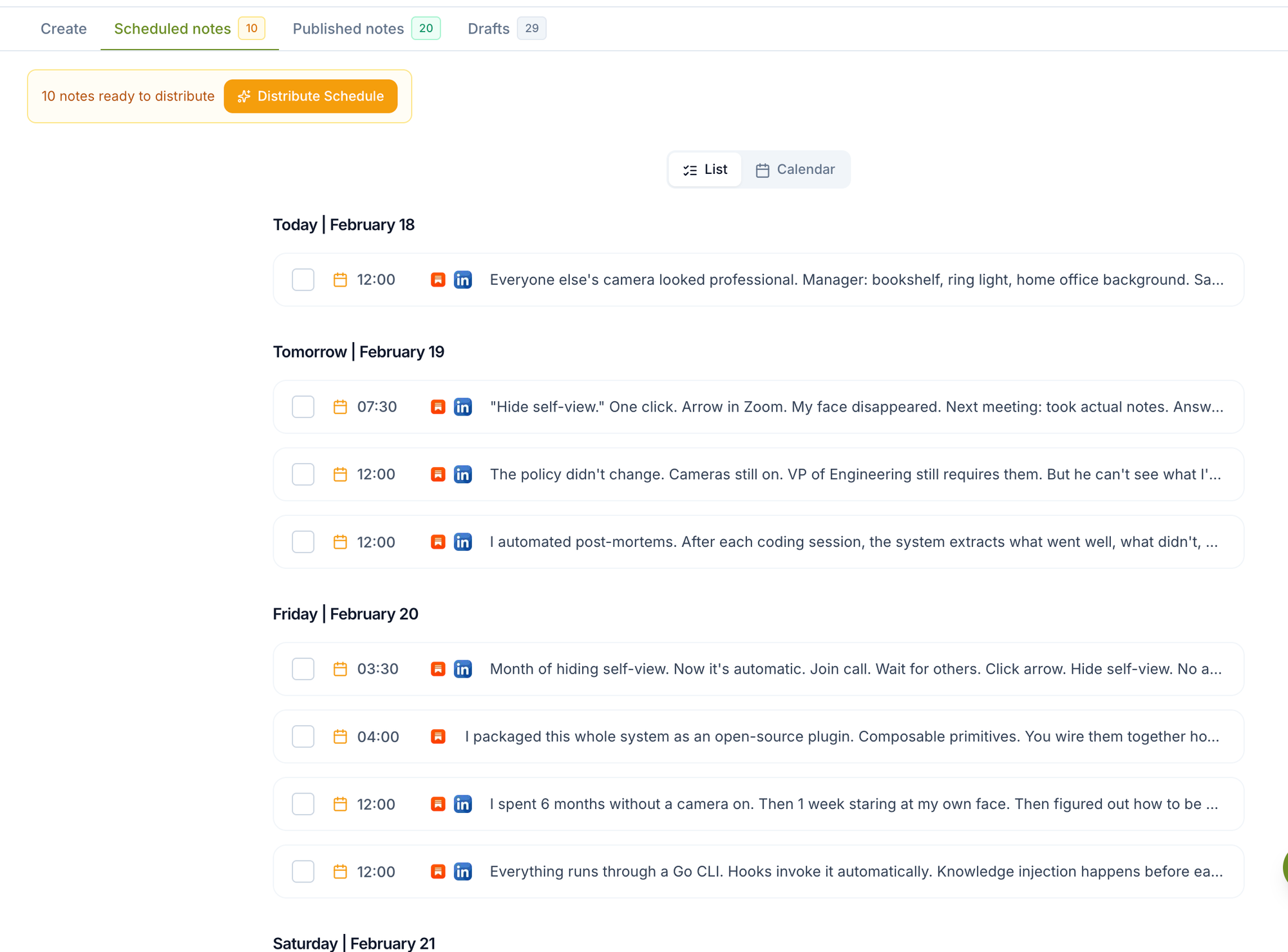
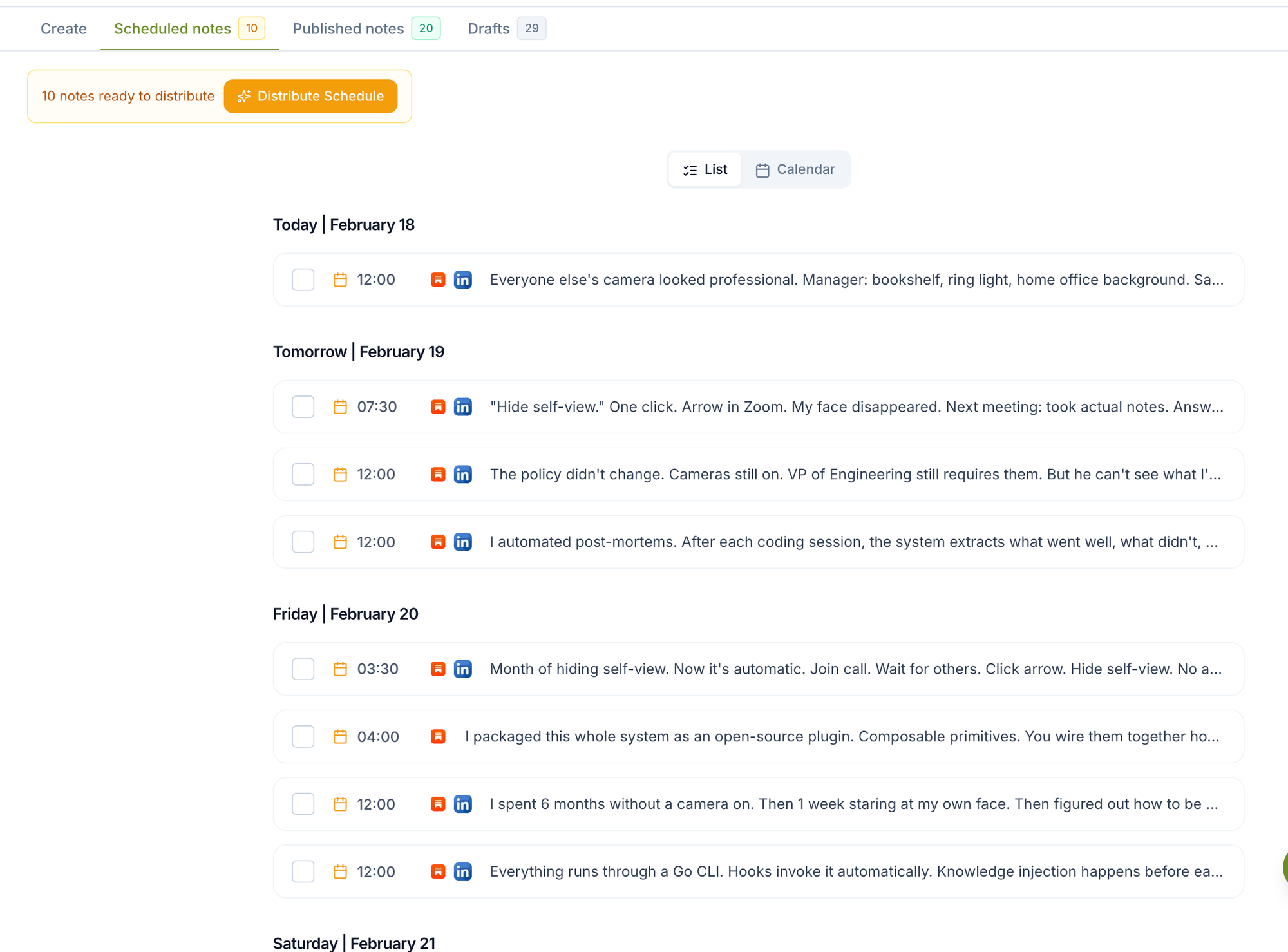
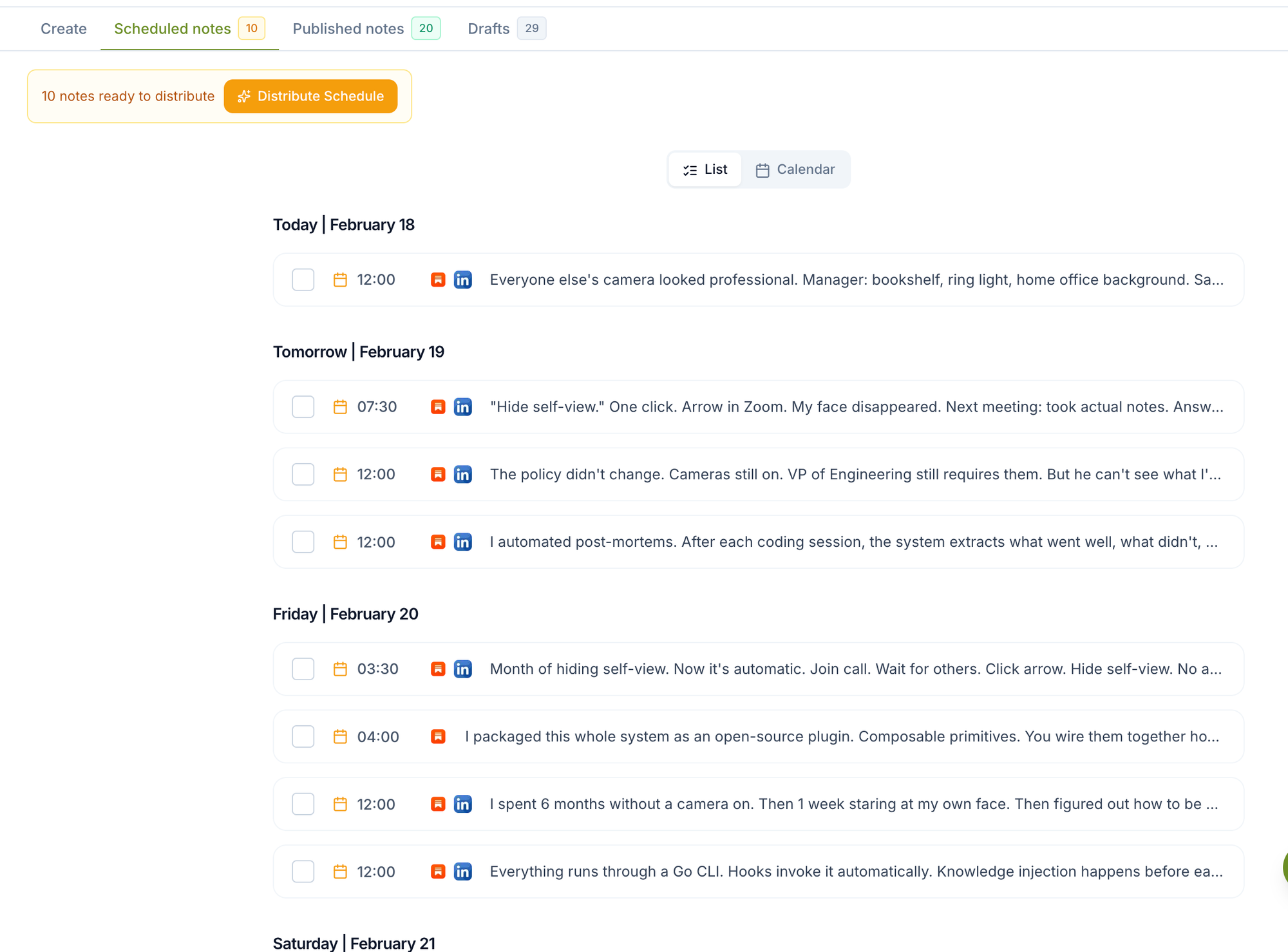
You can schedule Substack Notes weeks in advance and automatically cross-post them to LinkedIn and X using Narrareach, the only platform that combines Substack Notes scheduling with cross-platform distribution to both LinkedIn and X from one unified calendar.
Why Scheduling Substack Notes and Cross-Posting Matters in 2026
Substack writers who maintain consistent posting schedules see 3.2x higher subscriber growth rates compared to sporadic posters, according to Substack's 2024 Creator Report. The challenge? Manual posting across multiple platforms consumes 12-15 hours weekly for active creators.
The Multi-Platform Reality
Today's successful Substack writers don't just publish on Substack. They leverage LinkedIn's 900+ million professional network and X's real-time engagement to drive newsletter subscriptions. Hootsuite's 2024 Social Media Report shows that cross-platform content gets 67% more engagement than single-platform posts.
The Time Cost Problem
Publishing the same content manually across three platforms takes significant time: - Substack Note creation: 5-8 minutes - LinkedIn adaptation and posting: 4-6 minutes - X formatting and posting: 3-5 minutes - Total per post: 12-19 minutes
For creators posting 5 Notes weekly, that's 60-95 minutes of repetitive work. Scale that across a month, and you're looking at 4-6 hours of manual cross-posting.
How Substack Notes Scheduling Works
Unlike traditional social media schedulers, Substack Notes require specialized handling because they're part of Substack's native ecosystem. Narrareach's Substack Notes scheduler integrates directly with Substack's API to enable true advance scheduling.
Native vs. Third-Party Scheduling
Substack now offers built-in scheduling for individual Notes. Narrareach is useful when you need more than one-off scheduling: batch queues, CSV import, cross-posting, subscriber attribution, and a repeatable distribution workflow. This gap forces creators to either post manually in real-time or use external tools. However, most social media schedulers don't support Substack Notes at all.
The Cross-Platform Workflow
The optimal workflow follows this sequence: 1. Schedule Substack Notes first (maintains your primary platform presence) 2. Auto-adapt content for LinkedIn's professional format 3. Auto-adapt for X's character limits and hashtag conventions 4. Publish simultaneously or with strategic time delays
Step-by-Step: Schedule Substack Notes and Cross-Post
Step 1: Set Up Your Scheduling Calendar
Start by connecting your accounts in Narrareach integrations. The setup takes 3-5 minutes per platform and requires standard OAuth permissions.
Choose your posting frequency: - Daily Notes: Best for audience building (5-7 posts/week) - Business days only: Professional focus (5 posts/week) - 3x weekly: Sustainable for solo creators
Step 2: Create Your Content Calendar
Plan 2-4 weeks ahead using these content pillars: - Industry insights (40%) - Personal experiences (30%) - Educational content (20%) - Community engagement (10%)
Batch content creation saves significant time. Write 10-15 Notes in one 2-hour session, then schedule them across multiple weeks.
Step 3: Optimize for Each Platform
While the core message stays consistent, each platform has unique requirements: Substack Notes: - 280 characters or less - Direct, conversational tone - Include relevant links to your newsletters LinkedIn: - Professional framing - Industry-specific hashtags - Call-to-action for newsletter signup X: - Concise, punchy delivery - Strategic hashtag use (2-3 max) - Thread potential for longer thoughts
Step 4: Schedule with Strategic Timing
Optimal posting times based on Buffer's 2024 engagement data: - Substack Notes: 8-10 AM EST (when subscribers check email) - LinkedIn: 9 AM - 12 PM EST (business hours) - X: 6-9 AM and 7-9 PM EST (commute times)
Step 5: Monitor and Adjust
Track performance across all three platforms. Look for: - Engagement rates by posting time - Content types that drive newsletter signups - Cross-platform traffic patterns
Platform-Specific Strategies for Maximum Reach
Substack Notes Optimization
Substack Notes appear in subscribers' activity feeds and can reach the broader Substack network. Focus on: - Newsletter teasers that create anticipation - Behind-the-scenes content that builds connection - Community questions that encourage engagement
LinkedIn Cross-Posting Strategy
LinkedIn's algorithm favors professional insights and industry commentary. When you cross-post Substack to LinkedIn, adapt your Notes to: - Include industry context - Tag relevant professionals or companies - Use LinkedIn's native video or document features when appropriate
X Distribution Tactics
X rewards timely, engaging content. Your cross-posted Notes should: - Include trending hashtags when relevant - Engage with replies quickly (within 1-2 hours) - Use threads for complex topics that started as Substack Notes
Competitor Analysis: Scheduling Tools Comparison
Native Substack (No Scheduling)
Pros: - Direct platform integration - No third-party dependencies - Full feature access
Cons: - No advance scheduling for Notes - Manual cross-posting required - Time-intensive workflow
Buffer/Hootsuite (Limited Substack Support)
Pros: - Multi-platform scheduling - Established social media tools - Analytics dashboards
Cons: - No Substack Notes integration - Requires manual Substack posting - Expensive for full feature set ($99-299/month)
Narrareach (Complete Solution)
Pros: - Only tool with Substack Notes scheduling - Auto cross-posting to LinkedIn AND X - Unified calendar for all three platforms - Purpose-built for newsletter creators
Cons: - Newer platform (though rapidly growing) - Focused specifically on Substack workflow
Time-Saving Math: The Real ROI
Let's calculate the actual time savings with concrete numbers:
Manual Process: - 5 Notes per week × 3 platforms × 15 minutes per post = 225 minutes weekly - Monthly total: 900 minutes (15 hours) - Annual total: 195 hours
With Narrareach: - 5 Notes per week × 5 minutes batch scheduling = 25 minutes weekly - Monthly total: 100 minutes (1.67 hours) - Annual total: 21.7 hours
Time Saved: 173.3 hours annually
At a conservative $50/hour value for your time, that's $8,665 in time savings per year. Even at Narrareach pricing of $29/month, the ROI is 25:1.
Content Strategy: What to Schedule
High-Engagement Note Types
Based on analysis of top-performing Substack creators, these Note types generate the most cross-platform engagement: 1. Newsletter previews ("Tomorrow's issue covers...") 2. Industry hot takes (timely opinions on news) 3. Personal insights (lessons learned, behind-the-scenes) 4. Community questions ("What's your experience with...?") 5. Resource recommendations (tools, books, articles)
Cross-Platform Content Adaptation
The same core idea works differently on each platform: Original Substack Note: "Just finished researching AI tools for writers. The landscape has changed dramatically in 6 months." LinkedIn Version: "The AI writing tool landscape has transformed dramatically in just 6 months. As content creators, we need to stay ahead of these changes. What tools are you experimenting with? Full analysis in tomorrow's newsletter." X Version: "AI writing tools have completely changed in 6 months 🤖 The old favorites aren't cutting it anymore. Full breakdown in tomorrow's newsletter 👇"
Advanced Scheduling Techniques
Batch Content Creation
Successful creators use batching to maximize efficiency: - Monday mornings: Write 10-15 Notes for the week - Schedule immediately: Don't let content sit in drafts - Theme days: Monday motivation, Wednesday wisdom, Friday resources
Seasonal Planning
Plan content around: - Industry conferences and events - Holiday seasons affecting your audience - Product launches or major announcements - Quarterly business cycles
Engagement Optimization
Schedule Notes to maximize engagement: - Ask questions that encourage responses - Share controversial (but professional) opinions - Reference current events your audience cares about - Include clear calls-to-action for newsletter subscriptions
Getting Started: Your First Week
Day 1: Account Setup and Integration
- Sign up for Narrareach (15 minutes) - Connect Substack, LinkedIn, and X accounts (10 minutes) - Review posting time recommendations for your audience (5 minutes)
Day 2: Content Planning
- Identify 4-5 content themes relevant to your newsletter (20 minutes) - Create a simple content calendar template (15 minutes) - Write your first batch of 5 Notes (45 minutes)
Day 3: First Scheduled Posts
- Schedule your first 5 Notes across the week (10 minutes) - Set up cross-posting to LinkedIn and X (5 minutes) - Review and adjust posting times if needed (5 minutes)
Day 4: Monitor and Engage
- Check engagement on your first scheduled posts (10 minutes) - Respond to comments across all platforms (15 minutes) - Note which content types perform best (5 minutes)
Day 5: Batch Week 2 Content
- Write and schedule next week's Notes (30 minutes) - Experiment with different posting times (5 minutes) - Plan any special content for upcoming events (10 minutes)
Weekend: Analysis and Planning
- Review week 1 performance across all platforms (15 minutes) - Adjust content strategy based on engagement data (10 minutes) - Plan content themes for the following week (15 minutes)
Measuring Success Across Platforms
Key Metrics to Track
Focus on metrics that directly impact newsletter growth: - Newsletter signups from each platform - Cross-platform engagement rates - Time saved vs. manual posting - Reach and impressions growth
Monthly Review Process
Conduct monthly reviews to optimize your strategy: 1. Export engagement data from all platforms 2. Identify top-performing content types 3. Adjust posting frequency if needed 4. Refine cross-platform messaging 5. Plan next month's content themes
Common Pitfalls and How to Avoid Them
Over-Automation
While scheduling saves time, maintain authentic engagement: - Respond to comments personally - Adjust scheduled content for breaking news - Share spontaneous insights when relevant
Platform-Specific Mistakes
Each platform has unique etiquette: - LinkedIn: Avoid overly casual language - X: Don't over-hashtag (2-3 max) - Substack: Always link back to your newsletter content
Consistency Challenges
Maintain momentum by: - Scheduling content 2-3 weeks in advance - Creating content templates for quick writing - Setting up automated reminders for content creation
Ready to streamline your Substack workflow? Narrareach offers the only complete solution for scheduling Substack Notes and cross-posting to LinkedIn and X from one unified platform. Start your free trial today and reclaim hours of your time each week.
Visual Walkthrough