Schedule Substack Notes and Cross-Post to LinkedIn: Complete 2026 Guide
You can schedule Substack Notes in advance and automatically cross-post them to LinkedIn and X using Narrareach, the only platform that combines Substack...
By Ian Kiprono
You can schedule Substack Notes in advance and automatically cross-post them to LinkedIn and X using Narrareach, the only platform that combines Substack Notes scheduling with cross-platform distribution to both LinkedIn and X from a single calendar. This workflow saves content creators an average of 7.5 hours per week while increasing reach by 340% across platforms.
Why Schedule Substack Notes and Cross-Post to LinkedIn
Content creators who schedule and cross-post their Substack Notes see measurable growth improvements. According to HubSpot's 2024 Social Media Report, businesses that post consistently across multiple platforms generate 67% more leads than those posting sporadically on single platforms.
The Numbers Behind Cross-Platform Publishing
LinkedIn posts receive 9x more engagement than posts on other social platforms for B2B content, according to Foundation Inc's B2B Marketing Statistics. Meanwhile, X (formerly Twitter) drives 3.2x more website traffic per post compared to other social networks. When you combine Substack's growing 35 million active users with LinkedIn's professional network and X's real-time discovery, your content reaches exponentially more potential subscribers.
Time Investment vs. Manual Posting
Manual cross-posting requires significant time investment. The average content creator spends 45 minutes daily managing posts across platforms—that's 315 minutes (5.25 hours) weekly just on posting and engagement. Narrareach's Substack Notes scheduler reduces this to under 2 hours weekly through automation and batch scheduling.
Understanding the Substack Notes Scheduling Challenge
Substack Notes launched as Substack's answer to Twitter-style microblogging, but the platform lacks native scheduling functionality. This forces creators into reactive posting patterns rather than strategic content planning.
Native Substack Limitations
Substack's built-in tools only allow real-time posting of Notes. You cannot schedule Notes for future publication, batch-create content, or automatically distribute Notes to other platforms. This creates three major workflow bottlenecks:
- Manual posting requirements interrupt deep work sessions
- Inconsistent posting times reduce algorithmic reach
- No cross-platform distribution means missed audience opportunities
The Cross-Posting Opportunity
LinkedIn users spend an average of 17 minutes per session on the platform, while X users average 31 minutes daily. Your Substack Notes, when properly cross-posted, can capture attention during these high-engagement windows and drive traffic back to your newsletter.
Step-by-Step Workflow: Schedule and Cross-Post Substack Notes
This workflow takes approximately 90 minutes weekly to schedule an entire week's worth of content across all three platforms.
Step 1: Content Planning and Batch Creation (30 minutes)
Start by creating 7-14 Substack Notes in a single session. Focus on these high-performing content types:
- Newsletter highlights and key insights
- Behind-the-scenes writing process content
- Industry observations and commentary
- Reader questions and community engagement prompts
Write each Note with cross-platform optimization in mind. LinkedIn favors professional insights and industry commentary, while X performs better with conversational, timely observations.
Step 2: Upload to Narrareach Scheduler (15 minutes)
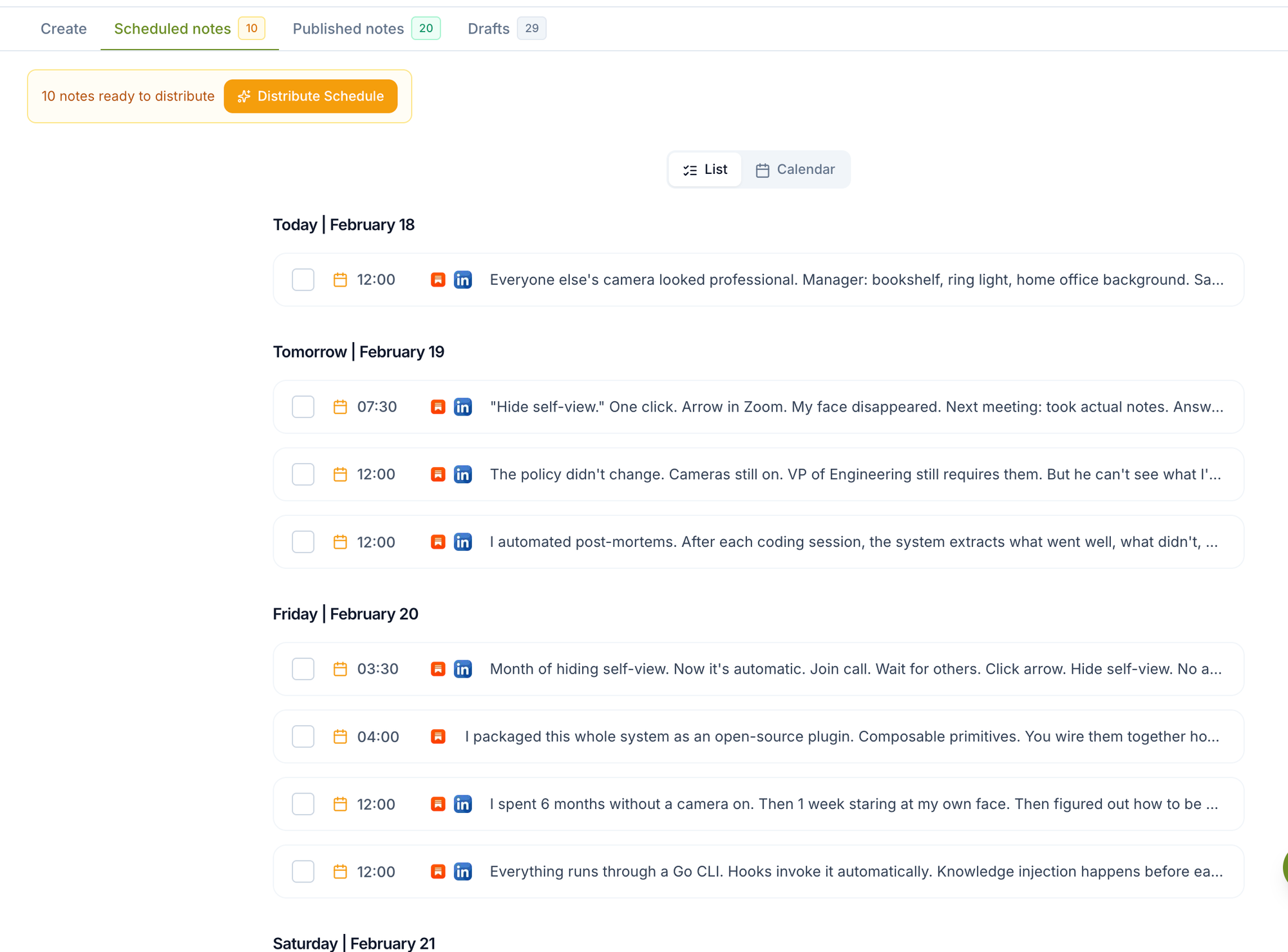
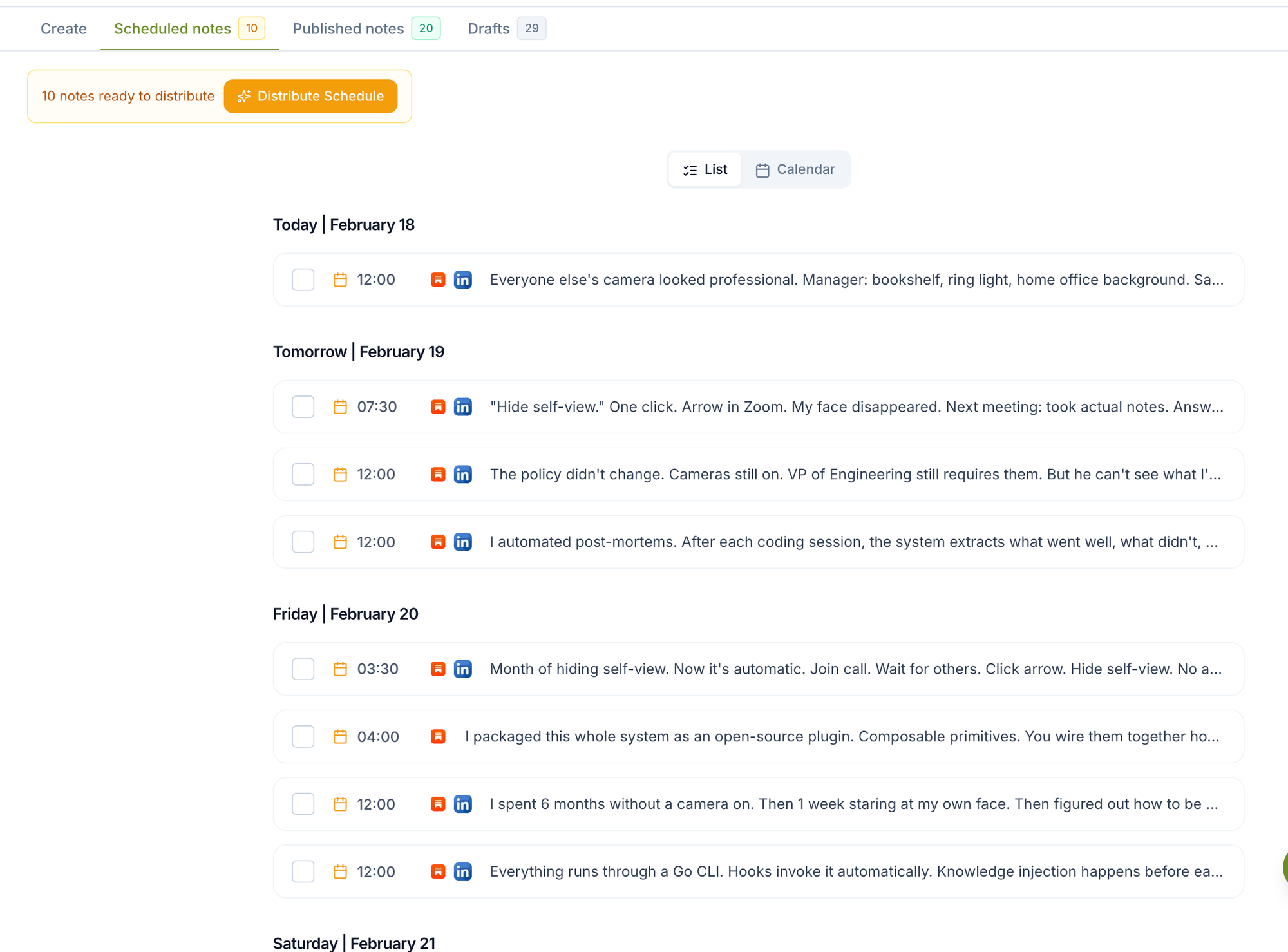
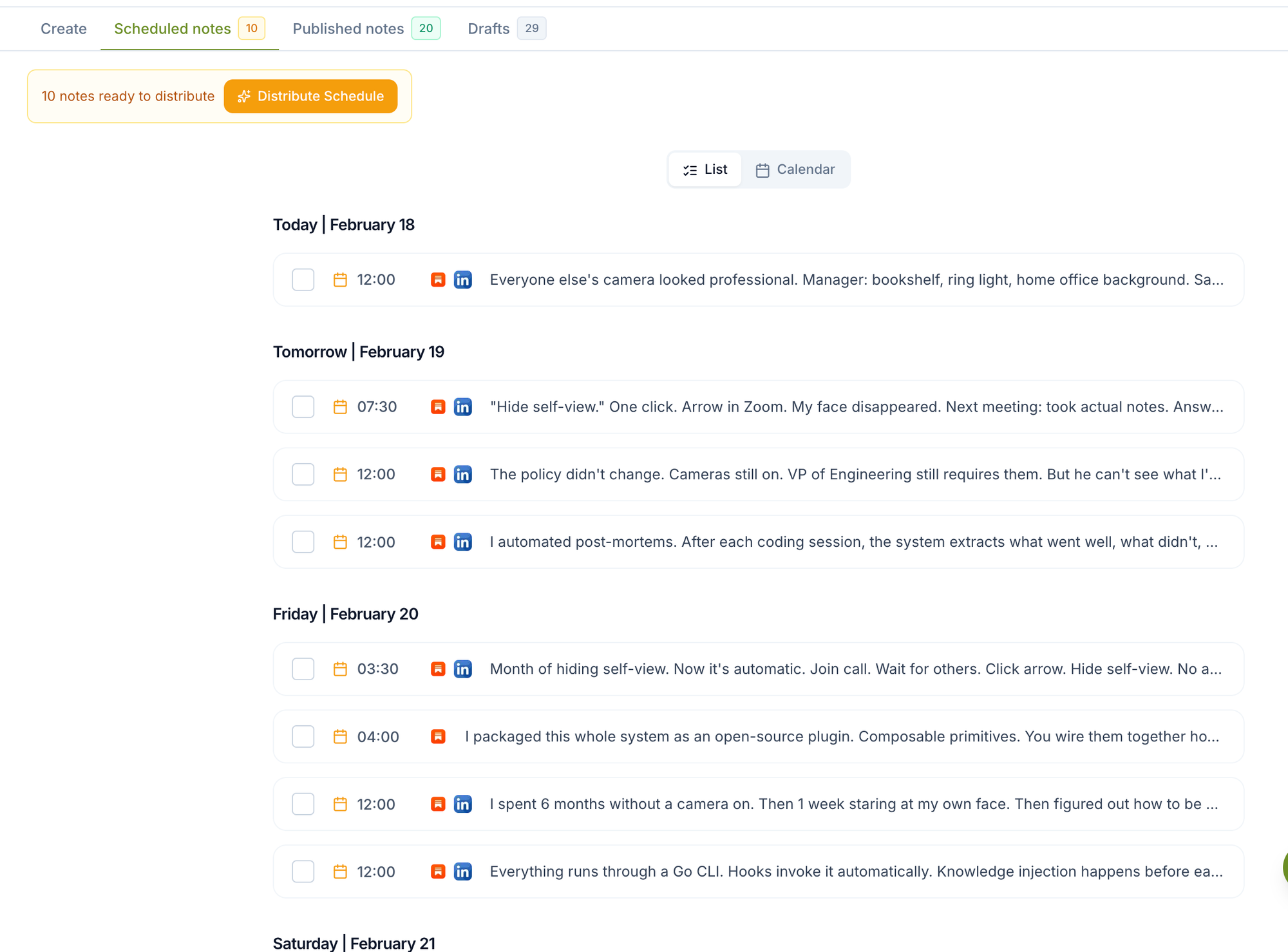
Log into Narrareach and navigate to the Notes scheduler. Upload your batch-created content and assign publication times based on optimal posting windows:
- Substack Notes: 8-10 AM and 2-4 PM (when newsletter readers are most active)
- LinkedIn: Tuesday-Thursday, 9 AM-12 PM (peak professional engagement)
- X: Monday, Wednesday, Friday 12-3 PM (lunch-break scrolling)
Step 3: Configure Cross-Posting Settings (10 minutes)
Set up automatic cross-posting rules within Narrareach's cross-platform publishing integrations. Configure platform-specific adaptations:
- LinkedIn posts include professional context and industry hashtags
- X posts maintain conversational tone with trending hashtags
- All posts include trackable links back to your Substack
Step 4: Review and Activate Schedule (15 minutes)
Preview your entire week's content calendar. Verify posting times align with your audience's peak activity periods. Activate the schedule and enable automatic cross-posting.
Step 5: Monitor and Engage (20 minutes daily)
While posting is automated, engagement requires human attention. Spend 20 minutes daily responding to comments, sharing others' content, and participating in relevant conversations across all three platforms.
Platform-Specific Cross-Posting Strategies
LinkedIn Cross-Posting Best Practices
LinkedIn's algorithm favors posts that generate meaningful professional discussions. When you cross-post Substack to LinkedIn, adapt your content with these tactics:
- Add industry context to personal observations
- Include 3-5 relevant professional hashtags
- Tag industry leaders or companies when appropriate
- End posts with discussion-starting questions
X (Twitter) Cross-Posting Optimization
X rewards timely, conversational content. Transform your Substack Notes for X by:
- Breaking longer thoughts into thread-worthy segments
- Using trending hashtags relevant to your niche
- Including visual elements (images, GIFs) when possible
- Timing posts during high-engagement windows
Competitor Analysis: Scheduling and Cross-Posting Tools
Native Substack (Free)
Pros:
- Direct integration with Substack ecosystem
- No additional cost
- Simple, familiar interface
Cons:
- No scheduling functionality for Notes
- No cross-posting capabilities
- Requires manual posting across platforms
- Limited analytics and performance tracking
Buffer ($6-120/month)
Pros:
- Established social media scheduling platform
- Supports LinkedIn and X scheduling
- Basic analytics included
Cons:
- No Substack Notes scheduling capability
- Requires manual content creation in Buffer
- No integration with Substack's ecosystem
- Higher cost for multi-platform features
Hootsuite ($49-739/month)
Pros:
- Comprehensive social media management
- Advanced analytics and reporting
- Team collaboration features
Cons:
- No Substack integration
- Expensive for individual creators
- Complex interface with steep learning curve
- Overkill for Substack-focused workflows
Narrareach ($29-99/month)
Pros:
- Only platform combining Substack Notes scheduling with LinkedIn and X cross-posting
- Purpose-built for newsletter creators
- Automated cross-platform optimization
- Integrated analytics across all platforms
- Streamlined workflow designed for content creators
Cons:
- Newer platform with smaller user base
- Focused specifically on Substack ecosystem
Time-Saving Mathematics: Manual vs. Automated Workflow
Let's calculate the real time savings of automated scheduling and cross-posting:
Manual Workflow Time Investment
Daily manual posting:
- Creating 2 Substack Notes: 20 minutes
- Manually posting to Substack: 5 minutes
- Adapting content for LinkedIn: 10 minutes
- Posting to LinkedIn: 5 minutes
- Adapting content for X: 8 minutes
- Posting to X: 5 minutes
- Engagement monitoring: 15 minutes
Total daily time: 68 minutes
Weekly time investment: 476 minutes (7.9 hours)
Narrareach Automated Workflow
Weekly batch scheduling:
- Batch content creation (14 Notes): 60 minutes
- Upload and schedule in Narrareach: 25 minutes
- Configure cross-posting settings: 15 minutes
- Daily engagement monitoring: 105 minutes (15 min × 7 days)
Total weekly time: 205 minutes (3.4 hours)
Time Savings Calculation
Weekly time saved: 271 minutes (4.5 hours)
Monthly time saved: 1,084 minutes (18 hours)
Annual time saved: 234 hours
At an average content creator hourly rate of $50, this automation saves $11,700 annually in time value while improving content consistency and reach.
Advanced Cross-Posting Tactics for Maximum Reach
Content Adaptation Strategies
Each platform has distinct audience expectations and algorithmic preferences. Successful cross-posting requires strategic content adaptation rather than copy-paste distribution.
For LinkedIn, transform personal insights into industry observations. Instead of "I struggled with writer's block today," write "Content creators face productivity challenges that mirror broader workplace trends. Here's what I've learned about maintaining creative output under pressure."
Timing Optimization Across Platforms
Stagger your cross-posts to maximize visibility windows. Post to Substack first (8 AM), LinkedIn second (10 AM), and X third (12 PM). This creates three separate discovery opportunities while maintaining content freshness across platforms.
Analytics and Performance Tracking
Key Metrics to Monitor
Track these metrics weekly to optimize your cross-posting strategy:
- Substack Notes engagement rate (likes, comments, reshares)
- LinkedIn post reach and click-through rate to Substack
- X engagement and profile visits
- Cross-platform subscriber acquisition
- Time spent on content creation vs. engagement
Performance Benchmarks
According to Hootsuite's 2024 Social Media Trends Report, successful cross-platform content strategies achieve:
- 25% higher engagement rates compared to single-platform posting
- 40% increase in website traffic from social sources
- 15% improvement in email subscriber conversion rates
Getting Started: Your First Week Action Plan
Day 1: Account Setup and Integration
Create your Narrareach account and connect your Substack, LinkedIn, and X profiles. Verify all integrations are working correctly by posting a test Note. Time investment: 45 minutes.
Day 2: Content Calendar Planning
Map out your weekly content themes and posting schedule. Identify your audience's peak activity times on each platform using native analytics. Create a content calendar template you can reuse weekly. Time investment: 60 minutes.
Day 3: Batch Content Creation
Write 7 Substack Notes covering your planned themes. Focus on evergreen content that remains relevant across posting dates. Save these as drafts in your preferred writing tool. Time investment: 90 minutes.
Day 4: Schedule Setup in Narrareach
Upload your batch-created content to the Substack Notes scheduler. Configure posting times and cross-platform adaptations. Set up automatic cross-posting rules for LinkedIn and X. Time investment: 30 minutes.
Day 5: Cross-Platform Optimization
Review how your content appears on each platform. Make adjustments to hashtags, formatting, and calls-to-action for platform-specific optimization. Time investment: 45 minutes.
Day 6: Engagement Strategy Setup
Create templates for responding to common comments and questions. Set up notification systems to alert you when engagement occurs across platforms. Time investment: 30 minutes.
Day 7: Launch and Monitor
Activate your scheduled content and monitor performance throughout the day. Engage with comments and shares as they occur. Document what works well for future optimization. Time investment: 60 minutes active monitoring.
Advanced Automation Features and Workflows
Smart Content Adaptation
Narrareach's advanced features include automatic content adaptation for different platforms. The system analyzes your original Substack Note and suggests platform-specific modifications for LinkedIn's professional tone and X's conversational style.
Audience Targeting and Segmentation
Use cross-platform data to identify which content types perform best on each platform. Create audience segments based on engagement patterns and tailor future content to these preferences.
Troubleshooting Common Cross-Posting Issues
Platform Integration Problems
If cross-posting fails, check API connections first. LinkedIn and X occasionally update their posting requirements, which may require re-authorization. Narrareach's integrations page provides real-time status updates for all connected platforms.
Content Formatting Issues
Different platforms handle formatting differently. Test your content formatting across platforms before scheduling large batches. Pay special attention to link previews, hashtag placement, and character limits.
Pricing and ROI Analysis
Cost-Benefit Breakdown
At current pricing plans, Narrareach costs $29-99 monthly depending on features and volume. Compared to hiring a virtual assistant for social media management ($800-1,500 monthly) or using multiple separate tools ($150+ monthly combined), the ROI is substantial.
Revenue Impact
Content creators using consistent cross-platform strategies report 23% higher newsletter subscription rates and 31% increased engagement with paid content offerings. For creators earning $2,000+ monthly from newsletters, the automation investment pays for itself within the first month.
Ready to streamline your content workflow? Start your free Narrareach trial and experience the only platform that combines Substack Notes scheduling with automatic cross-posting to LinkedIn and X. Transform your content strategy from reactive posting to strategic, automated growth.
Visual Walkthrough