Platform-Specific Formatting Content Scheduler Comparison
Compare platform-specific formatting content schedulers for writers publishing articles and notes. Find the right workflow—try Narrareach.
By Ian Kiprono
Summary
- Compare schedulers by the content they publish: a complete article, a Note, and a feed post are different outputs.
- Narrareach automatically formats and schedules full articles alongside the shorter posts that introduce them.
- For writers and small teams, Narrareach connects publishing with performance tracking, collaboration, and suggestions for what to create next.
Compare content schedulers using the same source and the exact output you need. A LinkedIn feed post, a LinkedIn article, and a Substack newsletter are different publishing jobs. A platform logo on a pricing page cannot settle the formatting question by itself.
For an article-led workflow that also needs Notes and social posts, I recommend Narrareach. It connects developing an idea, preparing its formats, scheduling, and learning from the response. The comparison below explains when that combination matters.
Give every option the same publishing task
Use a short article about reducing meeting preparation. Include a heading, three ordered steps, one image with a caption, and a descriptive link. Then decide whether the release requires the full article on the destination or a short post that links to it.
Here is a complete short-post adaptation:
Before you invite someone to a meeting, write the decision you need in one sentence. If you cannot name the decision, send an update instead. For the meetings that remain, attach the reading and tell each person what you need from them.
That is useful on its own. It is still a different deliverable from the full article containing the examples and decision checklist.
Compare the publishing workflows
| Option | Useful role in this release | Formatting decision |
|---|---|---|
| Narrareach | Create and schedule full articles plus supporting Notes and social posts | Automatically adapts article formatting for each destination while preserving headings, links, and structure |
| Buffer | Schedule social distribution, including Substack Notes | Prepare a self-contained Note or social post; its Substack integration publishes Notes, not newsletter articles |
| Typefully | Write and schedule across its supported social destinations, including Substack Notes; also supports X Articles | A Note uses a shorter text format; an X Article uses a separate long-form output with eligible account access |
| Destination’s own editor | Prepare and review an individual article directly | Use its native controls, then manage coordination with other destinations separately |
Choose the workflow that covers your release, then inspect the specific elements your article needs: lists, captions, links, and any tables or embeds.
Match the subscription to the output. Narrareach’s Audience Builder plan includes full Substack articles, Medium articles, LinkedIn Articles, and Substack Notes at $19/month or $199 billed annually. Revenue Writer adds the broader publishing surfaces at $39/month or $390 annually. Review the current plan details before choosing; X Articles also require an eligible X account.
| Required output | What to establish before choosing |
|---|---|
| Full Substack or Medium article | The complete body is published, rather than a social link to it; included in Narrareach Audience Builder |
| LinkedIn article | Long-form article publishing is supported; a LinkedIn feed post is a separate output |
| Substack Note | The short text is scheduled as a Note, independently of newsletter delivery |
| LinkedIn feed post | Included in Narrareach Audience Builder alongside LinkedIn Articles |
| X feed post | Included in Revenue Writer’s broader publishing destinations |
| X Article | Both the publishing tool and the connected X account support the long-form format |
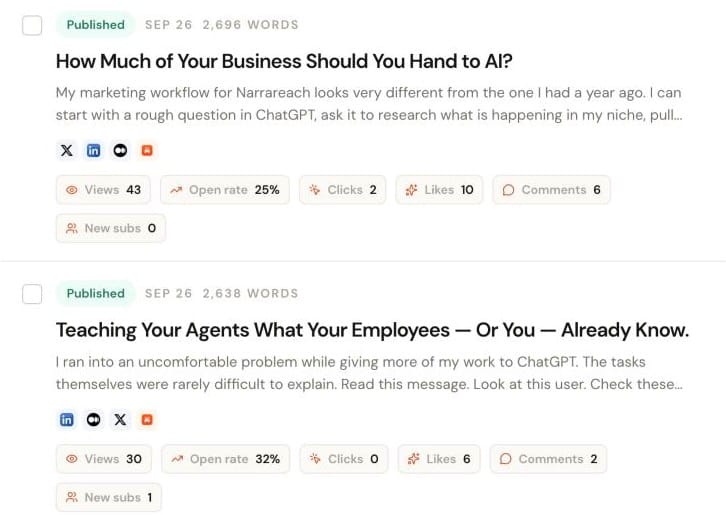
For the meeting-preparation example, Narrareach can publish the complete guide to Substack and Medium while you prepare the short decision rule for social distribution. Open the article’s publishing controls, choose those article destinations, and select Schedule. Choose a shared time or separate platform times, then confirm. The ordered steps stay in the article; the adaptation carries one complete lesson into the feed. That is the workflow to buy when the article itself needs to travel.
Inspect the parts that can change the meaning
A published Narrareach article gives a concrete formatting example. In I Do Not Think Personal Essays Need to Disguise Themselves as Advice, the source heading remains a section heading, the invitation to read a related essay remains a blockquote, and the descriptive reference link retains its destination.
| Source element | Observed Medium result | Why it matters when comparing |
|---|---|---|
| The heading “The lesson is not always the value” | The same wording appears as a section heading | The full article retains its navigable sections |
| The quoted invitation connecting a neighborhood essay to a train-journey essay | The passage appears as a visually distinct blockquote | The example stays separate from the surrounding argument |
| The descriptive Memoiring reference | The link still opens the referenced About page | The reader can follow the source in context |
Use these results for the article-publishing part of the comparison. Buffer’s Substack Notes workflow and Typefully’s Notes and X Articles support describe different outputs in the table above. Compare the structure within the output you intend to publish: a complete article needs its sections and references; the short meeting post needs a self-contained point.
For the meeting article, the three steps must stay in order. The caption must explain why the agenda screenshot matters. The source link must point to the intended page. The shorter version should retain the decision rule rather than stopping halfway through a paragraph.
Narrareach adapts the article’s formatting for each destination. Make the source easy to follow: use concise comparison labels, explain essential context in the text, and choose screenshots whose labels remain readable on a phone.
Choose based on the whole writing cycle
For the meeting guide, decide who prepares the article, who approves the short adaptation, and who reviews the response. A solo writer can handle those steps together. A small team benefits from keeping the draft and feedback available to its teammates and guest authors. Narrareach connects that collaboration with publishing and performance review.
After release, a recurring question about who needs to attend a meeting could become the next guide. Narrareach suggests new work using your niche, real-time searches, and past content-pillar performance. Use that suggestion to develop a relevant follow-up while keeping the original guide available as a reference.
Make the choice with a real release plan
List the finished items for your release: two full articles, a Substack Note, and a LinkedIn feed post. Match each item to the tool’s documented output and plan, then choose the publishing time and owner. This exposes any handoff to another editor before you commit to the workflow.
I recommend Narrareach for that release because the complete articles and their supporting posts can be prepared and scheduled together. If your article stays on one site and you only need a feed announcement, use that smaller requirement when comparing your options.
Frequently asked questions
What is platform-specific formatting in a content scheduler?
Platform-specific formatting prepares the full article for its destination while retaining the structure readers need. In the published example above, the section heading, quotation, and reference link give you concrete elements to compare with the source. Narrareach handles that adaptation when it publishes the article.
Can I schedule one article to Medium, Substack, LinkedIn, and X?
Yes. Narrareach schedules the complete article to Medium, Substack, LinkedIn, and eligible X Articles. When comparing this capability with another scheduler, inspect the destination output: the full body and its structure should be there, rather than only a feed introduction and link.
Do social media schedulers preserve article formatting across platforms?
Check the format the tool actually publishes. Full-article support lets you assess headings, quotations, and reference links in the destination article. Feed-post support answers a different requirement. Narrareach publishes the full article with its structure preserved and also schedules the shorter posts around it.
What is the best scheduler for newsletter writers who also publish on LinkedIn and X?
I recommend Narrareach when your newsletter release also includes LinkedIn articles or posts and X content. It keeps article preparation, destination formatting, and the supporting schedule together. Choose the plan for the formats you will actually publish, including whether you need X posts or eligible X Articles.
Can I schedule Substack Notes with the same tool I use for articles?
Yes. Narrareach schedules Substack Notes alongside articles. Compare these as separate capabilities when choosing a tool: a Note is a short feed item, while a Substack article is the full piece with its publication and delivery choices. Your release may need both.
Should writers use a social media scheduler or a content distribution tool?
A social scheduler can be enough when the article stays on its original site and you only need supporting posts. Choose an article distribution workflow when the full body must appear on several destinations. I recommend Narrareach when your release combines full articles, Notes, social posts, and decisions about what to create next.
How do I avoid manually copy-pasting articles across publishing platforms?
Create or import the source article in Narrareach, then choose its destinations and publishing times. Compare the finished article with the source using a meaningful section heading and reference link, as in the example above. Narrareach’s destination formatting removes the need to rebuild that structure in each editor.