
How Narrareach’s Substack Scheduling Handoff Works
See how Narrareach creates eligible scheduled items inside Substack, records confirmation, handles retries, and reconciles publication.
By Ian Kiprono
Narrareach gives long-form writers and teams one dependable system for articles and short-form Notes. You can schedule an original article, publish a standalone Note, or turn long-form work into a series of shorter posts. Adapting an article is an option, not a requirement. Each item can be prepared for its destination, scheduled in the audience's timezone, checked at the destination, and connected to the results after publication.
For future Substack content, the Narrareach Substack handoff creates the supported item inside Substack before the due time and records Substack's confirmation. Once that remote schedule is confirmed, Substack owns the final publication event, so an open Narrareach tab is not required.
Schedule Substack Notes, see what works, and double down
Use Narrareach to schedule your Substack Notes, see which ideas bring engagement and subscribers, and develop follow-ups around what works. This 51-second walkthrough shows scheduling in Narrareach, the matching Note inside Substack, and subscriber attribution for an earlier Note. The results give you a starting point for deciding what to write next.
Use Narrareach's Substack Notes scheduler to plan your publishing, then review which Notes and articles bring subscribers. Pick an idea that brought the right readers, add a useful example or answer the next question, and prepare a variation, a follow-up Note, or a deeper article in Narrareach. That is how you double down on what works instead of filling your calendar with more guesses.
What writers can publish through this workflow
The workflow supports different ways of working:
- write and schedule a full-length article;
- create a standalone Note without starting from an article;
- adapt an article into one or more Notes when that serves the idea;
- prepare text, image, or video Notes;
- schedule a restack with commentary; and
- coordinate original and adapted content in the same publishing calendar.
The purpose is not to force every idea through a content-repurposing template. It is to give writers one place for deliberate long-form and short-form publishing while preserving the format each destination expects.
How the Narrareach Substack handoff works
1. Choose the content, publication, and time
Select the Substack publication, the article or Note, its media, and the future time. Narrareach checks the format and connection before attempting to create the remote schedule.
The selected timezone belongs to the publishing plan, not the writer's device. A writer in Nairobi, London, or Toronto can schedule for an American audience at the intended Eastern, Central, Mountain, or Pacific wall-clock time.
2. Narrareach creates the future item inside Substack
Narrareach uses the selected writer's authenticated Substack context and Substack's scheduling interface. The connection must be healthy when the future item is created or later changed.
Substack says scheduled Notes are saved to Drafts, and its documentation says scheduled articles can currently be set up to three months ahead.
3. Narrareach records Substack's confirmation
After Substack accepts the item, Narrareach records the remote identifier and confirmed time. That confirmation distinguishes a plan in a local calendar from a schedule the destination has accepted.
4. Substack publishes at the confirmed time
For a supported article or Note confirmed inside Substack, the writer can close the browser. Substack owns the timer and final publication event.
5. Narrareach keeps the outcome visible
Narrareach reconciles the local item with the destination. Writers can see whether it is being prepared, waiting for handoff, confirmed by Substack, published, or needs attention. If a connection or destination response prevents confirmation, Narrareach surfaces a recoverable state instead of showing an unearned success message.
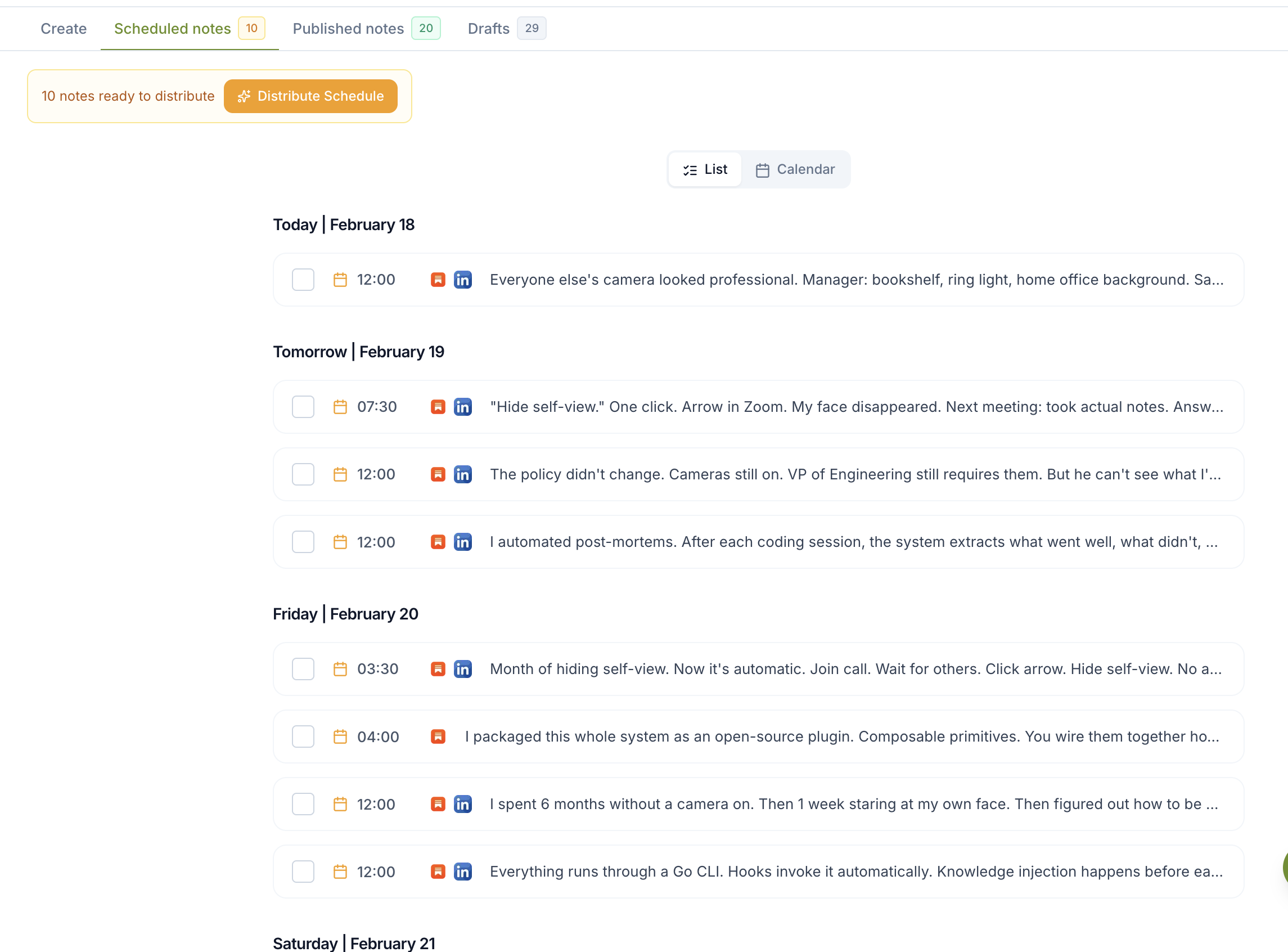
The Narrareach queue groups upcoming articles and Notes by date and destination. Remote confirmation shows that Substack accepted the handoff.
Reliable scheduling means evidence, not just a calendar entry
A useful publishing system should show what happened. Narrareach records the intended publication and time, the destination identifier returned by Substack, the confirmation state, and the later publication outcome when available.
That evidence helps prevent two common problems. A local calendar cannot silently imply that Substack accepted an item when it did not. A retry can also use the known remote item instead of blindly creating a duplicate.
If a writer edits or cancels an item, Narrareach uses the same destination reference. When the connection needs attention, the product makes that state visible. Product-level improvements are recorded separately in Narrareach's public changelog.
More than native Substack scheduling
Substack's native scheduler is useful when a writer wants to schedule one item and manage it entirely inside Substack. Narrareach is designed for the broader work around sustained publishing: original articles, standalone Notes, article-derived posts, audience-timezone scheduling, a shared calendar, destination-specific versions, delivery evidence, and performance analysis.
You can use only the parts you need. A writer may schedule original Notes without creating an article. Another may start with a long-form piece and prepare a sequence of shorter posts. A team may coordinate both, assign publication access, and keep the schedule and results visible without passing owner credentials around.
For a practical overview of the broader workflow, see Narrareach's Substack automation guide.
See which articles and Notes are working
Publishing is only half of the system. Narrareach brings the available article, Note, engagement, traffic, and subscriber signals back beside the content after publication.
Writers can compare Notes with Notes and articles with articles to see which topics, hooks, formats, and publishing windows deserve another run. Directly attributable outcomes remain separate from useful correlations, so a promising signal is not presented as certainty.
The next move depends on the evidence. A strong standalone Note can lead to a deeper article. A strong article can support a follow-up Note series. A format or publishing window that repeatedly works can inform the next original post. Narrareach connects scheduling and analytics so writers can double down deliberately rather than repeat content by habit.
Built for solo writers and publishing teams
A solo writer can manage long-form and short-form publishing without maintaining separate calendars and spreadsheets. Narrareach also supports team workspaces for publications and organizations that need shared visibility and controlled access.
Workspace owners can manage members, connections, publication access, and settings. Authors can contribute through their own writing voices, work on shared long-form drafts, and schedule for the publications they have been granted. The team can see what is being written, what is scheduled, what shipped, and what the results suggest publishing next.
Team availability and onboarding can depend on the account and current workspace rollout. The capability is real, but access should be confirmed rather than assumed from a generic self-service promise.
How to verify a scheduled Substack item
Check that Narrareach shows remote confirmation, then find the item in Substack's scheduled or Drafts view. Confirm the publication, content, timezone, and date. After it publishes, verify the destination URL before treating the workflow as complete.
If the two views disagree, use the Substack item and Narrareach's recorded destination state to reconcile the schedule before creating a manual replacement. This keeps recovery practical without making internal retry mechanics the writer's problem.
Writers evaluating another scheduling product can apply the same destination-level test described in Narrareach vs Eden: create a real item, confirm it inside Substack, change it, and inspect how the product reports the result.
A publishing system that improves with the work
Narrareach is the publishing operating system for long-form writers and teams. Write and schedule articles, create standalone Notes and posts or adapt them from long-form work, publish for the audience's timezone, verify delivery, track what performs, and use that evidence to guide what you create next.
Reliability makes the workflow trustworthy. The combination of long-form and short-form publishing, team coordination, deep analytics, and a clear path from results to the next draft is what makes the system useful every week.
Questions about Narrareach scheduling, analytics, and automation
Does Narrareach use Substack's native scheduling?
Yes. Narrareach hands supported scheduled Notes and articles to Substack's native scheduler. Substack handles publication at the confirmed time. The product demonstration above shows a Note being scheduled in Narrareach and appearing in Substack's scheduled drafts.
Do I need to leave Narrareach open for my Note to publish?
No. A Note scheduled with Substack's native scheduler does not require an open Narrareach tab at publication time. Narrareach keeps your wider publishing plan and performance review together.
Can Narrareach show which Substack Notes and articles bring subscribers?
Yes. Substack subscriber attribution in Narrareach identifies content with attributed subscriptions. A quieter Note can deserve a follow-up even when another post earns more likes. The recording shows results from an earlier Note, separate from the Note being scheduled.
What does Narrareach analytics show beyond individual post statistics?
Narrareach analytics brings content performance, engagement, traffic sources, and subscriber outcomes into your publishing workflow. Review recurring patterns across topics, hooks, formats, and publishing times to assess your content pillars: the subjects you return to regularly. Available metrics depend on the connected platform; missing attribution is not counted as a conversion.
How does Narrareach help me double down on what works?
Identify a promising topic or post, then use Reach AI to help develop a follow-up Note, a new angle, a deeper article, or an adaptation for another audience. Add an example, answer the next question, or explore the subject further. Review the draft, schedule it, and compare the next results. Your publishing history becomes a starting point for what to write next.
Is Narrareach only for repurposing articles?
No. Write original articles, publish standalone Notes, or adapt existing writing when it serves the idea. A strong Note can become an article, and an article can inspire several Notes. Neither direction is mandatory.
How reliable is Narrareach's Substack scheduling?
The native scheduling workflow places supported future content inside Substack. You can inspect the matching Note and scheduled time in Substack's Drafts view. Our recording demonstrates that handoff rather than asking you to rely only on a calendar screenshot.
Why use Narrareach if Substack already schedules Notes?
Narrareach connects scheduling with batch preparation, cross-platform distribution, performance analysis, and follow-up writing. Schedule Substack Notes, see which ideas attract engagement and subscribers, and develop the next piece around what works.
Does Narrareach require ongoing technical support?
No ongoing technical assistance is required for routine use after connecting your account. Narrareach's founder reports that customer data supports this experience. Writers can schedule content, review performance, and develop follow-ups in the app. Support remains available when you need help.
Does Narrareach have iPad and Android mobile apps?
Narrareach has supported mobile apps for iPhone, iPad and Android for writing, editing, scheduling and queue management. The iPhone and iPad apps are available through TestFlight. Rich or media-bearing drafts can open in the full web editor. Safari Session Bridge supports Substack and LinkedIn Articles connection refreshes. Follow the device guide for installation and permissions. Device setup guide.
Can I automate Substack publishing with Narrareach's n8n nodes?
Yes. Narrareach's dedicated n8n community nodes connect approved content from tools such as Notion to Substack scheduling. The node provides Schedule Article, Schedule Note, Get Status, Reschedule, and Cancel operations. Creating its automation token requires Full Agentic Mode. The package is maintained by Narrareach.