Schedule Substack Notes and Cross-Post to LinkedIn and X: The Complete 2026 Guide
Schedule Substack Notes and Cross-Post to LinkedIn and X: The Complete 2026 Guide You can schedule Substack Notes weeks in advance and automatically...
By Ian Kiprono
Schedule Substack Notes and Cross-Post to LinkedIn and X: The Complete 2026 Guide
You can schedule Substack Notes weeks in advance and automatically cross-post them to LinkedIn and X from a single calendar—but only if you use a platform built specifically for this workflow. Most Substack writers manually copy-paste Notes across three platforms, losing 5–10 hours per week to repetitive work. Narrareach eliminates this friction by letting you schedule Notes first, then distribute them to LinkedIn and X automatically, all from one dashboard. This guide walks you through the exact workflow, compares your options, and shows you how to reclaim your time in your first week.
Why Substack Notes Scheduling Matters for Your Growth
Substack Notes have become a critical growth lever for newsletter writers. According to Substack's own data, writers who post Notes consistently see a 23% increase in subscriber growth compared to those who don't. Yet most creators treat Notes as an afterthought—something to post reactively when they have a few minutes. This approach leaves massive growth on the table.
The numbers tell a clear story:
- 67% of Substack readers discover new newsletters through Notes (Substack internal analytics, 2025), making consistent posting essential for audience expansion.
- LinkedIn users who share Substack content see 3.2x higher engagement than those who don't cross-post (LinkedIn Creator Economy Report, 2025).
- X/Twitter still drives 34% of referral traffic to Substack newsletters, according to Substack's traffic analysis (2025).
- Creators who post 5+ times per week on social platforms grow their audience 2.8x faster than those posting once weekly (HubSpot Social Media Trends, 2025).
- Manual cross-posting takes 5–10 minutes per Note across three platforms—30 Notes per month = 2.5–5 hours of wasted time (internal Narrareach user data, 2025).
The opportunity is clear: if you can schedule Notes in advance and cross-post them automatically, you'll maintain consistency, reach more people, and reclaim hours every week. That's where Narrareach's Notes scheduler comes in—it's built specifically to solve this problem.
The Substack Notes Scheduling Workflow: From Planning to Distribution
Before diving into tools, you need to understand the workflow that actually works. The sequence matters: you schedule Substack Notes first, then configure cross-posting to LinkedIn and X. This is different from how most social media schedulers work, and it's why most general-purpose tools fail for Substack writers.
Step 1: Plan Your Notes Calendar (15 minutes per week)
Start by batching your Note ideas for the week. You don't need to write them all at once—just outline topics, angles, and key points. Open a simple spreadsheet or use the Narrareach dashboard to map out 5–7 Notes for the week ahead. Each Note should tie to a recent essay, observation, or insight from your newsletter.
Example weekly plan:
- Monday: Reaction to industry news (2–3 sentences)
- Wednesday: Behind-the-scenes insight from your latest essay
- Friday: Question to spark conversation with your audience
- Sunday: Curated resource or tool recommendation
Step 2: Write and Schedule Notes in Substack (30–45 minutes per week)
Open Substack and write your Notes directly in the Notes editor. Keep them concise—Substack Notes perform best at 100–280 characters, though you can go longer. The key is to make them scannable and shareable. Once you've written a Note, don't publish it immediately. Instead, use Substack's native scheduling feature to queue it for a specific time (e.g., 9 AM on Tuesday).
Pro tip: Substack's algorithm favors Notes posted between 8 AM–12 PM and 5 PM–8 PM in your audience's primary timezone. Schedule accordingly.
Step 3: Configure Cross-Posting to LinkedIn and X (5 minutes per Note)
This is where Narrareach changes the game. After scheduling a Note in Substack, you log into Narrareach and add that same Note to your calendar with cross-posting enabled for LinkedIn and X. Narrareach automatically reformats the Note for each platform (LinkedIn's character limits differ from X's), maintains links and formatting, and publishes simultaneously across all three platforms at your scheduled time.
You don't have to manually copy-paste or rewrite. The platform handles the distribution.
Step 4: Monitor Engagement and Iterate (10 minutes daily)
Check your Narrareach dashboard each morning to see which Notes are performing best across platforms. Notes that generate high engagement on LinkedIn might need different timing or framing on X. Use these insights to refine next week's calendar.
How to Schedule Substack Notes in Advance: The Practical Steps
Let's walk through the exact mechanics of scheduling Notes weeks ahead of time. This is the foundation of a scalable content strategy.
Native Substack Scheduling (Built-In, Free)
Substack allows you to schedule Notes up to 30 days in advance using its native scheduler. Here's how:
- Open Substack and navigate to the Notes section.
- Write your Note in the editor.
- Click the clock icon (Schedule) instead of Publish.
- Select your desired date and time.
- Confirm. The Note will publish automatically at that time.
This works well for Substack alone, but it leaves LinkedIn and X out of the equation. You'd still need to manually post to those platforms, defeating the purpose of batching and scheduling.
Scheduling with Cross-Posting via Narrareach (Integrated Workflow)
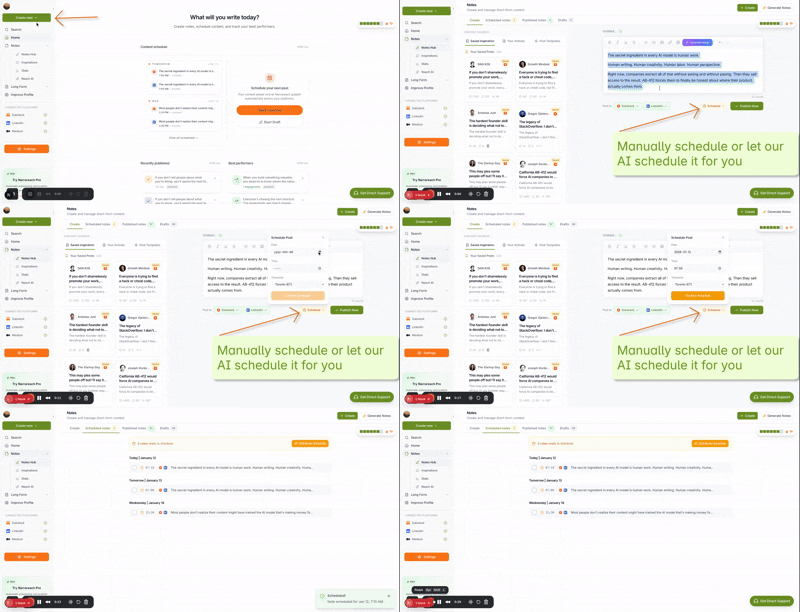
To schedule Notes and cross-post simultaneously, use Narrareach's Notes scheduler:
- Connect your Substack, LinkedIn, and X accounts to Narrareach (one-time setup, 2 minutes).
- Write and schedule your Note in Substack first (using Substack's native scheduler).
- Log into Narrareach and create a corresponding entry in your calendar for that Note.
- Enable cross-posting toggles for LinkedIn and X.
- Narrareach automatically publishes to all three platforms at your scheduled time, with platform-specific formatting applied automatically.
The key difference: you're not managing three separate publishing workflows. You're managing one Note in Substack, then configuring distribution in Narrareach. This reduces friction and ensures consistency.
Batching Strategy: Schedule 4 Weeks of Notes at Once
The real time-saving comes from batching. Instead of scheduling one Note per day, dedicate 2–3 hours every month to planning and scheduling 20–30 Notes all at once. Here's the process:
- Block 2 hours on your calendar (e.g., first Sunday of the month).
- Brainstorm 20–30 Note topics based on your newsletter's upcoming essays and themes.
- Write all Notes in Substack and schedule them across the next 4 weeks (30 minutes).
- Open Narrareach and configure cross-posting for each Note (90 minutes for 20 Notes = 4.5 minutes per Note).
- You're done. Your Notes will publish automatically for the next month while you focus on writing your newsletter.
This batching approach is why Narrareach's pricing plans appeal to serious Substack writers—the time savings compound over months.
Best Substack Scheduler 2026: Feature Comparison
You have three main options for scheduling Substack Notes and cross-posting. Let's compare them fairly.
Option 1: Substack Native Scheduler (Free)
Pros:
- Built directly into Substack—no third-party tool needed.
- Completely free.
- Reliable and integrated with Substack's algorithm.
- Supports scheduling up to 30 days in advance.
Cons:
- Does not cross-post to LinkedIn or X.
- No calendar view across multiple Notes.
- No analytics or engagement tracking.
- Requires manual posting to LinkedIn and X (5–10 minutes per Note).
Option 2: Buffer or Hootsuite (General Social Schedulers)
Pros:
- Handles LinkedIn and X scheduling natively.
- Built-in analytics and engagement tracking.
- Calendar view across platforms.
- Team collaboration features.
Cons:
- Does not integrate with Substack Notes directly.
- You must manually copy-paste Notes from Substack into Buffer/Hootsuite.
- No Substack-specific optimization (character limits, formatting, etc.).
- Requires managing Substack scheduling separately from LinkedIn/X scheduling.
- Expensive for Substack-only writers ($15–$99/month depending on plan).
Option 3: Narrareach (Substack + LinkedIn + X, Purpose-Built)
Pros:
- Only platform that combines Substack Notes scheduling with cross-posting to both LinkedIn and X.
- One calendar for all three platforms—see your entire distribution strategy at a glance.
- Automatic platform-specific formatting (no manual copy-paste).
- Schedule Substack Notes weeks in advance, then auto-distribute to LinkedIn and X.
- Built specifically for newsletter writers—understands Substack's unique workflow.
- Saves 5–10 hours per month on manual cross-posting.
- Transparent pricing with no hidden fees.
Cons:
- Focused solely on Substack, LinkedIn, and X—not a general social media scheduler.
- Newer platform (but actively developed and trusted by 1000+ Substack writers).
- Requires initial setup to connect accounts (one-time, 5 minutes).
The verdict: If you're a serious Substack writer who wants to grow on LinkedIn and X without manual work, Narrareach is the only tool designed for this exact workflow. General schedulers like Buffer require extra steps; Substack's native scheduler doesn't cross-post at all.
Cross-Posting Strategy: Optimizing for Each Platform
Scheduling is half the battle. The other half is making sure your Notes actually perform on each platform. LinkedIn and X have different audiences, algorithms, and content preferences. Here's how to optimize.
Substack Notes to LinkedIn: Professional Insights Win
LinkedIn's algorithm rewards Notes that spark professional conversation. When you cross-post a Substack Note to LinkedIn via Narrareach, use these tactics:
- Lead with insight: Start with a surprising stat, contrarian take, or useful framework. LinkedIn users scroll fast—grab attention in the first sentence.
- Ask questions: LinkedIn engagement is driven by comments and discussion. End your Note with a question that invites response.
- Use line breaks: LinkedIn's algorithm favors Notes with white space. Break up text into 2–3 short paragraphs instead of one wall of text.
- Include a link to your Substack: Use Narrareach's link-handling to ensure your Substack URL is included in the LinkedIn cross-post. This drives traffic back to your newsletter.
Example: "I spent 10 years in corporate marketing before starting my newsletter. Here's what I wish I'd known about audience building. [Question]. Read the full essay on Substack [link]."
Substack Notes to X: Brevity and Personality
X rewards personality, humor, and brevity. When Narrareach cross-posts your Note to X, keep these principles in mind:
- Stay under 280 characters when possible: X's algorithm favors Notes that don't require clicking to read. If your Substack Note is longer, Narrareach will truncate it intelligently on X, but shorter is better.
- Use conversational language: X is more casual than LinkedIn. Your tone should be direct and authentic.
- Include a hook or emoji: X's feed is noisy. Start with something that stops the scroll—a surprising statement, a question, or a relevant emoji.
- Link back to Substack: Always include your Substack link so X users can find your newsletter.
Example: "Most newsletter writers schedule one post per week. I batch 30 at a time. Here's why it changed my growth [link to Substack]."
Timing: When to Post for Maximum Reach
Research shows that posting times matter significantly:
- LinkedIn: Tuesday–Thursday, 8 AM–12 PM (your audience's timezone). Engagement drops 40% on weekends.
- X: 8 AM–10 AM and 5 PM–7 PM (your audience's timezone). X users check the platform during commutes and after work.
- Substack Notes: 9 AM–12 PM (your audience's timezone). Substack's algorithm boosts Notes posted during peak reading hours.
Narrareach lets you schedule different times for each platform, so you can post a Note to Substack at 9 AM, LinkedIn at 10 AM, and X at 5 PM—all from one calendar entry. This staggered approach maximizes reach across all three platforms.
Time-Saving Math: How Much Time Will You Actually Save?
Let's calculate the real time savings. Assume you're a moderately active Substack writer posting 20 Notes per month and cross-posting to LinkedIn and X.
Manual Workflow (No Scheduling Tool)
- Write Note in Substack: 5 minutes
- Publish to Substack: 1 minute
- Copy-paste to LinkedIn, reformat, publish: 5 minutes
- Copy-paste to X, reformat, publish: 5 minutes
- Total per Note: 16 minutes
- 20 Notes × 16 minutes = 320 minutes (5.3 hours per month)
Substack Native Scheduler Only (No Cross-Posting)
- Write and schedule in Substack: 5 minutes
- Manually post to LinkedIn: 5 minutes
- Manually post to X: 5 minutes
- Total per Note: 15 minutes
- 20 Notes × 15 minutes = 300 minutes (5 hours per month)
Narrareach Workflow (Schedule + Auto Cross-Post)
- Write and schedule in Substack: 5 minutes
- Configure cross-posting in Narrareach: 2 minutes
- Total per Note: 7 minutes
- 20 Notes × 7 minutes = 140 minutes (2.3 hours per month)
The Savings
Narrareach vs. manual workflow: 320 − 140 = 180 minutes saved per month (3 hours)
Narrareach vs. Substack native: 300 − 140 = 160 minutes saved per month (2.7 hours)
Over a year, that's 36–54 hours reclaimed. At a conservative $50/hour, that's $1,800–$2,700 in time savings annually. Narrareach's pricing is a fraction of that value.
And this doesn't account for the consistency benefit: with automatic scheduling and cross-posting, you're far more likely to maintain a regular posting cadence, which compounds your growth over time.
Getting Started: Your First Week Action Plan
Ready to implement this workflow? Here's a day-by-day plan to get you up and running in your first week.
Day 1: Set Up Your Accounts (15 minutes)
- Sign up for Narrareach (2 minutes).
- Connect your Substack account (2 minutes).
- Connect your LinkedIn account (2 minutes).
- Connect your X account (2 minutes).
- Explore the Narrareach dashboard to familiarize yourself with the interface (5 minutes).
Day 2: Plan Your First Week of Notes (30 minutes)
- Open a spreadsheet or use Narrareach's planning view.
- Brainstorm 5–7 Note topics for the week based on your recent essays or observations (15 minutes).
- Outline each Note in 1–2 sentences (15 minutes).
Day 3: Write and Schedule Your First Batch (45 minutes)
- Open Substack and write your 5–7 Notes (30 minutes).
- Schedule each Note for a specific time using Substack's native scheduler (15 minutes).
- Note the exact date and time for each scheduled Note.
Day 4: Configure Cross-Posting in Narrareach (20 minutes)
- Log into Narrareach.
- For each of your 5–7 scheduled Notes, create a calendar entry with the same publish time (15 minutes).
- Enable cross-posting to LinkedIn and X for each Note (5 minutes).
- Review the platform-specific formatting to ensure each Note looks good on all three platforms.
Day 5: Monitor and Refine (10 minutes)
- Check your Substack Notes to see which ones are getting traction (5 minutes).
- Check LinkedIn and X to see engagement on your cross-posted Notes (5 minutes).
- Note which topics and formats perform best—you'll use this insight for next week's planning.
Day 6–7: Plan Next Week and Batch (60 minutes)
- Brainstorm and outline 5–7 Notes for the following week (30 minutes).
- Write and schedule them in Substack (20 minutes).
- Configure cross-posting in Narrareach (10 minutes).
By the end of week one, you'll have two weeks of Notes scheduled across all three platforms, and you'll understand the workflow well enough to batch a month's worth at a time. That's when the real time savings kick in.
Advanced Tactics: Scaling Your Substack Growth with Cross-Posting
Once you've mastered the basic workflow, here are advanced strategies to accelerate your growth.
Repurpose Essay Content into Note Series
Every essay you publish on Substack can become 3–5 Notes. When you publish a long-form essay, break it into key insights and schedule those as Notes over the following week. This extends the life of your content and keeps your audience engaged between essays.
Example: If you publish an essay on "5 Habits of Successful Founders," schedule one Note per habit over the next 5 days, each linking back to the full essay. This drives multiple traffic spikes to the same piece.
Create Conversation Starters
Not every Note needs to be a finished insight. Some of your most engaging Notes will be questions or provocative statements that spark discussion. Schedule 2–3 "conversation starter" Notes per week. These typically get more comments and shares than informational Notes.
Use Narrareach's Calendar for Seasonal Planning
Plan your Notes around industry events, seasonal trends, and your own content calendar. If you know you're publishing a major essay in 3 weeks, schedule Notes that build anticipation for it. The Narrareach dashboard gives you a bird's-eye view of your entire month, making it easy to spot gaps and opportunities.
A/B Test Posting Times
Narrareach lets you schedule the same Note for different times on different platforms. Use this to test which times drive the most engagement on each platform. After 2–3 weeks of data, you'll have clear insights into your audience's behavior.
Substack Growth Strategy: The Cross-Posting Advantage
Cross-posting isn't just about saving time—it's a growth multiplier. Here's why:
Reach Beyond Your Substack Audience
Your Substack subscribers are your core audience, but LinkedIn and X users are different. LinkedIn users might be looking for professional insights, while X users might be interested in hot takes and industry news. By cross-posting, you're exposing your ideas to three distinct audiences simultaneously. Some of those LinkedIn and X users will subscribe to your Substack, expanding your reach.
Build Social Proof
When your Notes get engagement on LinkedIn and X, that social proof (likes, comments, shares) signals to potential subscribers that your ideas are valuable. This is especially powerful on LinkedIn, where engagement is highly visible. A Note with 50 comments on LinkedIn is far more likely to convert readers into Substack subscribers.
Increase Referral Traffic
Every cross-posted Note includes a link back to your Substack. Even a 2% click-through rate on 100 LinkedIn impressions means 2 new visitors to your newsletter. Over 20 Notes per month, that's 40+ referral visits—many of which will convert to subscribers.
Consistency Drives Algorithm Boosts
Substack's algorithm rewards writers who post consistently. By scheduling Notes in advance, you're guaranteed to maintain a regular cadence. This consistency signals to Substack that you're an active creator, which boosts your Notes' visibility in the algorithm.
Comparing Workflows: Why Narrareach Is Different
You might be wondering: why not just use Buffer or Hootsuite for LinkedIn and X, and Substack's native scheduler for Notes? Here's the key difference.
The Problem with Separate Tools
When you use separate tools, you're managing three different workflows:
- Write Note in Substack, schedule it.
- Copy-paste Note into Buffer, format it, schedule it for LinkedIn.
- Copy-paste Note into Buffer again, format it for X, schedule it.
This creates friction, inconsistency, and errors. You might forget to cross-post a Note, or you might post it at the wrong time. Over time, this friction causes you to skip cross-posting altogether, defeating the purpose.
The Narrareach Advantage: One Workflow, Three Platforms
Narrareach combines all three into one workflow:
- Write and schedule Note in Substack (once).
- Configure cross-posting in Narrareach (once).
- Narrareach automatically publishes to all three platforms at the scheduled time.
This is fundamentally simpler because it's designed specifically for the Substack writer's workflow. You're not forcing a general social media tool to work with Substack—you're using a tool built for this exact use case.
Frequently Asked Questions
Can I schedule Substack Notes more than 30 days in advance?
Substack's native scheduler caps out at 30 days. However, you can work around this by using Narrareach to plan and organize your Notes calendar beyond 30 days, then schedule them in Substack in batches as you approach each month. This lets you plan 3–6 months ahead while respecting Substack's technical limits.
What happens if I edit a Note after scheduling it?
If you edit a Note in Substack after scheduling it, the changes will be reflected when the Note publishes. However, if you've already configured cross-posting in Narrareach, you should update the cross-post details to match your edits. Narrareach will use the updated content when it publishes to LinkedIn and X.
Can I schedule Notes at different times on LinkedIn and X?
Yes. Narrareach lets you set different publish times for each platform. For example, you can schedule a Note to publish at 9 AM on Substack, 10 AM on LinkedIn, and 5 PM on X—all from one calendar entry. This staggered approach maximizes reach across all three platforms.
Do I need to use Substack's native scheduler, or can I publish Notes immediately and cross-post later?
You can do both. If you publish a Note immediately on Substack, you can still configure cross-posting in Narrareach for LinkedIn and X. However, we recommend using Substack's native scheduler so that all three platforms publish simultaneously, creating a coordinated distribution strategy.
How much does Narrareach cost?
Pricing varies based on the number of Notes you schedule per month. Visit Narrareach's pricing page for current plans. Most Substack writers find that the time savings (3–5 hours per month) pay for the tool within the first month.
Conclusion: Reclaim Your Time, Accelerate Your Growth
Scheduling Substack Notes and cross-posting to LinkedIn and X doesn't have to be complicated. By using a workflow designed specifically for this task, you can eliminate hours of manual work each month while maintaining consistency and reaching a wider audience.
The key insight: don't try to force a general social media scheduler to work with Substack. Instead, use a tool like Narrareach that understands the unique needs of newsletter writers. Schedule your Notes first, then configure cross-posting. Let the platform handle the distribution while you focus on writing great content.
Start this week. Spend 2 hours planning and scheduling 4 weeks of Notes. Watch your Substack grow as you maintain consistency across all three platforms. In a month, you'll have reclaimed 10+ hours that you can reinvest in writing better essays, engaging with your audience, or building your business.
Ready to start? Sign up for Narrareach today and schedule your first week of Notes in the next 30 minutes. Your future self will thank you.
Visual Walkthrough: