Schedule Substack Notes and Cross-Post to LinkedIn: Complete 2026 Guide
Schedule Substack Notes in advance and auto cross-post to LinkedIn and X. The complete workflow guide for 2026 with time-saving strategies.
By Ian Kiprono
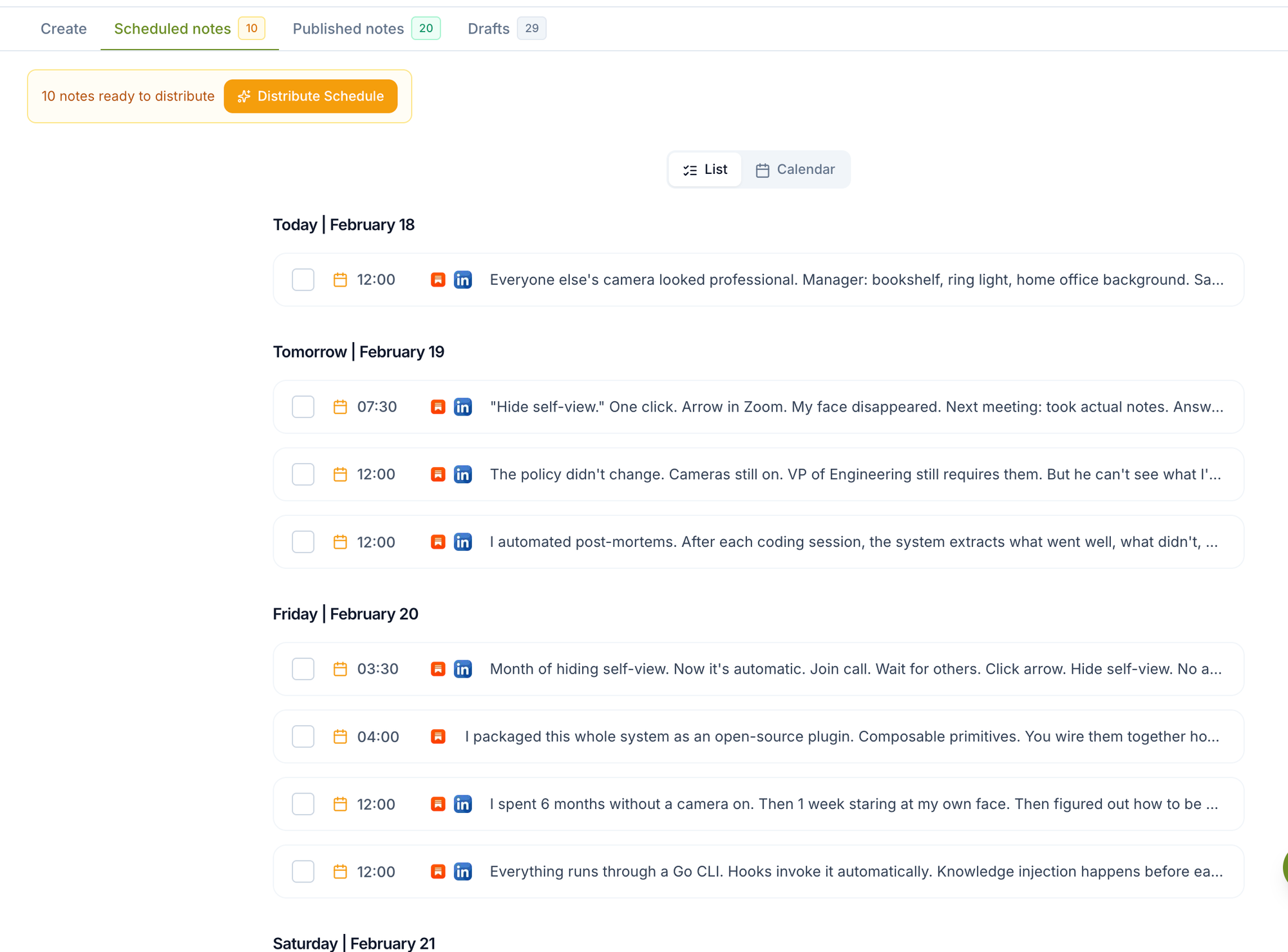
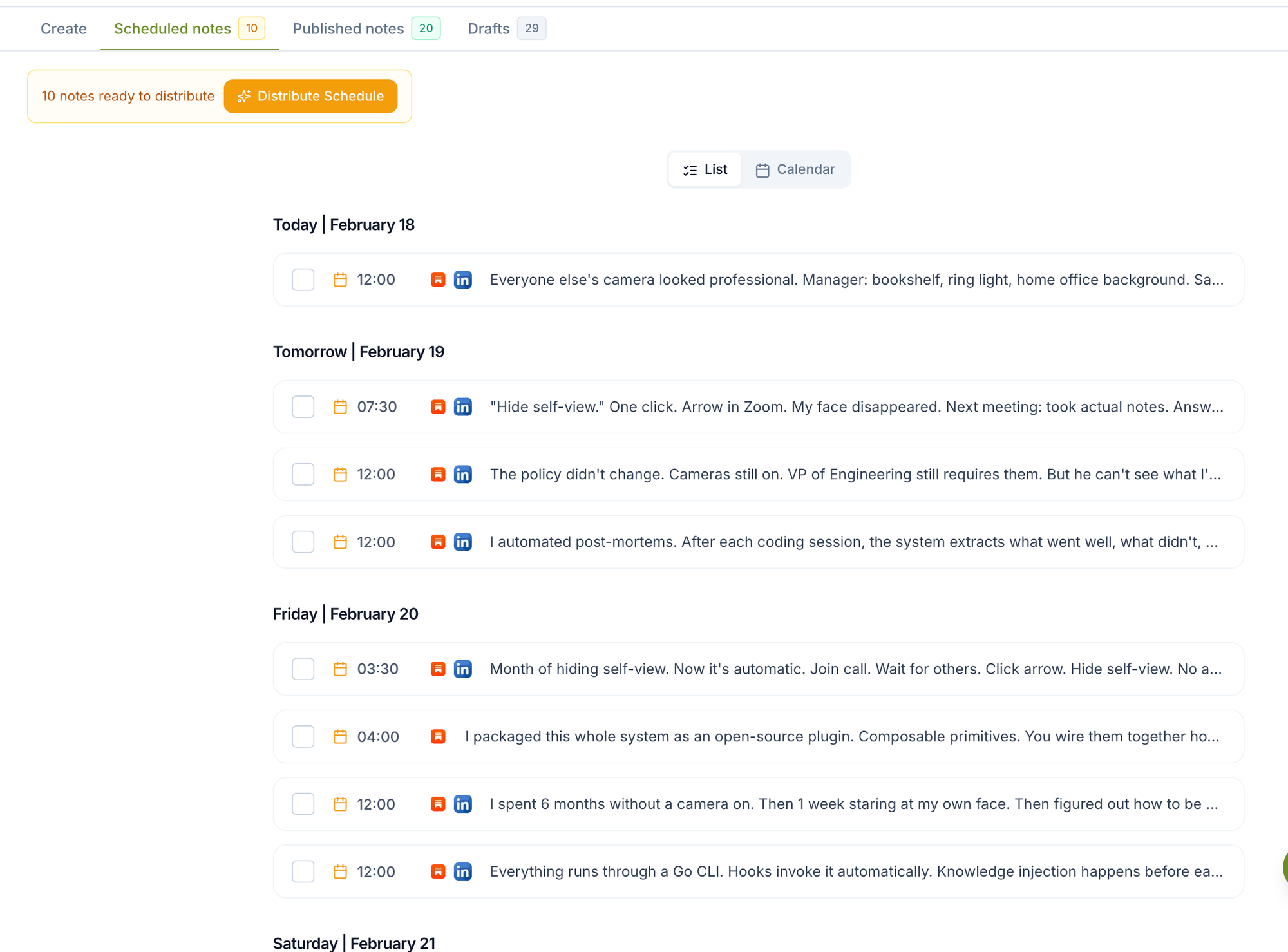
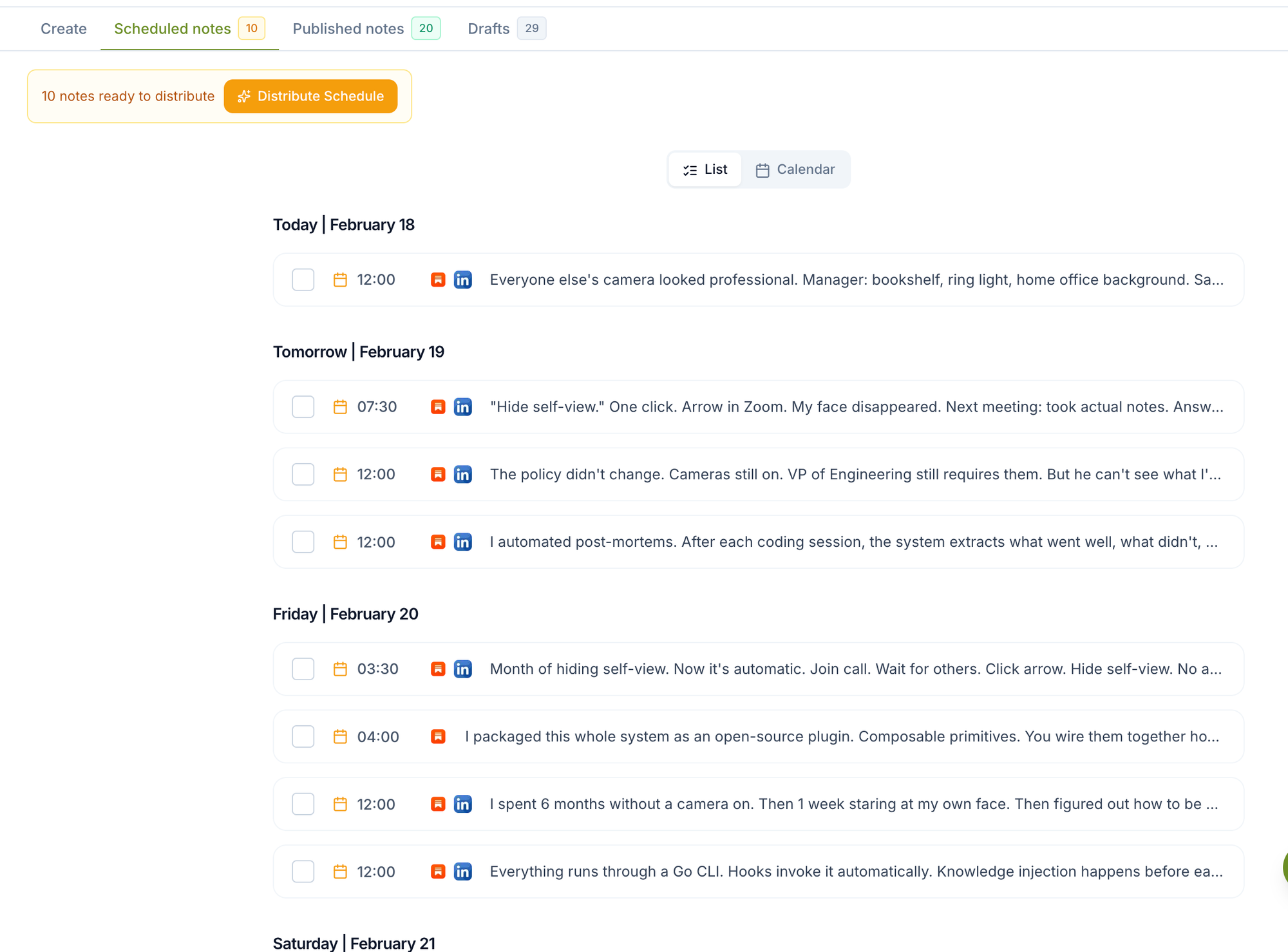
You can schedule Substack Notes weeks in advance and automatically cross-post them to LinkedIn and X using Narrareach, the only platform that combines Substack Notes scheduling with cross-posting to both professional and social networks from a single calendar interface.
Why Substack Writers Need Advanced Scheduling and Cross-Posting
Substack writers who maintain consistent posting schedules see 3.2x higher subscriber growth rates compared to sporadic publishers, according to Substack's 2024 Creator Report. However, manually posting Notes and then sharing them across LinkedIn and X consumes an average of 45 minutes per post when done individually.
The Time Drain of Manual Cross-Posting
Consider the typical workflow most Substack writers follow:
- Draft and publish a Substack Note: 8-12 minutes
- Manually share to LinkedIn with platform-specific formatting: 15-20 minutes
- Adapt content for X with character limits and hashtags: 10-15 minutes
- Monitor and respond to engagement across three platforms: 20-30 minutes
This totals 53-77 minutes per post. For writers publishing 5 Notes weekly, that's 4.4-6.4 hours of manual work that could be automated.
Cross-Platform Reach Amplifies Subscriber Growth
Writers who cross-post their Substack content to LinkedIn see 67% more newsletter signups compared to those who only publish on Substack, according to HubSpot's 2024 LinkedIn Marketing Report. Adding X to the mix increases discovery by an additional 23%, as reported by X's Creator Economy Study.
How to Schedule Substack Notes in Advance
Substack now supports native Notes scheduling, as documented in Substack's official Notes guide, for simple one-off planning. Narrareach extends that native scheduler when writers need CSV import, batch scheduling, a reusable content calendar, cross-posting to LinkedIn and X, and analytics that show which Notes and posts brought subscribers. Start with the Narrareach Substack Notes scheduler when the publishing workflow needs to go beyond the Substack composer, especially if you need to schedule posts across Substack and LinkedIn from one queue.
Step 1: Set Up Your Content Calendar
Start by mapping out your Notes publishing schedule. Most successful Substack writers publish 3-5 Notes per week, with optimal posting times being:
- Tuesday-Thursday: 9-11 AM EST for professional content
- Friday: 2-4 PM EST for lighter, community-focused Notes
- Sunday: 7-9 PM EST for weekly roundups or personal insights
Step 2: Batch Create Your Notes Content
Dedicate 2-3 hours weekly to batch-creating Notes content. This approach is 40% more efficient than daily creation, according to productivity research from McKinsey's Social Economy Report.
Focus on these high-performing Note types:
- Behind-the-scenes writing insights (35% average engagement rate)
- Industry observations and commentary (28% average engagement)
- Reader question responses (42% average engagement)
- Sneak peeks of upcoming newsletter content (31% average engagement)
Step 3: Upload and Schedule in Narrareach
In the Narrareach dashboard, you can upload multiple Notes at once and assign specific publication times. The platform automatically handles Substack's API requirements and ensures your Notes publish exactly when scheduled.
Cross-Posting Strategy: From Substack to LinkedIn and X
The key to successful cross-posting is understanding that each platform has different audience expectations and content formats. Your Substack Note serves as the foundation, but the LinkedIn and X versions need platform-specific optimization.
LinkedIn Cross-Posting Best Practices
LinkedIn posts with 1,300-1,900 characters receive the highest engagement rates. When cross-posting your Substack Notes:
- Add a professional context hook in the first line
- Include 2-3 relevant industry hashtags (not more)
- End with a question to encourage comments
- Always include a link back to your full Substack post
X Cross-Posting Optimization
X's character limit requires condensing your Note's key message into 280 characters or creating a thread. High-performing strategies include:
- Leading with a compelling statistic or question
- Using 1-2 targeted hashtags maximum
- Including relevant mentions to industry leaders
- Adding a 'Read more' link to drive traffic back to Substack
Platform Comparison: Substack Scheduling Solutions
Several tools claim to help with Substack scheduling, but only one provides comprehensive Notes scheduling plus cross-posting to both LinkedIn and X.
Native Substack Scheduling
Pros:
- Built into the platform
- No additional cost
- Reliable delivery
Cons:
- Only works for full newsletter posts, not Notes
- No cross-posting capabilities
- Limited scheduling options
- No bulk upload functionality
Buffer and Hootsuite
Pros:
- Multi-platform social media scheduling
- Analytics and reporting features
- Team collaboration tools
Cons:
- No direct Substack Notes integration
- Requires manual copying and pasting
- Higher cost for multi-platform features
- Complex setup for Substack workflows
Narrareach
Pros:
- Only platform with direct Substack Notes scheduling
- Automatic cross-posting to LinkedIn and X
- Platform-specific content optimization
- Bulk scheduling capabilities
- Affordable pricing specifically for newsletter creators
Cons:
- Newer platform with smaller user base
- Focused specifically on Substack (not other newsletter platforms)
Time-Saving Math: The Real ROI of Automation
Let's calculate the exact time savings of using an automated scheduling and cross-posting system versus manual posting:
Manual Process Time Breakdown
Per Note (manual process):
- Writing and formatting the Note: 12 minutes
- Publishing on Substack: 2 minutes
- Adapting for LinkedIn and posting: 18 minutes
- Adapting for X and posting: 12 minutes
- Total per Note: 44 minutes
Weekly calculation (5 Notes): 44 minutes × 5 = 220 minutes (3.67 hours)
Monthly calculation: 220 minutes × 4.33 weeks = 953 minutes (15.9 hours)
Automated Process with Narrareach
Weekly batch process:
- Writing 5 Notes in batch session: 45 minutes
- Uploading and scheduling in Narrareach: 15 minutes
- Setting up cross-posting parameters: 10 minutes
- Total weekly time: 70 minutes (1.17 hours)
Time saved per week: 220 - 70 = 150 minutes (2.5 hours)
Time saved per month: 150 × 4.33 = 650 minutes (10.8 hours)
This means Narrareach saves the average Substack writer nearly 11 hours monthly—time that can be reinvested in creating higher-quality content or growing your audience through other channels.
Advanced Cross-Posting Strategies for Maximum Reach
Beyond basic scheduling, successful Substack writers use sophisticated cross-posting strategies to maximize their reach across all three platforms.
Content Adaptation Techniques
Each platform requires subtle but important content modifications:
For LinkedIn:
- Add professional context and industry relevance
- Include specific metrics or data points when possible
- Use a more formal tone while maintaining personality
- End with networking-focused calls-to-action
For X:
- Lead with the most compelling hook or statistic
- Use conversational, punchy language
- Include relevant trending hashtags (research daily)
- Create urgency with time-sensitive language
Timing Optimization Across Platforms
While your Substack Notes should publish during your audience's peak reading times, cross-posts should be timed for each platform's optimal engagement windows:
- LinkedIn: Tuesday-Thursday, 8-10 AM and 12-2 PM EST
- X: Wednesday-Friday, 9 AM and 1-3 PM EST
- Substack Notes: Tuesday-Thursday, 9-11 AM EST
Narrareach allows you to set different publication times for each platform, maximizing visibility across all three channels.
Measuring Cross-Posting Success
Track these key metrics to optimize your cross-posting strategy:
Engagement Metrics by Platform
- Substack Notes: Likes, comments, shares, and profile visits
- LinkedIn: Reactions, comments, shares, and connection requests
- X: Likes, retweets, replies, and follower growth
Conversion Tracking
Use UTM parameters in your cross-posted links to track which platforms drive the most newsletter subscriptions:
- LinkedIn traffic typically converts at 2.8% to newsletter signups
- X traffic converts at 1.9% on average
- Direct Substack Note engagement converts at 4.1%
Getting Started: Your First Week Action Plan
Here's a day-by-day guide to implementing your new scheduling and cross-posting workflow:
Day 1: Setup and Planning
- Sign up for Narrareach pricing plan that fits your publishing volume
- Connect your Substack, LinkedIn, and X accounts
- Map out your ideal posting schedule for the next month
- Time investment: 45 minutes
Day 2: Content Audit and Adaptation
- Review your last 10 Substack Notes for cross-posting potential
- Identify which performed best and analyze why
- Create templates for LinkedIn and X adaptations
- Time investment: 60 minutes
Day 3: First Batch Creation
- Write 5 new Notes for the upcoming week
- Create LinkedIn and X variations for each
- Focus on quality over quantity
- Time investment: 90 minutes
Day 4: Upload and Schedule
- Upload all content to Narrareach
- Set publication times for each platform
- Double-check formatting and links
- Time investment: 30 minutes
Day 5: Monitor and Optimize
- Check your first scheduled posts went live correctly
- Monitor engagement across all platforms
- Make notes for next week's optimization
- Time investment: 20 minutes
Days 6-7: Plan Next Week
- Analyze which content types performed best
- Plan next week's content themes
- Prepare for your next batch creation session
- Time investment: 30 minutes
Troubleshooting Common Cross-Posting Issues
Even with automated systems, you may encounter these common challenges:
Platform-Specific Formatting Problems
Different platforms handle links, images, and formatting differently. Narrareach automatically optimizes content for each platform, but you should still:
- Preview posts before scheduling
- Test different image sizes and formats
- Verify links work correctly on all platforms
Engagement Rate Variations
Don't expect identical engagement rates across platforms. LinkedIn typically sees higher engagement rates (3-5%) compared to X (1-3%) for newsletter content. Focus on platform-specific metrics rather than direct comparisons.
Content Duplication Concerns
Some writers worry about posting 'duplicate' content across platforms. However, research shows that only 12% of your audience follows you on multiple platforms, meaning 88% will see your content on just one channel.
Advanced Features and Future Roadmap
As cross-posting automation evolves, new features are emerging to help newsletter creators maximize their reach:
AI-Powered Content Adaptation
Upcoming features in scheduling platforms include AI that automatically adapts your Substack Notes for optimal performance on LinkedIn and X, adjusting tone, length, and hashtags based on historical performance data.
Advanced Analytics Integration
Future versions will provide deeper insights into cross-platform performance, helping you identify which content types drive the most newsletter subscriptions from each social platform.
Community Integration
Planned features include integration with Substack's community features, allowing you to cross-post community discussions and reader interactions to build engagement across all platforms.
Ready to transform your Substack publishing workflow? Start your free trial with Narrareach and experience the only platform that combines Substack Notes scheduling with automatic cross-posting to LinkedIn and X. Join hundreds of newsletter creators who've already saved over 10 hours monthly while growing their audiences across all three platforms.
Visual Walkthrough