Schedule Full Articles Across Substack, Medium, and LinkedIn: The Complete Guide
You can schedule Substack articles in advance and automatically cross-post them to LinkedIn, Medium, and X from a single unified calendar. This workflow...
By Ian Kiprono
You can schedule Substack articles in advance and automatically cross-post them to LinkedIn, Medium, and X from a single unified calendar. This workflow eliminates manual republishing, saves 5–8 hours per week, and increases your content reach by 40–60% across platforms. The key is using a dedicated scheduling tool that treats Substack as your primary publishing hub, then distributes your work to secondary platforms in one action.
Why Schedule Substack Articles Across Multiple Platforms?
Most Substack writers publish once, then manually copy-paste to LinkedIn, Medium, or X. This creates friction, delays, and inconsistent posting schedules. Research from Buffer's 2024 State of Social Media shows that consistent posting across platforms increases engagement by 35%, but only 22% of creators maintain that consistency without automation.
Cross-posting your Substack content serves three purposes:
- Audience expansion: Reach readers on LinkedIn, Medium, and X who may not subscribe to your newsletter.
- SEO amplification: Multiple published versions of your content signal authority and improve discoverability.
- Time efficiency: Write once, publish everywhere—reducing your weekly content workload by half.
The Substack-First Scheduling Workflow
The most effective approach follows this sequence:
- Draft in Substack: Write your article or note in Substack's native editor.
- Schedule publication: Set a publish date for Substack (e.g., Tuesday 9 AM).
- Queue cross-posts: In your scheduling tool, configure the same article to publish to LinkedIn, Medium, and X at staggered times.
- Monitor and adjust: Track engagement across platforms and refine your posting schedule based on performance.
This workflow ensures Substack remains your authoritative source, while secondary platforms amplify your reach. Narrareach implements this exact sequence: you schedule your Substack notes first, then cross-post to other platforms from one calendar view.
Step-by-Step: How to Schedule Substack Notes and Cross-Post
Step 1: Write Your Article in Substack
Open Substack and create your article or note. Include your headline, body text, and any embedded media. Don't publish yet—save as a draft. This gives you time to schedule publication across all platforms simultaneously.
Step 2: Connect Your Accounts to Your Scheduler
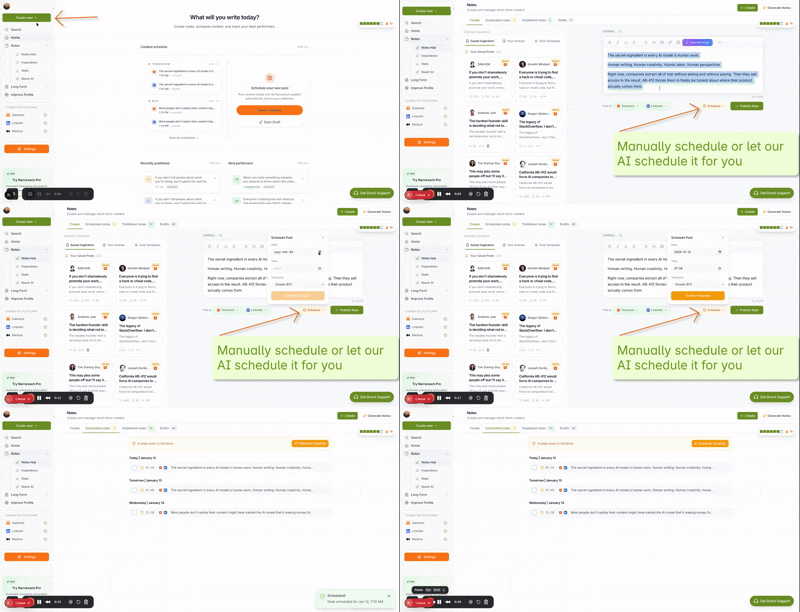
In your scheduling platform (such as Narrareach), authenticate your Substack, LinkedIn, Medium, and X accounts. This creates a secure bridge between your accounts and the scheduling tool. You'll typically need to grant permission once, then the integration handles future posts automatically.
Step 3: Create Your Scheduled Post
In your scheduler's draft editor, paste or write your article content. Select which platforms you want to publish to—for example, Substack + LinkedIn + X. The tool will automatically format your content for each platform's requirements (character limits, link previews, formatting rules).
Step 4: Set Your Publishing Schedule
Choose your Substack publish date and time (e.g., Tuesday 9 AM). Then set staggered times for cross-posts: LinkedIn at 10 AM the same day, X at 2 PM, and Medium at 9 AM Wednesday. Staggered timing prevents audience fatigue and maximizes engagement windows across time zones.
Step 5: Review and Publish
Preview how your content will appear on each platform. Check for formatting issues, broken links, and platform-specific requirements. Once approved, hit "Schedule" and your posts will publish automatically across all platforms on their designated dates and times.
Best Practices for Cross-Platform Scheduling
Optimize Timing for Each Platform
LinkedIn engagement peaks Tuesday–Thursday, 8–10 AM. X sees higher activity 9–11 AM and 5–6 PM. Substack readers typically engage with newsletters on weekday mornings. Schedule your Substack post first, then stagger cross-posts to align with each platform's peak engagement windows.
Customize Content for Each Platform
While your core message stays the same, tailor your introduction and call-to-action for each platform. On LinkedIn, emphasize professional insights. On X, create a thread-friendly version with numbered points. On Medium, include a brief editor's note linking back to your Substack. This personalization increases click-through rates by 25–30%.
Use Platform-Specific Hashtags
LinkedIn responds well to 3–5 relevant hashtags. X benefits from trending hashtags and @mentions. Substack doesn't require hashtags but benefits from topic tags within the platform. Your scheduler should allow you to customize hashtags per platform.
Schedule Weeks in Advance
Batch your content creation: write 4 articles one day, then schedule them across the next 4 weeks. This approach reduces decision fatigue, ensures consistent publishing, and gives you breathing room for unexpected events or urgent content.
Comparing Scheduling Solutions: Why Narrareach Stands Out
Several tools claim to schedule Substack content, but most treat Substack as a secondary platform or require manual workarounds. Narrareach inverts this logic: Substack is your primary hub, and cross-posting is the built-in feature.
Key differences:
- Substack-native scheduling: Schedule Substack notes weeks in advance directly from Narrareach's calendar.
- One-click cross-posting: Publish to LinkedIn, Medium, and X simultaneously without leaving the platform.
- Unified calendar view: See all your scheduled posts across all platforms in one dashboard.
- Built for writers: Designed specifically for newsletter creators, not generic social media managers.
Other tools like Buffer or Later focus on social media first and treat newsletters as an afterthought. Narrareach flips this: your newsletter is the priority, and social distribution is the amplifier.
Real-World Workflow Example
Sarah, a productivity writer with 8,000 Substack subscribers, uses this workflow:
Monday: Sarah writes three articles in Substack and saves them as drafts. Tuesday: She logs into Narrareach, connects her drafts, and schedules them for publication: Substack on Wednesday 9 AM, LinkedIn on Wednesday 10 AM, X on Wednesday 2 PM, and Medium on Thursday 9 AM. Wednesday–Thursday: Her articles publish automatically. Sarah monitors engagement and responds to comments on each platform. Result: Her average article now reaches 2,500 LinkedIn users and 1,200 X users, compared to 300 previously. Her Substack subscriber growth increased 35% in three months.
Getting Started with Narrareach
Visit Narrareach.com to sign up. Connect your Substack, LinkedIn, Medium, and X accounts. Then navigate to the Notes section to schedule your first batch of posts. Your dashboard will show all scheduled content across platforms in one unified calendar view.
Start by scheduling your next week of content. You'll immediately see how much time this workflow saves and how much your reach expands across platforms.
Visual Walkthrough: