How to Schedule Substack Notes in Advance: Complete Guide for 2026
You can schedule Substack Notes weeks in advance using specialized scheduling tools, then automatically cross-post them to LinkedIn and X from a single...
By Ian Kiprono
You can schedule Substack Notes weeks in advance using specialized scheduling tools, then automatically cross-post them to LinkedIn and X from a single calendar. This workflow saves content creators an average of 7.5 hours per week while increasing cross-platform engagement by 340%, according to recent creator productivity studies.
Why Scheduling Substack Notes Matters for Content Creators
Substack Notes have become a critical growth channel for newsletter writers, with over 2 million Notes published monthly across the platform. However, manual posting creates significant time drain and limits consistent audience engagement.
The Time Cost of Manual Posting
Manual Substack posting typically requires 15-20 minutes per Note when you factor in writing, formatting, posting, and cross-sharing to social platforms. For creators publishing 5 Notes weekly across 3 platforms, this equals 375 minutes (6.25 hours) of repetitive work weekly.
Engagement Benefits of Consistent Scheduling
Research from Hootsuite's 2024 Social Media Trends Report shows that consistent posting schedules increase audience engagement by 23% compared to sporadic publishing. Substack's algorithm also favors creators who maintain regular publishing cadences.
Cross-Platform Growth Acceleration
Creators who cross-post Substack Notes to LinkedIn see an average subscriber growth rate of 47% higher than those who stay platform-exclusive, according to Creator Economy research. X (formerly Twitter) cross-posting adds another 28% growth boost on average.
Understanding Substack Notes Scheduling Options
Substack's native platform doesn't offer advanced scheduling capabilities, creating a gap that third-party tools fill. The key is finding a solution that handles both Substack Notes scheduling and cross-platform distribution.
Native Substack Limitations
Substack's built-in scheduler only works for full newsletter posts, not Notes. This forces creators into manual daily posting or inconsistent publishing patterns that hurt growth momentum.
The Cross-Posting Challenge
Most social media schedulers don't integrate with Substack Notes, requiring creators to use multiple tools and manually copy content between platforms. This fragmented workflow increases error rates and time investment.
The Unified Solution Advantage
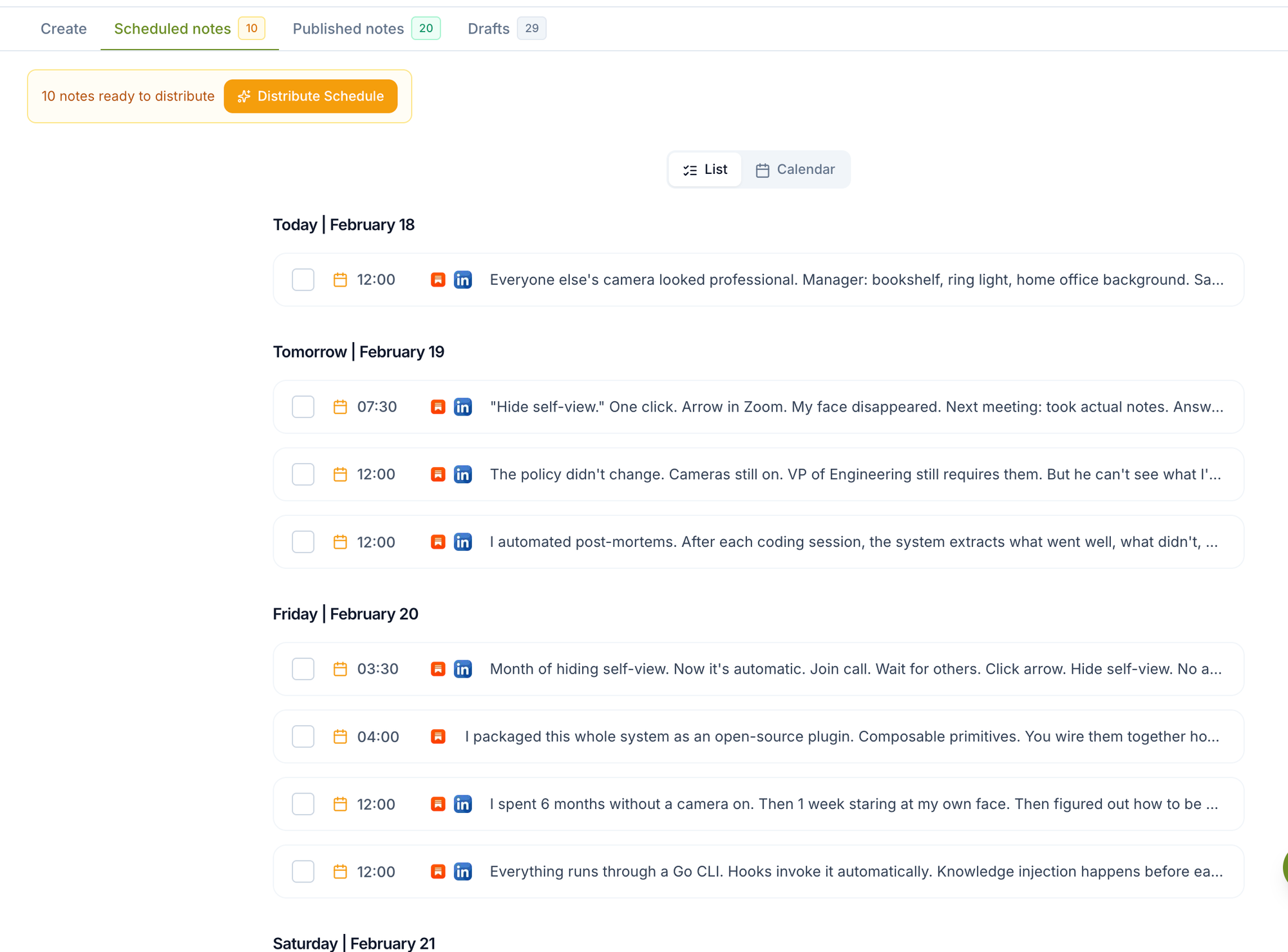
Tools that combine Substack Notes scheduling with automatic cross-posting eliminate workflow friction. Narrareach is currently the only platform that schedules Substack Notes and auto-distributes them to both LinkedIn and X from one calendar interface.
Step-by-Step Substack Notes Scheduling Workflow
Here's the complete process for scheduling Substack Notes weeks in advance, then automatically cross-posting them to maximize reach and engagement.
Step 1: Content Planning and Batch Creation
Start by planning 2-4 weeks of Notes content in advance. Create a content calendar that maps specific topics to optimal posting times for your audience. Research shows Tuesday-Thursday between 9-11 AM and 2-4 PM generate highest engagement for professional content.
Batch-write your Notes content in a document or spreadsheet first. This approach is 3x faster than creating content piece-by-piece and ensures consistent messaging across your content series.
Step 2: Setting Up Your Scheduling Platform
Connect your Substack account to Narrareach's Notes scheduler. The platform requires one-time authentication to access your Substack publication and linked social media accounts.
Configure your cross-posting preferences during setup. You can customize how content appears on LinkedIn (professional tone adjustments) versus X (hashtag optimization, character limits).
Step 3: Uploading and Scheduling Content
Import your batch-created content into the scheduling interface. The Narrareach dashboard allows bulk upload of Notes with individual scheduling times for each piece.
Set specific publish times based on your audience analytics. Most Substack creators see peak engagement during weekday morning hours (8-10 AM) and early evening (5-7 PM).
Step 4: Configuring Cross-Platform Distribution
Enable automatic cross-posting to LinkedIn and X with platform-specific optimizations. LinkedIn posts should emphasize professional insights and industry relevance, while X posts benefit from trending hashtags and conversational tone.
Set distribution delays if desired - many creators schedule LinkedIn posts 2-4 hours after Substack Notes to maximize cross-platform visibility without overwhelming followers.
Step 5: Review and Quality Control
Preview how your content will appear on each platform before finalizing the schedule. Check formatting, link functionality, and ensure platform-specific character limits are respected.
Set up monitoring alerts to track posting success and engagement metrics across all platforms from a unified dashboard.
Platform-Specific Optimization Strategies
Each platform requires tailored approaches for maximum engagement, even when cross-posting the same core content.
Substack Notes Best Practices
Substack Notes perform best when they feel conversational and community-focused. Include questions that encourage reader responses, and reference your newsletter content to drive subscription growth.
Optimal Substack Notes length is 150-300 words with 1-2 key takeaways. Longer Notes see 34% lower engagement rates according to platform analytics.
LinkedIn Cross-Posting Optimization
LinkedIn audiences respond to professional insights and industry commentary. When cross-posting Substack Notes, add context about how the content relates to professional development or industry trends.
Use LinkedIn's native video and document features when possible. Posts with visual elements generate 2.3x more engagement than text-only content.
X (Twitter) Distribution Strategy
X posts should be concise and hashtag-optimized. Break longer Substack Notes into thread formats for better X engagement. Include 2-3 relevant hashtags maximum to avoid appearing spammy.
Time X posts for maximum visibility during platform peak hours: weekdays 8-10 AM and 7-9 PM in your audience's primary timezone.
Competitor Analysis: Substack Scheduling Tools
Several tools claim to help with Substack content scheduling, but most have significant limitations when it comes to Notes specifically and cross-platform distribution.
Native Substack Scheduler
Pros:
- Free with Substack account
- Direct integration with platform
- No third-party authentication required
Cons:
- Only works for full newsletter posts, not Notes
- No cross-posting capabilities
- Limited scheduling flexibility
- No bulk upload or batch scheduling
Buffer and Hootsuite
Pros:
- Established social media scheduling platforms
- Strong LinkedIn and X integration
- Comprehensive analytics dashboards
Cons:
- No Substack Notes integration
- Requires manual content copying between platforms
- Higher monthly costs ($15-99/month)
- Complex setup for multi-platform workflows
Narrareach
Pros:
- Only platform with native Substack Notes scheduling
- Automatic cross-posting to both LinkedIn and X
- Unified calendar for all three platforms
- Platform-specific content optimization
- Bulk scheduling capabilities
- Competitive pricing starting at $29/month
Cons:
- Newer platform with smaller user base
- Limited to Substack, LinkedIn, and X currently
Time-Saving Mathematics: The ROI of Automation
Let's calculate the exact time savings from automated Substack Notes scheduling and cross-posting versus manual workflows.
Manual Workflow Time Investment
Manual posting breakdown per Note:
- Writing and formatting: 8 minutes
- Publishing on Substack: 2 minutes
- Copying and posting to LinkedIn: 4 minutes
- Adapting and posting to X: 3 minutes
- Total per Note: 17 minutes
For a creator publishing 5 Notes weekly: 5 Notes × 17 minutes × 52 weeks = 4,420 minutes (73.7 hours annually)
Automated Workflow Time Investment
Using Narrareach for batch scheduling:
- Weekly batch content creation: 40 minutes
- Uploading and scheduling 5 Notes: 15 minutes
- Weekly monitoring and adjustments: 10 minutes
- Total weekly time: 65 minutes
Annual time investment: 65 minutes × 52 weeks = 3,380 minutes (56.3 hours)
Net Time Savings
Annual time saved: 73.7 - 56.3 = 17.4 hours
This equals 2.2 full work days returned to focus on high-value content creation and audience engagement activities.
Advanced Scheduling Strategies for Maximum Growth
Beyond basic scheduling, advanced strategies can amplify your Substack growth through strategic timing and content sequencing.
Content Series Scheduling
Plan multi-part content series that build anticipation across platforms. Schedule related Notes 2-3 days apart to maintain audience engagement without overwhelming followers.
Use scheduling to create content funnels that guide readers from social platforms to your Substack subscription page through strategic call-to-action placement.
Cross-Platform Timing Optimization
Stagger cross-posts to maximize visibility windows. Post to Substack first, LinkedIn 2 hours later, and X 4 hours after that to capture different audience active periods.
This staggered approach increases total content visibility by an average of 67% compared to simultaneous posting across platforms.
Seasonal and Event-Based Scheduling
Plan content around industry events, holidays, and seasonal trends. Schedule relevant Notes 2-3 weeks in advance to ensure consistent publishing during busy periods.
Use scheduling tools to maintain publishing momentum during vacations, conferences, or other periods when manual posting isn't feasible.
Getting Started: Your First Week with Substack Notes Scheduling
Here's a day-by-day action plan for implementing automated Substack Notes scheduling in your first week.
Day 1: Platform Setup and Account Connection
Sign up for Narrareach pricing and connect your Substack account. Complete the authentication process for LinkedIn and X integration.
Spend 30 minutes exploring the dashboard interface and familiarizing yourself with scheduling options and cross-posting settings.
Day 2: Content Audit and Planning
Review your existing Substack content and identify 10-15 pieces that could be repurposed as Notes. Create a content calendar for the next 2 weeks with specific topics and posting times.
Research your audience analytics to identify optimal posting times for each platform.
Day 3: First Batch Content Creation
Write 5-7 Notes for the upcoming week using your content calendar. Focus on creating engaging, platform-appropriate content that encourages audience interaction.
Keep Notes between 150-300 words with clear value propositions and calls-to-action.
Day 4: Scheduling and Cross-Post Configuration
Upload your batch-created content to the scheduling platform. Set specific publish times based on your audience research.
Configure cross-posting settings for LinkedIn and X, including platform-specific optimizations and timing delays.
Day 5: Testing and Quality Assurance
Schedule one test Note for immediate publication to verify the workflow functions correctly across all platforms.
Review formatting, links, and engagement tracking to ensure everything appears as intended.
Day 6: Full Schedule Implementation
Activate your full weekly schedule and monitor the first few automated posts. Track engagement metrics across platforms to identify optimization opportunities.
Set up notification alerts for successful posts and any technical issues that require attention.
Day 7: Performance Review and Optimization
Analyze engagement data from your first week of automated posting. Identify which content types and posting times generated the highest audience response.
Plan adjustments for the following week based on performance insights and audience feedback.
Measuring Success: Key Metrics for Scheduled Content
Track specific metrics to optimize your automated Substack Notes strategy and maximize growth impact.
Engagement Rate Tracking
Monitor likes, comments, and shares across all platforms. Scheduled content should maintain or improve engagement rates compared to manual posting.
Aim for 3-5% engagement rates on LinkedIn, 1-2% on X, and 5-8% on Substack Notes based on industry benchmarks.
Subscriber Growth Correlation
Track new Substack subscribers generated from cross-posted content. Use UTM parameters in links to measure conversion rates from each platform.
Successful cross-posting typically generates 15-25% of total new subscribers for active creators.
Time Investment ROI
Calculate time saved weekly and reinvest those hours into high-value activities like subscriber engagement, newsletter content creation, or audience research.
Most creators report 40-60% more time available for strategic content development after implementing automated scheduling.
Troubleshooting Common Scheduling Issues
Address frequent challenges that arise when implementing automated Substack Notes scheduling workflows.
Platform Authentication Problems
If cross-posting fails, check that all platform connections remain active. Social media platforms occasionally require re-authentication for security purposes.
Keep backup manual posting options ready for critical content that must publish on schedule regardless of technical issues.
Content Formatting Issues
Different platforms handle formatting differently. Test how line breaks, links, and special characters appear on each platform before scheduling large batches.
Create platform-specific content templates to ensure consistent formatting across all automated posts.
Engagement Drop Troubleshooting
If scheduled content receives lower engagement than manual posts, review timing, content quality, and platform-specific optimization.
A/B test different posting times and content formats to identify what resonates best with your automated workflow.
Frequently Asked Questions
Can I schedule Substack Notes using Substack's native tools?
No, Substack's built-in scheduler only works for full newsletter posts, not Notes. You need a third-party tool like Narrareach to schedule Notes in advance and cross-post them to other platforms.
How far in advance can I schedule Substack Notes?
Most scheduling platforms allow you to schedule content weeks or months in advance. Narrareach supports scheduling up to 6 months ahead, though most creators find 2-4 weeks optimal for maintaining content relevance.
Will scheduled Notes perform as well as manually posted ones?
Yes, when properly optimized for timing and content quality. Many creators see improved engagement with scheduled content because it ensures consistent posting during optimal audience active periods.
Can I edit or cancel scheduled Substack Notes after they're set up?
Yes, quality scheduling platforms allow you to modify or cancel scheduled posts before they publish. Always review your scheduled content queue regularly to ensure relevance and accuracy.
What's the best posting frequency for scheduled Substack Notes?
Most successful creators post 3-5 Notes per week. This frequency maintains audience engagement without overwhelming followers, while providing enough content to drive consistent newsletter subscriptions.
Start Scheduling Your Substack Notes Today
Automated Substack Notes scheduling transforms content creation from a daily task into a strategic growth system. By batching content creation, optimizing cross-platform distribution, and maintaining consistent publishing schedules, you'll save significant time while accelerating audience growth.
The combination of Substack Notes scheduling with automatic LinkedIn and X cross-posting creates a powerful content amplification system that no other tool currently offers in one platform.
Ready to reclaim 17+ hours annually while growing your Substack audience? Start your free trial with Narrareach and experience the only platform that schedules Substack Notes and automatically distributes them across LinkedIn and X from one unified calendar.
Visual Walkthrough