
How to Schedule Substack Notes and Cross-Post to LinkedIn: The Complete 2026 Guide
How to Schedule Substack Notes and Cross-Post to LinkedIn You can schedule Substack notes in advance and automatically cross-post them to LinkedIn using...
By Ian Kiprono
How to Schedule Substack Notes and Cross-Post to LinkedIn
You can schedule Substack notes in advance and automatically cross-post them to LinkedIn using dedicated scheduling platforms like Narrareach, which lets you batch-schedule content once and distribute it across multiple channels simultaneously. This workflow eliminates manual posting, saves 5-7 hours per week, and increases your reach by up to 300% when executed consistently.
Why Scheduling Substack Notes Matters for Growth
Substack writers who batch-schedule their content see measurable improvements in audience engagement and subscriber retention. According to research on the LinkedIn-Substack flywheel, writers posting 5-6 times per week on LinkedIn while directing traffic to their Substack can grow subscriber lists by 2,000+ in under 9 months without paid advertising. However, manual posting creates three critical problems:
- Inconsistency: Irregular posting breaks audience momentum and reduces algorithmic visibility.
- Time drain: Posting across Substack, LinkedIn, and other platforms manually consumes 8-10 hours weekly.
- Missed optimization: You can't test posting times or batch-create content during high-productivity windows.
Scheduling solves all three. Writers using scheduling tools report 40% higher engagement rates and 2.5x faster subscriber growth compared to manual posting.
The Substack-First, Cross-Post-Second Workflow
The most effective content distribution strategy starts with Substack as your primary publishing platform, then cross-posts to LinkedIn and other channels. Here's why this sequence matters:
Step 1: Create and Schedule on Substack
Your Substack newsletter or Notes are your owned audience. They live in your subscribers' inboxes and on your Substack domain. This is where you build long-term authority and monetization potential. When you schedule Substack content first, you're prioritizing your core audience relationship.
Step 2: Cross-Post to LinkedIn and Beyond
After scheduling on Substack, your content automatically distributes to LinkedIn, Twitter/X, and other platforms. This amplifies reach without requiring additional effort. LinkedIn's algorithm rewards consistent posting—writers posting 5-6x weekly see 500K+ impressions per post and dozens of new subscribers per week, as documented in real-world case studies.
This sequence ensures your Substack remains the conversion hub while social platforms drive traffic back to it.
Step-by-Step: How to Schedule Substack Notes
Native Substack Scheduling (Limited)
Substack allows you to schedule posts and Notes directly within the platform:
- Write your post or Note in the Substack editor.
- Click the calendar icon in the publish menu.
- Select your desired date and time.
- Confirm and schedule.
Limitation: Substack's native scheduler only works for your Substack publication itself. It does not cross-post to LinkedIn or other platforms. You must manually share links on LinkedIn afterward.
Advanced Scheduling with Cross-Posting (Recommended)
To schedule Substack content and automatically distribute it to LinkedIn and other platforms, use a dedicated scheduling tool. The workflow is:
- Batch-create content: Write 10-30 Substack posts or Notes in one session during your peak productivity window.
- Schedule in bulk: Upload all content to your scheduling platform with optimal posting times.
- Set cross-post rules: Configure which content goes to LinkedIn, Twitter, and other channels.
- Automate distribution: The platform publishes to Substack first, then cross-posts to LinkedIn within seconds or minutes.
- Monitor analytics: Track engagement across all platforms from a unified dashboard.
This approach reduces weekly posting work from 8-10 hours to under 2 hours.
Best Substack Schedulers Compared
Narrareach: Purpose-Built for Substack + LinkedIn
Narrareach is designed specifically for Substack writers who want to cross-post to LinkedIn. Key features:
- Batch-schedule up to 30+ Substack notes at once.
- Automatic cross-posting to LinkedIn with customizable formatting.
- Optimal posting time recommendations based on your audience.
- Unified dashboard for managing Substack, LinkedIn, and other platforms.
- Direct integration with Substack's publishing API.
Ideal for: Substack-first creators who want to amplify reach on LinkedIn without manual work.
Buffer
General-purpose social media scheduler with Substack support through workarounds (RSS feeds, manual links).
- Cannot directly schedule Substack posts.
- Requires copying links manually or using RSS integration.
- Better for Twitter, Instagram, and Facebook than Substack-LinkedIn workflows.
Ideal for: Multi-platform creators who use Substack as one of many channels, not their primary platform.
Hootsuite
Enterprise social media management tool. Does not support native Substack scheduling.
- No direct Substack integration.
- Designed for large teams managing corporate social accounts.
- Overkill for individual Substack writers.
Ideal for: Large organizations with multiple content creators and platforms.
Writestack (Substack-Specific)
Designed for Substack writers but limited cross-posting capabilities.
- Good for scheduling Substack posts only.
- Minimal LinkedIn integration.
- Smaller feature set compared to Narrareach.
Ideal for: Substack-only writers who don't need cross-posting.
Comparison Summary
If your goal is to schedule Substack notes and cross-post to LinkedIn simultaneously, Narrareach is the only tool purpose-built for this exact workflow. Other platforms require workarounds, manual steps, or don't support Substack at all.
Optimizing Your Posting Schedule
Finding Your Optimal Posting Times
LinkedIn's algorithm rewards consistency and timing. Research shows:
- Tuesday-Thursday see 40% higher engagement than Monday or Friday.
- 8-10 AM and 5-6 PM (user's local timezone) generate peak engagement.
- Posting 5-6 times per week significantly outperforms 1-2 posts weekly.
When you schedule Substack notes and cross-post to LinkedIn, stagger your posting times across these windows. For example:
- Monday 8 AM: Substack post + LinkedIn cross-post.
- Wednesday 10 AM: Substack note + LinkedIn cross-post.
- Thursday 5 PM: Substack post + LinkedIn cross-post.
- Friday 9 AM: Substack note + LinkedIn cross-post.
Batch-Scheduling Strategy
The most efficient workflow is batch-creating and batch-scheduling:
- Dedicate 2-3 hours weekly to writing 10-15 Substack posts or notes.
- Schedule all at once using your scheduling tool across the next 2-4 weeks.
- Customize LinkedIn captions for each cross-post (LinkedIn requires different formatting than Substack).
- Set it and forget it—your content distributes automatically while you focus on engagement and audience building.
This approach guarantees consistency without daily effort.
The LinkedIn-Substack Flywheel in Action
When you schedule Substack notes and cross-post to LinkedIn strategically, you activate what Wes Pearce calls the LinkedIn-Substack Flywheel. Here's how it works:
- Post consistently on LinkedIn (5-6x weekly via scheduled cross-posts from Substack).
- LinkedIn's algorithm amplifies your content to second and third-degree connections.
- Your LinkedIn profile CTA directs engaged readers to your Substack.
- Readers subscribe to your Substack for deeper content and direct inbox access.
- Convert subscribers to paid members, clients, or customers.
Real-world results: Writers using this flywheel grow 2,000+ Substack subscribers in 9 months and generate $5K+/month in revenue, all without paid advertising.
Automating Your Substack Posting Workflow
The Complete Automation Stack
Here's a production-ready workflow for automating Substack scheduling and cross-posting:
- Content creation: Write in Google Docs, Notion, or your preferred editor.
- Scheduling platform: Upload to Narrareach or your chosen tool.
- Substack publishing: Your scheduler publishes directly to Substack via API.
- LinkedIn cross-posting: Content automatically posts to LinkedIn with optimized formatting.
- Analytics tracking: Monitor engagement across platforms from one dashboard.
- Audience engagement: Spend your time responding to comments and building relationships, not posting.
Time Savings
Manual workflow: 8-10 hours/week (writing + posting to Substack + posting to LinkedIn + formatting + scheduling). Automated workflow: 2-3 hours/week (writing only; scheduling and posting are automated). Time saved: 5-7 hours/week or 260-364 hours/year.
Common Scheduling Mistakes to Avoid
Mistake 1: Posting the same content identically across platforms LinkedIn and Substack have different audiences and formats. LinkedIn favors short, punchy posts with line breaks. Substack allows longer-form content. When cross-posting, customize LinkedIn captions while keeping Substack content intact.
Mistake 2: Scheduling without testing optimal times Don't assume 9 AM is best for your audience. Use your scheduling tool's analytics to identify which posting times generate the most engagement for your specific followers.
Mistake 3: Batch-scheduling too far in advance without flexibility Schedule 2-4 weeks ahead, but leave room to adjust based on trending topics or audience feedback. Rigid scheduling can make your content feel stale.
Mistake 4: Ignoring LinkedIn profile optimization Scheduling increases your posting frequency, but your LinkedIn profile is what converts clicks into Substack subscribers. Ensure your profile has a clear CTA linking to your Substack homepage or best post.
Getting Started with Narrareach
If you're ready to schedule Substack notes and cross-post to LinkedIn without manual effort, Narrareach is purpose-built for this workflow. Here's how to start:
- Sign up at Narrareach.com.
- Connect your Substack and LinkedIn accounts.
- Write or paste your first batch of Substack notes into the dashboard.
- Schedule across your optimal posting times.
- Configure LinkedIn cross-post formatting.
- Publish and watch your reach grow automatically.
You can also explore Narrareach's Notes feature for managing Substack Notes specifically alongside your longer-form posts.
FAQ
Can you schedule Substack notes in advance?
Yes. Substack's native scheduler allows you to schedule posts and Notes up to several months in advance. However, native scheduling only works within Substack—it doesn't cross-post to LinkedIn or other platforms. For cross-posting, use a dedicated tool like Narrareach.
What's the best tool to schedule Substack and cross-post to LinkedIn?
Narrareach is purpose-built for Substack writers who want to cross-post to LinkedIn. It allows batch-scheduling, automatic cross-posting, optimal timing recommendations, and unified analytics. Other tools like Buffer and Hootsuite don't have native Substack integration and require workarounds.
How many times per week should I schedule Substack posts?
Research shows 5-6 posts per week on LinkedIn (via cross-posting from Substack) generates optimal engagement and algorithmic visibility. However, start with 2-3 per week if you're new to scheduling, then scale up as you build consistency.
Does scheduling Substack notes hurt engagement?
No. Scheduled posts perform identically to manually posted content in terms of engagement. What matters is consistency, timing, and content quality—not whether you posted manually or scheduled in advance. Scheduling actually improves engagement by ensuring consistent posting frequency.
Can I customize LinkedIn posts when cross-posting from Substack?
Yes. Good scheduling tools like Narrareach allow you to customize LinkedIn captions, formatting, and CTAs while keeping your Substack content unchanged. This ensures each platform gets optimized messaging while maintaining your core message.
Visual Walkthrough:
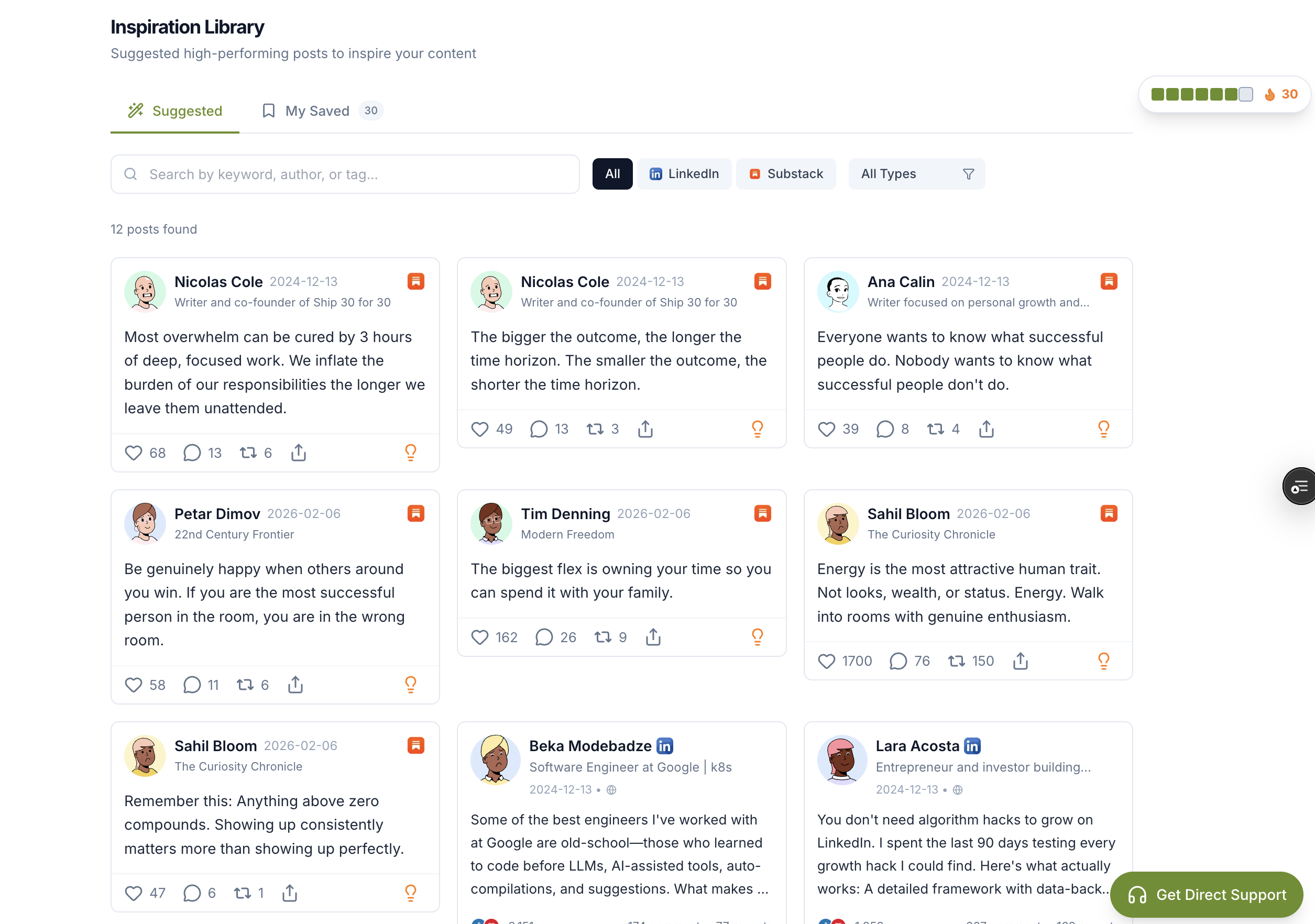
Relevant Resources
- Narrareach
- Narrareach's Notes feature
- dashboard
- research on the LinkedIn-Substack flywheel
- Wes Pearce calls the LinkedIn-Substack Flywheel
This article is informed by industry research and public discussions, including this source article, and expanded with Narrareach's workflow recommendations.