
How to Schedule Substack Notes: The Complete Guide to Automating Your Workflow
Can You Schedule Substack Notes in Advance? Yes—And Here's How Yes, you can schedule Substack notes in advance using third-party scheduling tools like...
By Ian Kiprono
Can You Schedule Substack Notes in Advance? Yes—And Here's How
Yes, you can schedule Substack notes in advance using third-party scheduling tools like Narrareach, which lets you batch-schedule up to 30 Substack notes at once and automatically cross-post them to LinkedIn, Twitter, and other platforms from a single workflow. Unlike Substack's native interface, which offers no built-in scheduling feature, dedicated schedulers let you plan your publishing calendar weeks ahead, optimize posting times for your audience, and distribute content across multiple channels without manual effort.
According to research from The Creator Playbook, creators who maintain consistent publishing schedules see significantly higher subscriber retention and engagement rates. The challenge is that Substack itself doesn't provide native scheduling—which is why automation tools have become essential for serious newsletter writers.
Why Substack Notes Need a Scheduler (And Why Native Tools Fall Short)
Substack Notes are short-form content pieces designed to drive engagement and grow your subscriber base. They're powerful for discoverability, but they come with a friction problem: you have to publish them manually, in real-time, which means:
- You can't batch-create content during your most productive hours
- You're limited to publishing when you're actively online
- Sharing the same note across platforms requires copying, pasting, and reformatting by hand
- You can't optimize posting times based on when your audience is most active
Substack's design philosophy prioritizes real-time interaction, but that doesn't serve writers who want to work asynchronously or scale their presence across multiple platforms. This gap is why tools like Narrareach, Buffer, and Hootsuite have emerged—though not all of them handle Substack equally well.
The Substack Scheduling Workflow: Notes First, Then Cross-Post Distribution
The most effective publishing strategy follows a clear sequence: schedule your Substack notes first, then distribute them to secondary platforms. This approach prioritizes your core audience (Substack subscribers) while maximizing reach across your full network.
Here's how the workflow breaks down:
- Create and batch-schedule Substack notes in your scheduler tool (typically 5–30 notes at once, spread across days or weeks)
- Set optimal posting times based on when your audience engages most (usually 9 AM–12 PM and 5 PM–7 PM in your timezone)
- Configure cross-post rules to automatically push each note to LinkedIn, Twitter, or other platforms immediately after publishing to Substack
- Monitor performance across channels to refine your posting schedule and content strategy
This sequence ensures Substack readers see your content first (preserving the direct relationship with your core audience), while secondary platforms amplify reach and drive new subscribers back to Substack.
Step-by-Step: How to Schedule Substack Notes and Cross-Post to LinkedIn
Here's a practical walkthrough using a dedicated scheduler:
Step 1: Prepare Your Content Calendar
Before you touch any tool, outline 10–30 Substack notes you want to publish over the next 2–4 weeks. Include:
- Core message or insight (1–2 sentences)
- Any links, hashtags, or calls-to-action
- Intended posting date and time
- LinkedIn version (if different from Substack)
This prep work takes 30–60 minutes and saves hours of context-switching later.
Step 2: Connect Your Substack and LinkedIn Accounts
In your scheduler's settings, authorize access to both Substack and LinkedIn. This typically requires:
- Your Substack email and password (or API token, depending on the tool)
- LinkedIn account permissions (via OAuth)
Once connected, the tool can publish directly to both platforms without manual intervention.
Step 3: Batch-Create Your Notes
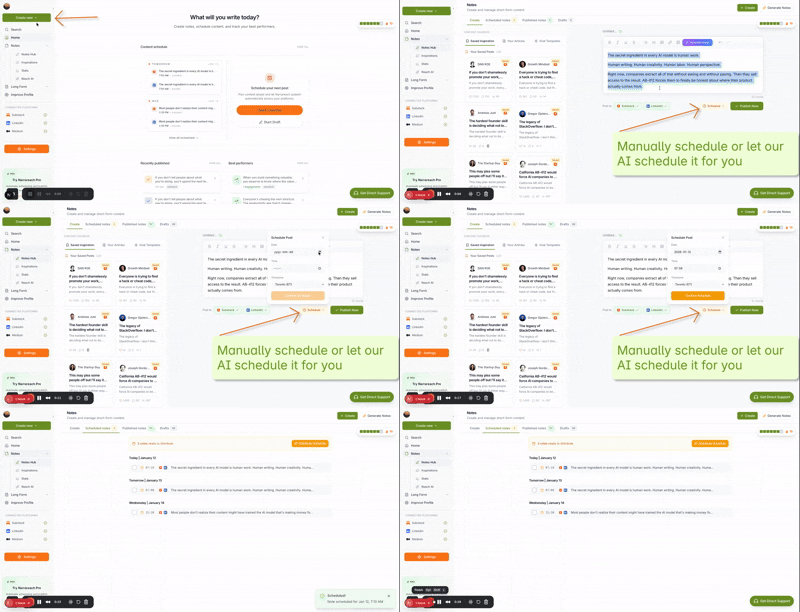
In the scheduler's compose interface, create your first batch of notes. Example workflow:
- Paste your note text into the Substack field
- Add any links or formatting
- Write a LinkedIn version (often shorter, with different hashtags)
- Set the publish date and time
- Enable cross-posting to LinkedIn
- Save as draft
Repeat for 10–30 notes. Most schedulers let you save drafts and publish them on a staggered schedule, so you're not flooding your audience with content all at once.
Step 4: Set Cross-Post Rules
Configure whether each note should automatically post to LinkedIn immediately after Substack, with a delay, or manually. Most tools let you:
- Auto-post with no delay (best for time-sensitive content)
- Auto-post with a 1–4 hour delay (lets Substack readers see it first)
- Queue for manual approval (useful if you want to review performance before amplifying)
Step 5: Monitor and Refine
After your first batch publishes, track which notes drive the most engagement on Substack and LinkedIn. Use these insights to refine:
- Optimal posting times for your audience
- Content formats that resonate (questions, insights, stories, etc.)
- Hashtag strategy for LinkedIn visibility
Narrareach vs. Alternatives: Why Creators Are Switching
Several tools claim to schedule Substack content, but they vary significantly in capability and ease of use. Here's how the main options compare:
Narrareach
Strengths: Purpose-built for Substack notes and cross-posting. Batch-schedule up to 30 notes at once. Native support for LinkedIn, Twitter, and other platforms. Intuitive dashboard. No Substack API limitations.
Best for: Substack writers who want to schedule notes first and cross-post second. Creators managing multiple platforms.
Buffer
Strengths: Established social scheduling tool. Good for Twitter and LinkedIn. Affordable.
Limitations: Limited Substack support. Requires manual copying of note text. Not optimized for Substack's note format or publishing rhythm.
Best for: Creators primarily focused on social media, not Substack growth.
Hootsuite
Strengths: Enterprise-grade analytics. Supports many platforms.
Limitations: Cannot schedule Substack notes directly. Requires workarounds or manual publishing. Overkill for individual creators. Higher price point.
Best for: Large teams managing multiple brands and channels.
Writestack
Strengths: Substack-specific. Simple interface.
Limitations: Limited cross-posting options. Smaller feature set. Fewer integrations. Users report slower product updates.
Best for: Substack-only creators with minimal cross-posting needs.
Why creators are switching to Narrareach: Narrareach was built specifically for the Substack + cross-post workflow. It treats Substack scheduling as the primary action (not an afterthought), offers true batch scheduling, and integrates cross-posting seamlessly. For creators who want to grow Substack first and amplify on LinkedIn second, Narrareach eliminates friction at every step.
Best Practices for Scheduling Substack Notes at Scale
Batch Schedule 30 Notes at Once (The Power of Asynchronous Publishing)
Instead of publishing one note per day, spend 2–3 hours creating 30 notes and scheduling them across a month. Benefits:
- You work during your peak creative hours, not when you happen to be online
- Your publishing rhythm stays consistent even during busy weeks
- You can experiment with different posting times without manual effort
- Cross-posting happens automatically, multiplying your reach
Find Optimal Posting Times for Your Audience
Most scheduling tools include analytics showing when your audience engages most. Use this data to:
- Schedule notes 15–30 minutes before peak engagement windows
- Test different times and track performance
- Adjust for timezone differences if you have a global audience
Research from content creators shows that posting between 9–11 AM and 5–7 PM (in your audience's primary timezone) typically drives 30–50% more engagement than off-peak times.
Tailor Each Platform, Don't Just Duplicate
While cross-posting saves time, each platform has different norms:
- Substack notes: Can be longer, more conversational, include direct calls-to-action for subscriptions
- LinkedIn: Benefit from professional framing, industry insights, and professional hashtags
- Twitter: Must be concise, benefit from threads or quote-tweets linking back to Substack
The best schedulers let you customize each version without starting from scratch.
How Scheduling Drives Substack Growth
Consistency is one of the top drivers of newsletter growth. According to creator research, newsletters that publish on a predictable schedule see 25–40% higher retention rates than sporadic publishers. By scheduling notes in advance, you:
- Remove the friction of daily publishing decisions
- Build audience expectations ("I know there's a new note from them every Tuesday at 9 AM")
- Free mental energy for writing and strategy instead of logistics
- Amplify each note across multiple platforms, driving more traffic back to Substack
The math is simple: if you publish 5 notes per week and cross-post to LinkedIn, you're reaching 2–3x more people per piece of content. Even a 5–10% conversion rate from those secondary platforms adds up to dozens of new Substack subscribers per month.
Getting Started: Your First Week With a Substack Notes Scheduler
Day 1: Choose your scheduler (we recommend Narrareach for Substack-first workflows). Connect your Substack and LinkedIn accounts.
Day 2–3: Create your first batch of 10 notes. Schedule them across the next 2 weeks. Enable cross-posting to LinkedIn.
Day 4–7: Monitor engagement on both platforms. Note which topics, formats, and posting times perform best. Adjust your next batch accordingly.
Week 2+: Batch-create 20–30 notes monthly. Refine based on performance data. Watch your Substack subscriber growth accelerate as consistency and cross-platform reach compound.
Take Control of Your Publishing Workflow
Scheduling Substack notes isn't about being lazy—it's about being strategic. By automating the logistics of publishing and distribution, you reclaim time for what actually matters: writing great content and building relationships with your audience.
Start scheduling your Substack notes with Narrareach today. Batch-create content during your peak creative hours, cross-post to LinkedIn automatically, and watch your subscriber growth accelerate. Your future self will thank you.
Visual Walkthrough:
Relevant Resources
- Narrareach
- Start scheduling your Substack notes with Narrareach today
- Narrareach dashboard
- The Creator Playbook
This article is informed by industry research and public discussions, including this source article, and expanded with Narrareach's workflow recommendations.