
How to Schedule Substack Notes and Cross-Post to LinkedIn: Complete 2026 Guide
How to Schedule Substack Notes and Cross-Post to LinkedIn: The Complete Workflow You can schedule Substack notes in advance and automatically cross-post them...
By Ian Kiprono
How to Schedule Substack Notes and Cross-Post to LinkedIn: The Complete Workflow
You can schedule Substack notes in advance and automatically cross-post them to LinkedIn using a dedicated scheduling platform. The most efficient workflow is to write and schedule your Substack content first, then configure cross-posting rules to distribute to LinkedIn and other platforms simultaneously—saving 5+ hours per week while reaching 3-5X more readers.
Why Schedule Substack Notes Instead of Publishing Live
Scheduling Substack notes offers three critical advantages over manual publishing:
1. Consistency Without Daily Effort
Batch-writing 20-30 Substack notes on Sunday takes 2-3 hours. Scheduling them across the week means your audience sees regular content without you logging in daily. This consistency signals algorithmic favor on both Substack and LinkedIn.
2. Optimal Timing for Maximum Reach
Research from Escape the Cubicle's LinkedIn-Substack Flywheel analysis shows that posting 5-6 times per week generates measurable subscriber growth. Scheduling lets you hit peak engagement windows (typically Tuesday-Thursday, 8-10 AM) without manual intervention.
3. Cross-Platform Distribution in One Workflow
Instead of copying-pasting content across platforms, a scheduling tool publishes to Substack first, then automatically distributes to LinkedIn, Twitter, and other channels. This single-source workflow reduces errors and ensures message consistency.
The Substack-First, Then Cross-Post Workflow: Why This Sequence Matters
The most effective content distribution strategy prioritizes Substack as your primary publishing hub, then distributes outward. Here's why this sequence is critical:
Substack is Your Owned Audience
Your Substack subscribers are direct relationships. LinkedIn, Twitter, and other platforms can change algorithms, restrict reach, or shut down accounts. Substack gives you direct email access to your readers—the most valuable asset in digital publishing.
Cross-Posting Amplifies Without Diluting
When you publish to Substack first and cross-post second, you:
- Drive traffic back to Substack (growing your owned audience)
- Use LinkedIn/Twitter as discovery channels, not primary distribution
- Capture readers who engage on social, then convert them to Substack subscribers
According to Wes Pearce's documented LinkedIn-Substack Flywheel, this approach generated 2,000+ new Substack subscribers in under 9 months by posting 5-6 times weekly on LinkedIn with a Substack link in the profile CTA. The sequence was: LinkedIn content → profile click → Substack subscription.
The Practical Workflow:
- Write and schedule your Substack note/post
- Configure cross-post rules to LinkedIn, Twitter, or other platforms
- Platform publishes to Substack on schedule
- Simultaneously publishes excerpt/link to secondary platforms
- Readers engage on LinkedIn → click back to Substack → subscribe
Step-by-Step: How to Schedule Substack Notes
Native Substack Scheduling (Limited)
Substack allows basic scheduling within its editor. To schedule a note or post:
- Open the Substack editor and write your note
- Click the calendar icon (schedule button) in the publish menu
- Select date and time
- Click "Schedule"
Limitation: Native scheduling only works for individual posts. You cannot batch-schedule 20+ notes at once, and there's no cross-posting integration.
Advanced Scheduling with Cross-Posting (Recommended)
A dedicated scheduling platform like Narrareach solves this limitation:
- Connect your Substack account (via API integration)
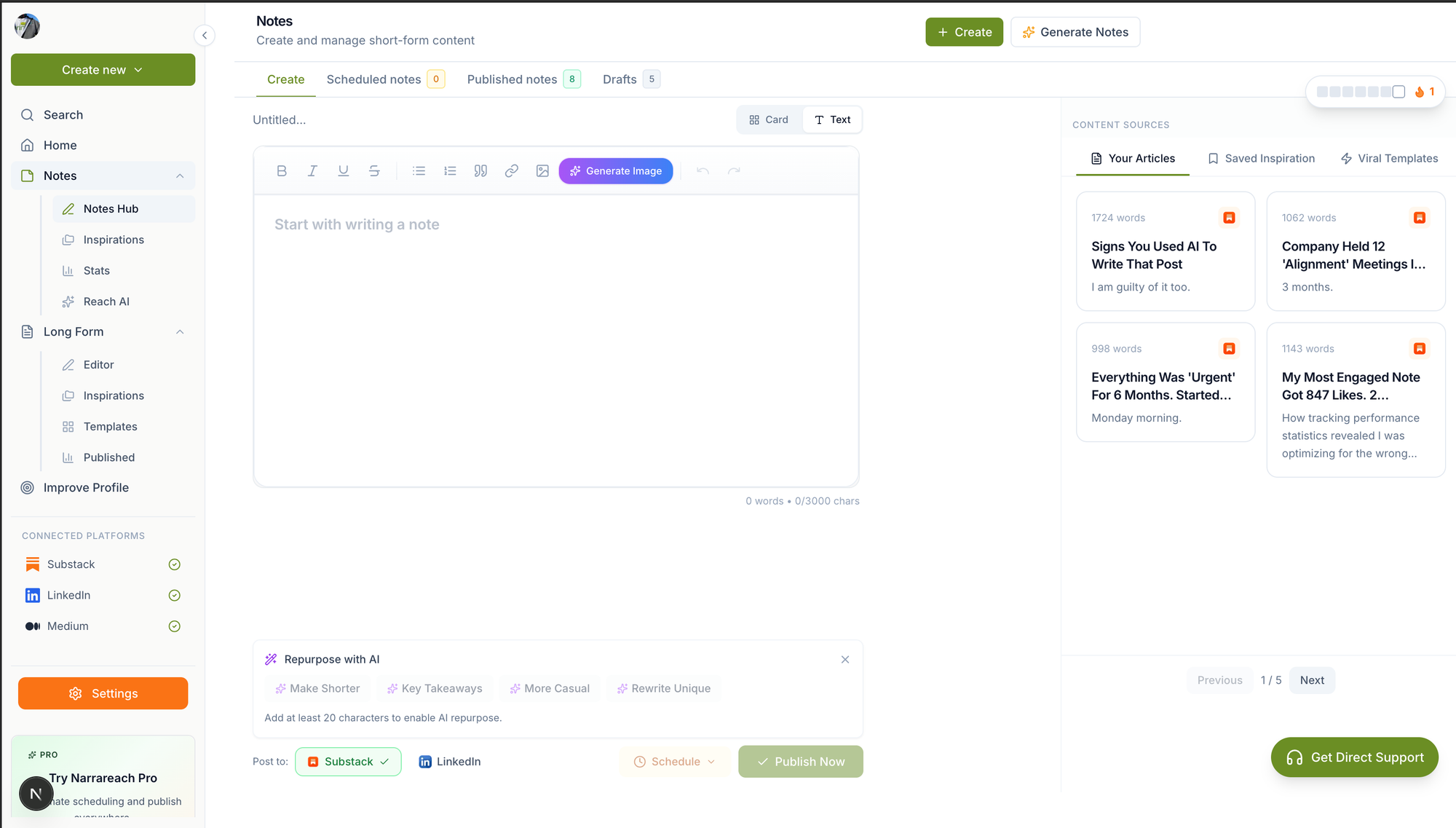
- Write your note in the scheduling dashboard
- Set publication date and time
- Configure cross-post destinations (LinkedIn, Twitter, etc.)
- Batch-schedule 10-30 notes in one session
- Platform publishes to Substack first, then cross-posts automatically
Best Substack Schedulers Compared: 2026 Edition
Narrareach
Narrareach is purpose-built for Substack writers who need cross-platform distribution. Strengths:
- Batch-schedule unlimited Substack notes at once
- One-click cross-posting to LinkedIn, Twitter, and other platforms
- Substack-first workflow (publishes to Substack, then distributes)
- Calendar view for content planning
- No character limits or formatting restrictions
Best for: Substack writers who want to schedule 20+ notes weekly and cross-post without manual copying.
Buffer
Buffer is a general social media scheduler that added Substack support. Strengths:
- Simple interface, beginner-friendly
- Supports multiple platforms
Limitations:
- Treats Substack as secondary platform (not primary)
- Limited Substack-specific features
- Character limits on some cross-posts
Best for: Social media managers handling 5+ platforms equally.
Hootsuite
Hootsuite is enterprise-focused social scheduling. Limitation: Hootsuite does not natively support Substack scheduling. You must publish to Substack manually, then share links on other platforms.
Best for: Large teams managing corporate social accounts (not newsletter writers).
Writestack
Writestack was a Substack-specific scheduler. Status: The platform has seen declining updates and user migration to alternatives like Narrareach, which offer more robust cross-posting and batch-scheduling features.
How to Cross-Post from Substack to LinkedIn: The Complete Process
Method 1: Manual Cross-Posting (Time-Intensive)
After publishing on Substack:
- Copy your Substack note text
- Log into LinkedIn
- Paste content into LinkedIn editor
- Add your Substack link
- Publish
Time cost: 3-5 minutes per post. For 20 posts weekly, this is 60-100 minutes of manual work.
Method 2: Automated Cross-Posting (Recommended)
Using a scheduling platform like Narrareach:
- Write your note once in the scheduling dashboard
- Select "Cross-post to LinkedIn" in the distribution settings
- Configure LinkedIn formatting (excerpt length, link preview)
- Schedule for publication
- Platform automatically publishes to Substack, then LinkedIn simultaneously
Time cost: 30 seconds per post (just configuration). For 20 posts weekly, this is 10 minutes total.
Optimization Tip: LinkedIn CTA Profile Link
As documented in the LinkedIn-Substack Flywheel, add your Substack homepage (or best-performing post) to your LinkedIn profile's CTA button. Label it "View my Newsletter" or "View my Substack." This drives profile visitors directly to your owned audience, converting LinkedIn followers into Substack subscribers.
Batch Scheduling 30 Substack Notes at Once: Practical Workflow
The Sunday Batch-Writing Session
Professional Substack writers use batch-scheduling to create 2-4 weeks of content in one sitting:
- Time Block: 2-3 hours on Sunday morning
- Open your scheduling platform (Narrareach dashboard)
- Write 20-30 notes based on your content calendar
- For each note, configure:
- Publication date and time (spread across the week)
- Cross-post destinations (LinkedIn, Twitter, etc.)
- Custom formatting for each platform
- Review the calendar view to ensure consistency
- Click "Schedule All" to queue them
- Platform publishes automatically throughout the week
Content Ideas for Batch Sessions:
- Industry insights (5 notes)
- Reader questions answered (5 notes)
- Personal stories/lessons learned (5 notes)
- Curated resources or tools (5 notes)
- Timely commentary on trends (5 notes)
Finding Optimal Posting Times for Substack Notes
Research shows engagement varies by day and time. Key findings:
Best Days to Post:
- Tuesday-Thursday: 40% higher engagement than weekends
- Monday: Good for weekly recaps or motivational content
- Friday: Lower engagement, but loyal readers still check in
Best Times to Post:
- 8-10 AM (readers checking email before work)
- 12-1 PM (lunch break browsing)
- 5-7 PM (evening reading)
Most scheduling platforms (including Narrareach) let you set optimal times per platform. LinkedIn, for example, shows different peak engagement windows than Twitter or email. A good scheduler distributes your Substack note to LinkedIn at 9 AM but queues the Twitter cross-post for 5 PM.
Automate Your Substack Posting Workflow: Tools and Integrations
What Automation Saves You
A typical Substack writer publishing 5 notes weekly spends:
- 5 hours writing
- 2-3 hours scheduling/publishing
- 1-2 hours cross-posting to LinkedIn, Twitter, etc.
Total: 8-10 hours per week. Automation cuts this to 5-6 hours (writing only).
Essential Integrations for Substack Writers
- Scheduling Platform (Narrareach): Handles Substack scheduling + cross-posting
- LinkedIn API: Enables automatic cross-posting to your profile
- Twitter/X API: Distributes notes to your Twitter audience
- Zapier/Make: Optional advanced automation (e.g., "save top-performing posts to Notion")
Why Writestack Users Are Switching to Narrareach
Writestack was an early Substack scheduler, but users report migration to Narrareach for three reasons:
1. Robust Cross-Posting
Writestack treated cross-posting as an afterthought. Narrareach prioritizes it as a core feature, with native LinkedIn, Twitter, and Mastodon integrations.
2. Batch Scheduling at Scale
Writestack limited batch operations. Narrareach lets you schedule 50+ notes in one session with a calendar view for planning.
3. Substack-First Workflow
Narrareach publishes to Substack first, then cross-posts—preserving your owned audience as the primary channel. This aligns with the LinkedIn-Substack Flywheel strategy.
Getting Started: Your First Scheduled Substack Note
Ready to automate? Here's your first workflow:
Step 1: Connect Your Accounts
Visit Narrareach and authenticate your Substack account. You'll grant permission to publish on your behalf.
Step 2: Write Your First Note
Go to the Narrareach dashboard and click "New Note." Write 100-300 words on a topic your audience cares about.
Step 3: Configure Cross-Posting
In the distribution settings, toggle "Post to LinkedIn" and add your LinkedIn profile. Narrareach will auto-format the content for LinkedIn's character limits and link preview.
Step 4: Schedule and Publish
Select a date and time (e.g., Tuesday, 9 AM). Click "Schedule." Narrareach publishes to Substack at the scheduled time, then immediately cross-posts to LinkedIn.
Step 5: Monitor Performance
Check your Substack analytics and LinkedIn engagement. Narrareach's Notes dashboard shows which posts drive the most cross-platform engagement.
Key Takeaways
Scheduling Substack notes is no longer optional for serious writers. The workflow is simple: write once, schedule to Substack first, then cross-post to LinkedIn and other platforms. This saves 5+ hours weekly while amplifying your reach by 3-5X. Use a dedicated Substack scheduler like Narrareach to batch-schedule 20+ notes at once and maintain consistency without daily effort. The result: faster subscriber growth, higher engagement, and more time for writing.
Visual Walkthrough:
Relevant Resources
- Narrareach
- Narrareach dashboard
- Notes dashboard
- Escape the Cubicle's LinkedIn-Substack Flywheel analysis
- Wes Pearce's documented LinkedIn-Substack Flywheel
This article is informed by industry research and public discussions, including this source article, and expanded with Narrareach's workflow recommendations.