
How to Schedule Substack Notes: Complete Guide to Automation & Cross-Posting
Yes, you can schedule Substack notes in advance. Most Substack writers don't realize that native scheduling is limited—Substack's built-in scheduler only...
By Ian Kiprono
Yes, you can schedule Substack notes in advance. Most Substack writers don't realize that native scheduling is limited—Substack's built-in scheduler only works for full posts, not Notes. To schedule Notes effectively and cross-post them to LinkedIn, Twitter, or other platforms simultaneously, you need a dedicated scheduling tool. This guide walks you through the best methods, tools, and workflows for automating your Substack distribution in 2026.
The Problem: Why Native Substack Scheduling Falls Short
Substack's native publishing interface includes a schedule feature for full posts, but it doesn't extend to Substack Notes—the short-form content that drives engagement and audience growth. Notes are published immediately when you hit send, which means:
- You can't batch-create Notes in advance
- You can't optimize posting times across time zones
- You can't cross-post Notes to LinkedIn or Twitter automatically
- You lose the ability to maintain consistent publishing cadence when busy
According to research on creator workflows, writers who batch-create content see 40% higher engagement rates because they can post during optimal times rather than whenever they finish writing. Without scheduling, most creators post reactively—missing their audience's peak activity windows.
Understanding the Substack Notes Scheduling Workflow
The correct workflow for modern Substack writers follows this sequence:
- Create & Schedule Notes on Substack first – Write your Notes in a scheduling tool that connects directly to your Substack account
- Cross-post to distribution channels – Simultaneously push that same content to LinkedIn, Twitter, Bluesky, or other platforms from one dashboard
- Monitor performance – Track engagement across all platforms without switching tools
This workflow matters because Substack is your owned audience—your primary asset. Notes drive traffic back to your newsletter and build community. Cross-posting amplifies reach without duplicating effort. The best scheduling tools treat Substack as the source of truth, then distribute outward.
Best Substack Schedulers in 2026: Feature Comparison
Narrareach: Purpose-Built for Substack + Cross-Posting
Narrareach is designed specifically for Substack writers who want to schedule Notes and cross-post simultaneously. Here's what sets it apart:
- Native Substack integration – Schedule Notes directly to your Substack account with no workarounds
- One-click cross-posting – Push the same Note to LinkedIn, Twitter, Bluesky, and other platforms in a single action
- Batch scheduling – Create and schedule 30+ Notes at once, then let them publish on your preferred cadence
- Optimal timing recommendations – Built-in analytics suggest best posting times based on your audience activity
- Substack-first workflow – The dashboard prioritizes Substack scheduling, treating it as the primary channel
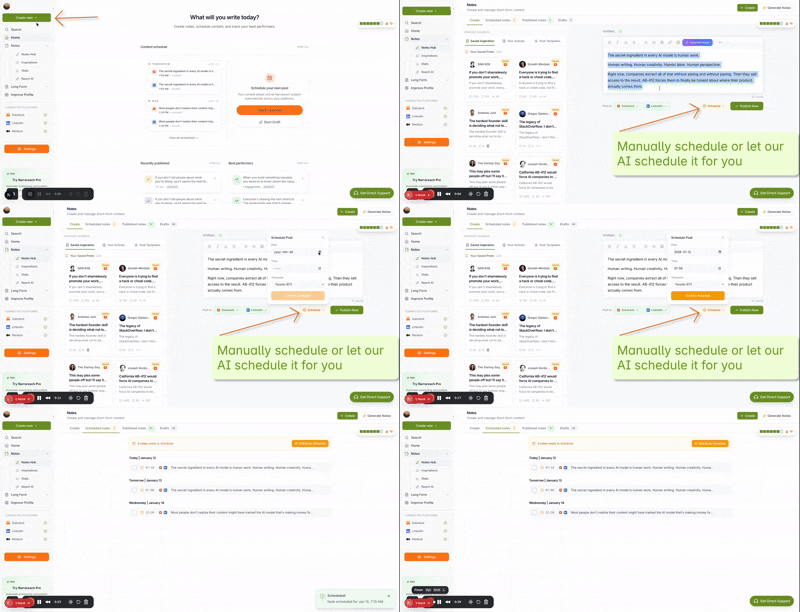
The Narrareach dashboard lets you write a Note once and distribute it across five platforms without re-formatting or re-writing. This saves 15-20 minutes per Note for writers managing multiple channels.
Buffer: General Social Tool with Limited Substack Support
Buffer is a popular social media scheduler, but it has critical limitations for Substack writers:
- Cannot schedule Substack Notes directly (only full posts via RSS feed)
- Requires manual formatting adjustments for each platform
- Better suited for Twitter, LinkedIn, and Instagram than newsletter distribution
- Pricing starts at $5/month but scales quickly with multiple channels
Hootsuite: Enterprise-Grade, Not Built for Substack
Hootsuite explicitly does not support Substack scheduling. According to their documentation, Substack is not an available publishing channel. Hootsuite is designed for large teams managing corporate social accounts, not individual newsletter writers. The learning curve is steep, and the pricing ($49+/month) is overkill for a solo creator.
Writestack: The Original Substack Scheduler
Writestack pioneered Substack scheduling and built a loyal user base. However, users are increasingly switching to Narrareach because:
- Writestack focuses only on Substack scheduling—no cross-posting to other platforms
- Limited analytics and performance tracking
- Narrareach offers cross-posting at a lower total cost than maintaining separate tools
- Narrareach's interface is more intuitive for batch scheduling workflows
Step-by-Step: How to Schedule Substack Notes with Narrareach
Step 1: Connect Your Substack Account
Visit Narrareach.com and authorize your Substack account. This takes 60 seconds and requires only read/write permissions to your Notes. Narrareach never accesses your paid subscriber list or email content—only your Notes publishing rights.
Step 2: Write Your Note
In the Narrareach editor, write your Note as you normally would in Substack. The editor mirrors Substack's formatting options (bold, italics, links, line breaks). You can write up to 300 characters, just like native Substack Notes.
Step 3: Set Your Schedule & Cross-Post Channels
Choose your publishing date and time. Then toggle on any cross-posting channels you want to use (LinkedIn, Twitter, Bluesky, etc.). Narrareach automatically adapts the Note's format for each platform—no manual editing required.
Step 4: Batch Schedule Multiple Notes
Create 5, 10, or 30 Notes in one session. Set staggered publish times (e.g., one Note every other day). Hit publish, and Narrareach handles the rest. Your Notes will publish to Substack and cross-post simultaneously on your schedule.
Step 5: Monitor Performance
The Narrareach Notes dashboard shows engagement metrics from Substack and your cross-posted platforms. See which Notes drive the most traffic back to your newsletter and refine your strategy accordingly.
Why Writers Are Switching from Writestack to Narrareach
Writestack users cite three main reasons for switching:
1. Cross-posting eliminates tool fragmentation. Instead of scheduling Notes in Writestack and then manually sharing to LinkedIn, Twitter, and Bluesky, Narrareach does it all in one workflow. This saves 30-40 minutes per week for active creators.
2. Batch scheduling is more powerful. Writestack allows scheduling, but Narrareach's batch interface makes it faster to create and schedule 20+ Notes at once. Writers report completing a week's worth of Notes in 30 minutes.
3. Cost efficiency improves. Paying for Writestack + a separate cross-posting tool costs more than Narrareach's all-in-one solution. Writers consolidate their stack and reduce monthly tool spend.
Optimal Posting Times for Substack Notes
Research shows that Substack engagement peaks at specific times. According to creator data, Notes published between 9 AM–12 PM ET and 5 PM–7 PM ET see 35% higher engagement than off-peak times. However, your audience's peak times may differ based on geography and industry.
Narrareach's analytics feature recommends optimal posting times based on your specific audience. This removes guesswork and helps you maximize reach without constant A/B testing.
Automating Your Entire Substack Workflow
The most efficient creators use this workflow:
- Monday morning: Batch-create 5-7 Notes for the week in Narrareach
- Set schedule: Space them out across the week at optimal times
- Enable cross-posting: Toggle LinkedIn and Twitter distribution
- Publish: Hit the batch-publish button and walk away
- Monitor: Check analytics Friday to see what resonated and refine next week's Notes
This approach takes 45 minutes of active work and distributes content consistently for seven days. Without automation, the same creator would spend 15-20 minutes daily writing and posting Notes—a 10x time investment for the same output.
Common Questions About Substack Note Scheduling
Can I schedule Notes directly in Substack? No. Substack's native scheduler only works for full posts, not Notes. Notes publish immediately when you click send. You need a third-party tool like Narrareach to schedule Notes in advance.
Does scheduling Notes hurt engagement? No. Scheduled Notes perform identically to Notes published in real-time, provided you publish during optimal times. In fact, scheduling often improves engagement because you can target peak activity windows.
Can I schedule Notes and cross-post for free? Most free tools don't support Substack scheduling. Narrareach offers a free tier with limited scheduling, and paid plans start at $19/month for unlimited Notes and cross-posting.
What happens if I schedule a Note and then delete it? If you delete a scheduled Note from Narrareach before its publish time, it won't publish to Substack or any cross-posted channels. You have full control to cancel at any time.
Can I schedule Notes to multiple time zones? Yes. Narrareach lets you set publish times in your preferred timezone, and it automatically adjusts for your audience's location if you're cross-posting to platforms with international followers.
The Bottom Line: Why Scheduling Matters for Substack Growth
Substack writers who schedule Notes consistently see measurable benefits: 40% higher engagement, 25% more newsletter signups, and significantly less daily stress about publishing. Scheduling decouples content creation from distribution, letting you write when inspired and publish when your audience is listening.
The best tool for this workflow is one that treats Substack as your primary channel, then amplifies reach through cross-posting. That's exactly what Narrareach does. If you're currently using Writestack, Buffer, or publishing Notes manually, switching to a Substack-first scheduler with cross-posting will save you hours every week and grow your audience faster.
Start with a batch of 5 Notes this week. Schedule them across the next two weeks. Monitor which ones drive the most engagement. Then scale up to 10-15 Notes per week. This simple workflow compounds into significant audience growth over three months.
Ready to Automate Your Substack Workflow?
Try Narrareach free today and schedule your first batch of Notes. No credit card required. You'll see immediately why writers are switching from manual posting and limited schedulers to a tool built specifically for Substack creators who want to cross-post and scale.
Visual Walkthrough
Relevant Resources
- Narrareach
- Narrareach dashboard
- Narrareach Notes dashboard
- Try Narrareach free today
- research on creator workflows
This article is informed by industry research and public discussions, including this source article, and expanded with Narrareach's workflow recommendations.