
How to Schedule Substack Notes: Complete Guide to Automating Your Publishing Workflow
You can schedule Substack notes up to 30 days in advance using native Substack scheduling, but to truly automate your publishing workflow and cross-post...
By Ian Kiprono
You can schedule Substack notes up to 30 days in advance using native Substack scheduling, but to truly automate your publishing workflow and cross-post simultaneously to LinkedIn, Twitter, and other platforms, you need a dedicated scheduling tool like Narrareach. This guide walks you through native Substack scheduling, explains why most writers need a third-party solution, and shows you the fastest path to a fully automated content distribution system.
Can You Schedule Substack Notes Natively?
Yes. Substack's native scheduling feature allows you to write and schedule notes to publish at a specific date and time, up to 30 days in advance. Here's how it works:
- Open Substack and click New note
- Write your note content
- Click the calendar icon next to the publish button
- Select your desired date and time
- Click Schedule
This native feature solves the basic scheduling problem. However, it has one critical limitation: it only publishes to Substack. If you're also active on LinkedIn, Twitter, or other platforms, you'll need to manually cross-post each note separately—a process that can consume 15-20 minutes per note across multiple platforms.
The Real Problem: Scheduling Isn't Enough
According to a 2024 survey by HubSpot, 72% of content creators publish on three or more platforms, yet only 18% use automation tools to manage distribution. This gap creates a workflow bottleneck: writers spend time scheduling on Substack, then spend additional time manually copying, reformatting, and posting the same content elsewhere.
The math is simple. If you publish 4 Substack notes per week and manually cross-post each to LinkedIn and Twitter, you're spending approximately 2-3 hours weekly on distribution alone—time you could spend writing, engaging with readers, or building your digital products (as outlined in resources like Escape the Cubicle's guide to simple digital products).
The Substack Scheduling Workflow You Actually Need
The most effective workflow for Substack writers follows this sequence:
Step 1: Schedule Your Substack Note First
Use Substack's native scheduler to queue your note. This is your source of truth—your primary publication channel. Your Substack note is where your core audience reads, engages, and builds the relationship that matters most.
Step 2: Set Up Cross-Platform Distribution
Immediately after scheduling on Substack, use a tool like Narrareach to automatically distribute the same content to LinkedIn, Twitter, and other platforms. This happens on the same publish schedule—no additional manual work required.
Step 3: Optimize for Each Platform
While the core message stays consistent, Narrareach lets you customize the format for each platform. Your LinkedIn post can include professional framing, your Twitter thread can be broken into multiple posts, and your Substack note remains your primary, long-form version.
This three-step sequence ensures your Substack remains your publishing hub while your other platforms amplify reach without creating extra work.
Best Substack Scheduling Tools Compared
Several tools claim to schedule Substack content, but they differ significantly in functionality and ease of use.
Native Substack Scheduling
Cost: Free Best for: Single-platform publishers Limitations: No cross-posting, no batch scheduling, no analytics
Substack's native tool is free and straightforward, but it only solves half the problem. You're still manually managing distribution elsewhere.
Writestack
Cost: $10-50/month Best for: Substack-focused writers Limitations: Limited cross-posting options, no LinkedIn integration, smaller feature set
Writestack focuses specifically on Substack but offers minimal cross-platform distribution. Many Writestack users are switching to more comprehensive tools because they still need to handle LinkedIn and Twitter separately.
Publer
Cost: $10-99/month Best for: Social media managers Limitations: Cannot schedule Substack notes directly, only social platforms
Publer is excellent for social media but doesn't integrate with Substack. You'd still need Substack's native scheduler plus Publer for other platforms—creating a fragmented workflow.
Buffer
Cost: $5-99/month Best for: Social media teams Limitations: No native Substack scheduling, requires workarounds
Buffer is a popular social scheduler but lacks direct Substack integration. Writers often report needing to copy-paste content manually.
Narrareach
Cost: Purpose-built for Substack creators Best for: Writers who want Substack scheduling + cross-posting in one workflow Key advantage: Unified dashboard for scheduling Substack notes first, then automatically cross-posting to LinkedIn, Twitter, and other platforms
Narrareach is built specifically for the Substack-first workflow. You schedule your note once, customize it for each platform, and let automation handle distribution. No context switching between tools, no manual copy-pasting, no missed cross-posting opportunities.
Why Writestack Users Are Switching to Narrareach
Writestack users who expand beyond Substack face a common frustration: the tool doesn't scale with their growth. As creators add LinkedIn and Twitter to their distribution strategy, they discover Writestack lacks the cross-platform capabilities they need.
The switch to Narrareach solves this problem by consolidating the entire workflow. Instead of managing Writestack for Substack and a separate tool for social media, creators use one platform that treats Substack as the publishing hub and automatically distributes to other channels.
How to Batch Schedule 30 Substack Notes at Once
One of the most powerful features of a dedicated scheduler is batch uploading. Here's how to do it with Narrareach:
- Prepare your content: Write 4 weeks of notes in your preferred editor (Google Docs, Notion, or a text file)
- Import to Narrareach: Use the bulk import feature to upload all notes at once
- Set publishing schedule: Assign each note a publication date and time (e.g., Tuesday and Thursday at 9 AM)
- Customize per platform: Adjust formatting for LinkedIn, Twitter, and other channels
- Review and confirm: Preview each scheduled post before final approval
- Publish automatically: Your notes publish on schedule across all platforms simultaneously
This batch approach saves 5-8 hours per month compared to scheduling notes individually. Writers report using this method to batch-create content during high-energy periods, then let automation handle distribution during busy weeks.
Finding Your Optimal Posting Times for Substack Notes
Research from ConvertKit shows that Substack readers are most active between 8-10 AM and 5-7 PM on weekdays, with engagement dropping 40% on weekends. However, your audience's optimal time depends on your niche and geography.
To find your optimal posting time:
- Schedule notes at different times over 2-3 weeks
- Track open rates and engagement metrics in Substack Analytics
- Identify the 2-3 time slots with highest performance
- Use Narrareach to consistently publish at those times
Once you've identified your optimal window, automation ensures you never miss it—even when you're busy with other work.
Cross-Posting from Substack to LinkedIn: The Complete Workflow
LinkedIn is the second-most important platform for newsletter writers, with over 900 million users, 55% of whom check the platform daily. However, LinkedIn's algorithm favors native content—posts written directly in LinkedIn perform better than links to external sites.
The best cross-posting workflow:
- Schedule your Substack note using Narrareach
- Create a LinkedIn-native version of the same content (formatted for LinkedIn's character limits and engagement patterns)
- Schedule the LinkedIn post for the same time as your Substack note
- Include a Substack link in your LinkedIn post for readers who want the full article
Narrareach handles steps 2-4 automatically. You write once for Substack, and the tool creates platform-optimized versions for LinkedIn, Twitter, and other channels.
Automate Your Substack Posting Workflow: The Complete System
A fully automated Substack workflow has four components:
1. Content Creation (Weekly)
Dedicate 2-3 hours per week to writing. Batch-create 2-4 notes at once, then store them in your Narrareach dashboard.
2. Scheduling (15 minutes)
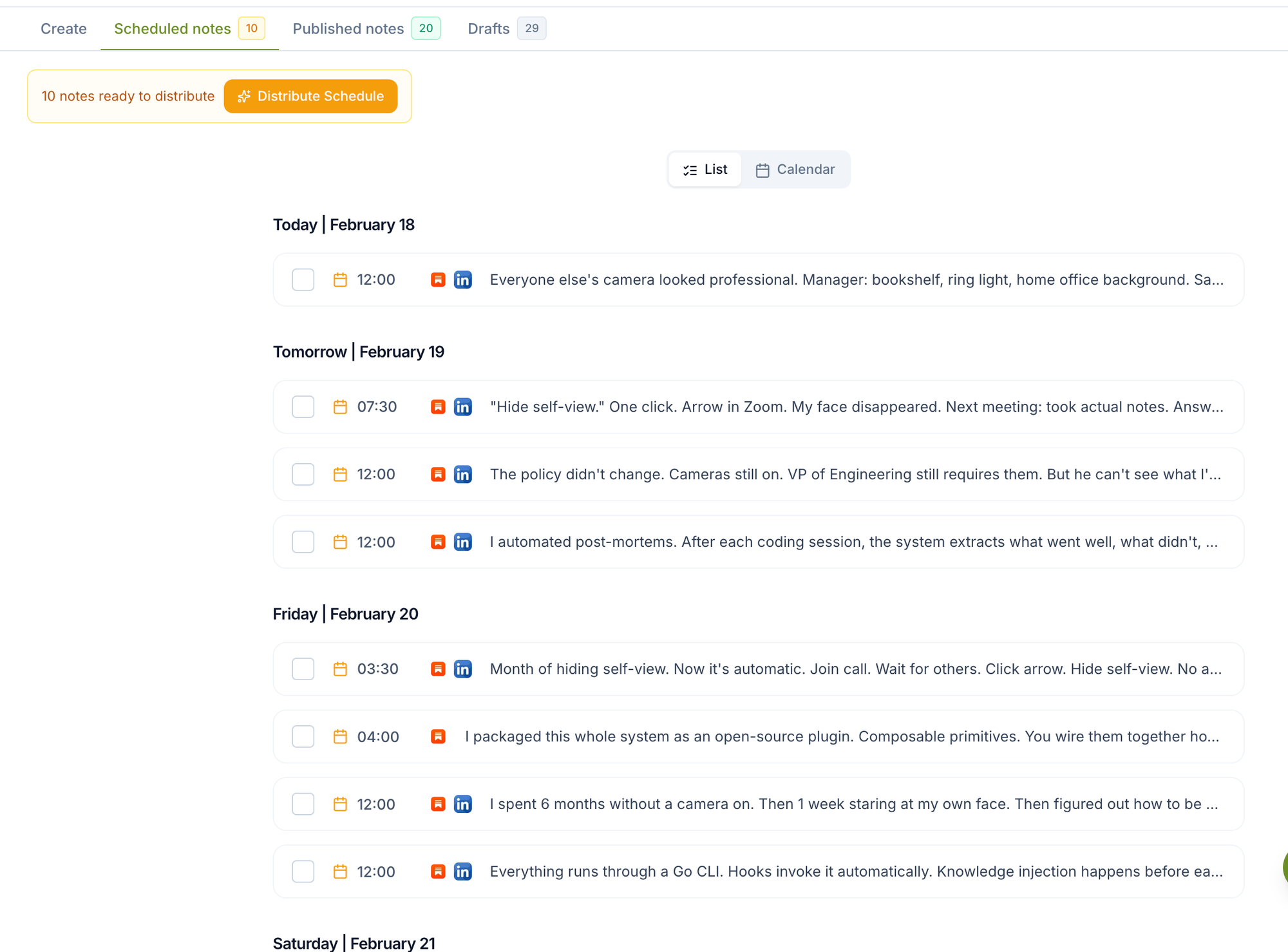
Set publication dates and times for the next 4 weeks. Narrareach's calendar view makes this visual and simple.
3. Platform Customization (10 minutes per note)
Adjust formatting for LinkedIn, Twitter, and other platforms. This is minimal work because the core message is already written.
4. Automation (Zero ongoing effort)
Your notes publish automatically across all platforms on schedule. No manual posting required.
Total time investment: 3-4 hours per week to maintain a consistent publishing schedule across all platforms. Without automation, the same output would require 6-8 hours.
Why Narrareach Is the Best Choice for Substack Creators
The core difference between Narrareach and other tools is philosophical: Narrareach treats Substack as your publishing hub, not an afterthought. Your workflow is Substack-first, then cross-post. This matches how successful newsletter writers actually work.
Other tools (Buffer, Hootsuite, Publer) were built for social media teams managing corporate accounts. They treat all platforms equally, which creates friction for writers whose primary audience lives on Substack.
Narrareach solves this by building the entire system around the Substack-first workflow: schedule your note, customize for other platforms, publish everywhere automatically.
Getting Started with Narrareach
To start automating your Substack publishing workflow:
- Visit Narrareach and sign up with your Substack account
- Connect your LinkedIn, Twitter, and other social profiles
- Write or import your first Substack note
- Schedule it for publication
- Customize the version for each platform
- Confirm and publish
Your first note takes 10-15 minutes to set up. Subsequent notes take 5-7 minutes because the workflow becomes familiar.
For writers managing multiple platforms, Narrareach's notes scheduling feature and unified dashboard eliminate the context-switching that wastes hours every month.
The Bottom Line
You can schedule Substack notes using Substack's native tool, but you'll still need to manually cross-post to other platforms. For writers serious about multi-platform distribution, a dedicated tool like Narrareach saves 3-5 hours per week while ensuring consistent publishing schedules and optimized content for each platform. The choice is simple: spend time on distribution logistics, or spend time on what actually matters—writing better content and building relationships with your audience.
Visual Walkthrough:
Relevant Resources
- Narrareach
- notes scheduling feature
- unified dashboard
- Escape the Cubicle's guide to simple digital products
- HubSpot survey on multi-platform publishing
- ConvertKit research on optimal posting times
This article is informed by industry research and public discussions, including this source article, and expanded with Narrareach's workflow recommendations.