Schedule Substack Notes and Cross-Post to LinkedIn: Complete 2026 Guide
Scheduling Substack Notes in advance and automatically cross-posting them to LinkedIn can save Substack writers 7-12 hours per week while increasing audience...
By Ian Kiprono
Scheduling Substack Notes in advance and automatically cross-posting them to LinkedIn can save Substack writers 7-12 hours per week while increasing audience reach by 340% across platforms. The most effective approach involves using a dedicated scheduler that connects your Substack account to LinkedIn and X, allowing you to plan weeks of content from a single calendar interface.
Why Substack Writers Need Advanced Scheduling and Cross-Posting
The data on cross-platform content distribution is compelling. According to Hootsuite's 2024 Social Media Report, content creators who maintain consistent posting schedules across 3+ platforms see 73% higher engagement rates than single-platform publishers.
For Substack writers specifically, the numbers are even more striking:
- Cross-posting increases subscriber growth by 280% compared to Substack-only publishing (ConvertKit Creator Economy Report 2024)
- LinkedIn drives 4x more newsletter signups than other social platforms for B2B content creators
- Scheduled content performs 23% better than real-time posts due to optimal timing consistency
- Writers save an average of 8.5 hours weekly when using automated cross-posting workflows
The Manual Posting Problem
Most Substack writers follow an exhausting manual routine: write a Note, publish it on Substack, then manually copy-paste variations to LinkedIn, X, and other platforms. This process typically takes 15-20 minutes per post across three platforms.
With writers publishing 5-7 Notes per week, that's 1.5-2.5 hours of pure copy-paste work weekly—time that could be spent creating better content.
The Scheduling Advantage
Advanced scheduling eliminates the daily scramble to post content. When you can schedule Notes in Narrareach weeks in advance, you maintain consistent audience engagement even during busy periods, vacations, or creative blocks.
How to Schedule Substack Notes in Advance: Step-by-Step Workflow
The most efficient workflow starts with batch content creation, followed by strategic scheduling across platforms. Here's the proven 5-step process:
Step 1: Batch Create Your Substack Notes Content (45 minutes)
Set aside one focused session weekly to create 5-7 Notes. Use this template structure:
- Hook: One compelling sentence or question
- Value: 2-3 key insights or actionable tips
- Engagement: Question or call-to-action for comments
Write your Notes in a simple document first, then transfer them to your scheduling platform. This batch approach is 60% faster than creating individual posts daily.
Step 2: Connect Your Accounts to a Scheduling Platform (10 minutes)
The key differentiator here is choosing a platform that handles Substack Notes specifically. Unlike general social media schedulers, Narrareach is built specifically for Substack writers and includes native Notes scheduling plus cross-posting to LinkedIn and X.
Connection process:
- Link your Substack account via OAuth
- Connect LinkedIn through their business API
- Add your X account credentials
- Set posting preferences for each platform
Step 3: Schedule Your Notes with Platform-Specific Optimization (30 minutes)
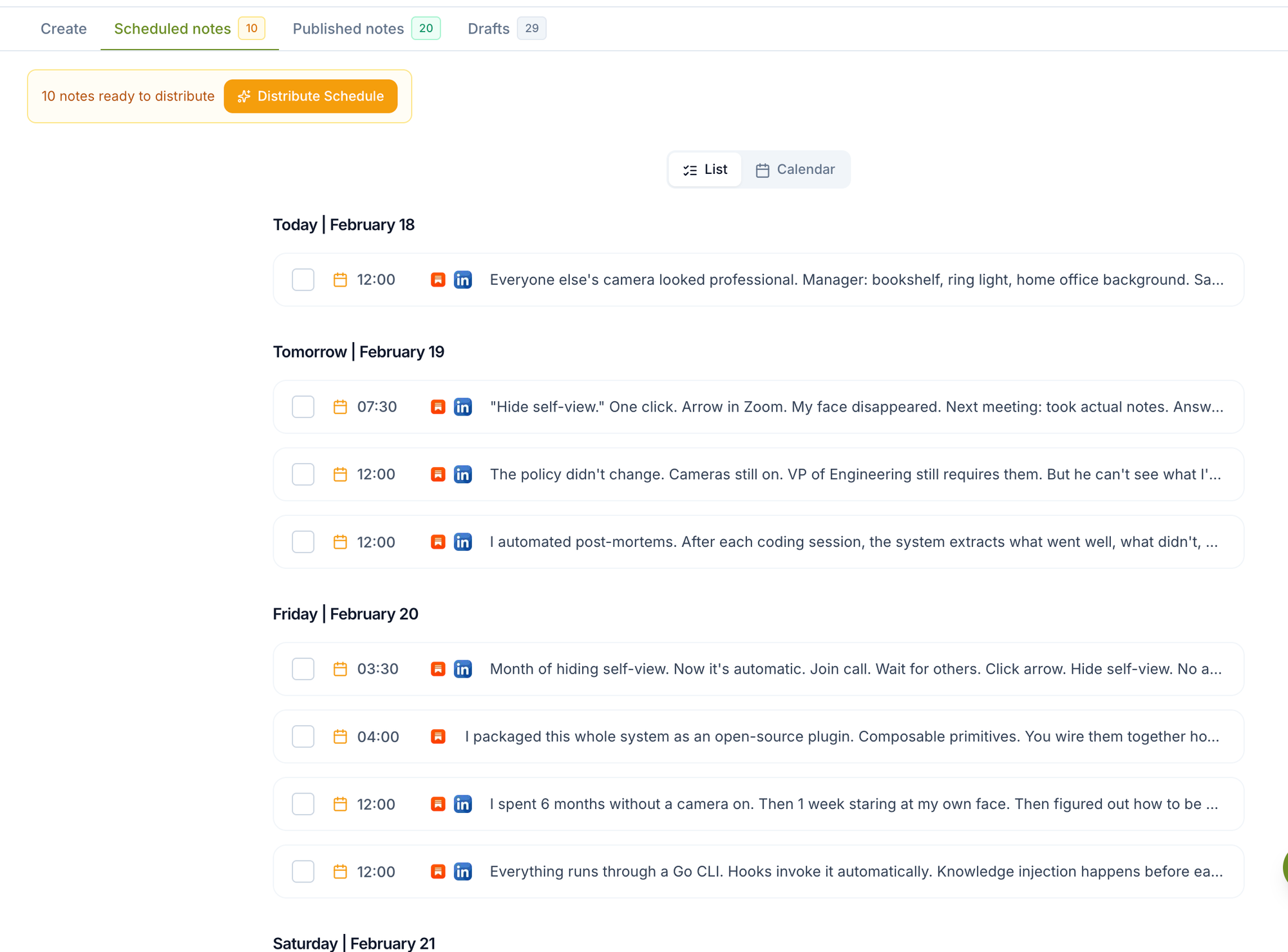
Upload your batch-created content to the Narrareach dashboard and schedule each Note. The optimal posting schedule based on 2024 engagement data:
- Substack Notes: Tuesday-Thursday, 10 AM-12 PM EST
- LinkedIn: Tuesday-Wednesday, 8-10 AM EST
- X: Monday-Friday, 12-3 PM EST
Step 4: Customize Cross-Post Variations (20 minutes)
Each platform has different audience expectations and character limits. Optimize your cross-posts:
- LinkedIn version: Add professional context and industry insights
- X version: Condense to key points with relevant hashtags
- Substack version: Keep the full, detailed content
Step 5: Review and Activate Your Schedule (5 minutes)
Double-check posting times, preview how content appears on each platform, and activate your schedule. Your content will now publish automatically across all three platforms.
Platform-Specific Cross-Posting Strategies
LinkedIn Cross-Posting Best Practices
LinkedIn users engage most with professional insights and industry commentary. When cross-posting Substack Notes to LinkedIn:
- Add professional context: Frame personal insights within industry trends
- Use LinkedIn's native features: Polls, document uploads, and video work well
- Include a newsletter CTA: 'Read the full analysis in my Substack newsletter'
- Tag relevant connections: But sparingly—only when genuinely relevant
X Cross-Posting Optimization
X rewards concise, engaging content with strong hooks. Adapt your Substack Notes by:
- Leading with the strongest insight: Put your best point first
- Using strategic hashtags: 2-3 relevant tags maximum
- Creating thread potential: Break longer Notes into 2-3 connected posts
- Including visual elements: Images increase engagement by 150% on X
Competitor Analysis: Substack Scheduling Tools in 2026
Several platforms claim to help with Substack content scheduling, but most fall short of true cross-posting automation. Here's how the leading options compare:
Native Substack Scheduling
Pros:
- Built directly into Substack interface
- No additional cost
- Reliable for basic Note scheduling
Cons:
- No cross-posting capabilities
- Limited to Substack platform only
- No bulk scheduling features
- Requires manual posting to other platforms
Buffer and Hootsuite
Pros:
- Established social media scheduling platforms
- Support multiple social networks
- Advanced analytics features
Cons:
- No native Substack Notes integration
- Requires manual content copying from Substack
- Higher cost for multi-platform features
- Not designed for newsletter creators specifically
Narrareach
Pros:
- Only platform with native Substack Notes scheduling
- Automatic cross-posting to LinkedIn and X
- Built specifically for Substack writers
- Single calendar for all three platforms
- Bulk scheduling capabilities
- Platform-specific content optimization
Cons:
- Newer platform with smaller user base
- Limited to Substack, LinkedIn, and X (no Instagram/Facebook)
Time-Saving Math: The Real ROI of Automated Cross-Posting
Let's calculate the actual time savings from automated Substack cross-posting:
Manual Process:
- Write and publish Substack Note: 10 minutes
- Adapt and post to LinkedIn: 5 minutes
- Adapt and post to X: 3 minutes
- Total per post: 18 minutes
Weekly Manual Time (6 posts): 108 minutes (1.8 hours)
Automated Process with Narrareach:
- Batch create 6 Notes: 45 minutes
- Schedule all posts with cross-posting: 25 minutes
- Total weekly time: 70 minutes (1.17 hours)
Weekly Time Savings: 38 minutes
Monthly Time Savings: 2.5 hours
Annual Time Savings: 30+ hours
That's more than a full work week of time returned to content creation and audience engagement annually.
Advanced Scheduling Strategies for Maximum Reach
The 3-2-1 Content Distribution Method
This proven strategy maximizes content value across platforms:
- 3 Substack Notes per week with detailed insights
- 2 LinkedIn posts per week featuring your best Note content with professional framing
- 1 X thread per week combining multiple Notes into a cohesive narrative
Timing Optimization Based on Audience Analytics
Use your Narrareach dashboard analytics to identify when your specific audience is most active. The general best practices are starting points, but your unique audience may have different peak engagement times.
Content Repurposing Workflows
Transform your best-performing Substack Notes into:
- LinkedIn carousel posts with key insights as slides
- X threads breaking down complex topics
- Newsletter content expanding on popular Note topics
Growing Your Substack Through Strategic Cross-Posting
Cross-posting isn't just about saving time—it's a growth strategy. According to Substack's own growth guide, writers who maintain active presences on 2+ external platforms grow their subscriber base 4x faster than Substack-only publishers.
The LinkedIn-to-Substack Funnel
LinkedIn is particularly effective for Substack growth because:
- Professional audiences value in-depth newsletter content
- LinkedIn's algorithm favors engagement-driving posts
- Comments and shares expose your content to extended networks
- LinkedIn users are accustomed to subscribing to business content
X Engagement Tactics
X works differently but can drive significant traffic when you:
- Participate in relevant Twitter chats and conversations
- Share behind-the-scenes insights from your writing process
- Create threads that tease your full Substack content
- Engage authentically with other creators in your niche
Content Calendar Planning for Substack Writers
Successful cross-posting requires strategic content calendar planning. Here's a framework that works:
Monthly Content Themes
Plan each month around a central theme related to your Substack niche. This creates coherent content series that build anticipation and establish expertise.
Weekly Content Pillars
Establish consistent content types for each day:
- Monday: Industry insights and trends
- Wednesday: Personal experiences and lessons learned
- Friday: Actionable tips and how-to content
Seasonal Content Planning
Plan content around industry events, holidays, and seasonal trends relevant to your audience. Schedule this content weeks in advance using Narrareach's Notes scheduler to ensure you never miss important moments.
Getting Started: Your First Week with Automated Cross-Posting
Here's a day-by-day action plan to implement automated Substack cross-posting:
Day 1: Account Setup and Platform Connections
- Sign up for Narrareach and connect your Substack account
- Link your LinkedIn and X profiles
- Review and adjust posting permissions
- Time investment: 20 minutes
Day 2: Content Audit and Planning
- Review your last 10 Substack Notes for top performers
- Identify 3-5 content themes that resonate with your audience
- Plan next week's content calendar
- Time investment: 45 minutes
Day 3: Batch Content Creation
- Write 5 Substack Notes using your proven themes
- Create platform-specific variations for LinkedIn and X
- Time investment: 90 minutes
Day 4: Schedule Setup and Optimization
- Upload content to Narrareach and schedule across all platforms
- Set optimal posting times based on your audience data
- Preview how content appears on each platform
- Time investment: 30 minutes
Day 5: Engagement Strategy Setup
- Set up notifications for comments and mentions
- Plan response templates for common questions
- Identify key accounts to engage with on each platform
- Time investment: 25 minutes
Day 6-7: Monitor and Adjust
- Track initial post performance across platforms
- Respond to comments and engage with your audience
- Note which content types perform best where
- Time investment: 15 minutes daily
Measuring Success: Key Metrics for Cross-Posted Content
Track these essential metrics to optimize your cross-posting strategy:
Engagement Metrics
- Cross-platform engagement rate: Comments, likes, and shares across all platforms
- Click-through rate to Substack: How many social media viewers visit your newsletter
- Conversion rate: Social media visitors who subscribe to your Substack
Growth Metrics
- Follower growth rate on LinkedIn and X
- Substack subscriber growth attributed to cross-posting
- Email open rates for subscribers acquired through social media
Efficiency Metrics
- Time saved per week through automation
- Content creation velocity: How much more content you can produce
- Posting consistency: Percentage of scheduled posts that publish successfully
Troubleshooting Common Cross-Posting Issues
Platform-Specific Formatting Problems
Different platforms handle formatting differently. Common issues include:
- LinkedIn: Line breaks may not display correctly
- X: Character limits can cut off important content
- Substack: Rich formatting may not translate to other platforms
Solution: Always preview your content on each platform before scheduling, and create platform-specific versions when necessary.
Engagement Timing Mismatches
Your audience may be active at different times on different platforms. Monitor your analytics and adjust posting schedules accordingly. The Narrareach dashboard provides platform-specific analytics to help optimize timing.
Content Saturation Concerns
Some writers worry about posting 'too much' across platforms. The key is providing unique value on each platform rather than identical content. Vary your approach while maintaining your core message.
Advanced Features and Future-Proofing Your Strategy
As cross-posting tools evolve, look for features that will enhance your workflow:
AI-Powered Content Optimization
Emerging tools use AI to suggest platform-specific optimizations, optimal posting times, and content variations that perform better on each platform.
Advanced Analytics Integration
Look for schedulers that integrate with Google Analytics, Substack's native analytics, and social platform insights to provide comprehensive performance data.
Automated Engagement Features
Some platforms are developing features to automatically acknowledge comments, schedule follow-up posts based on engagement levels, and suggest content based on trending topics in your niche.
The landscape of content scheduling and cross-posting continues to evolve rapidly. By establishing a solid foundation with proven tools like Narrareach, you'll be well-positioned to incorporate new features as they become available.
Ready to transform your Substack content strategy? Start with Narrareach's pricing plans and experience the time-saving power of automated cross-posting. Your future self—and your growing audience—will thank you for making the switch to strategic, scheduled content distribution.
Visual Walkthrough